 Steam · Sign in
How to Switch Between Multiple Steam Accounts on One Computer
In the Steam app, open Steam › Change Account, click + to add an account, and check Remember me. After that, just click the account to switch. You won't need to enter a code again.
This guide shows you how to add several Steam accounts to the same computer and switch between them with the built-in Change Account option in the Steam app. Add each account once, the right way. After that, switching takes one click and Steam won't ask for a sign-in code again.
Before you start
Add a new account to the list
You only need to do this once per account.
Open the Steam app on your computer.
Click the Steam menu in the top-left corner of the window.
Select Change Account....

Click Change Account.... If Steam asks you to confirm, click Continue. In newer versions of Steam, this prompt usually doesn't appear and the account picker opens right away.
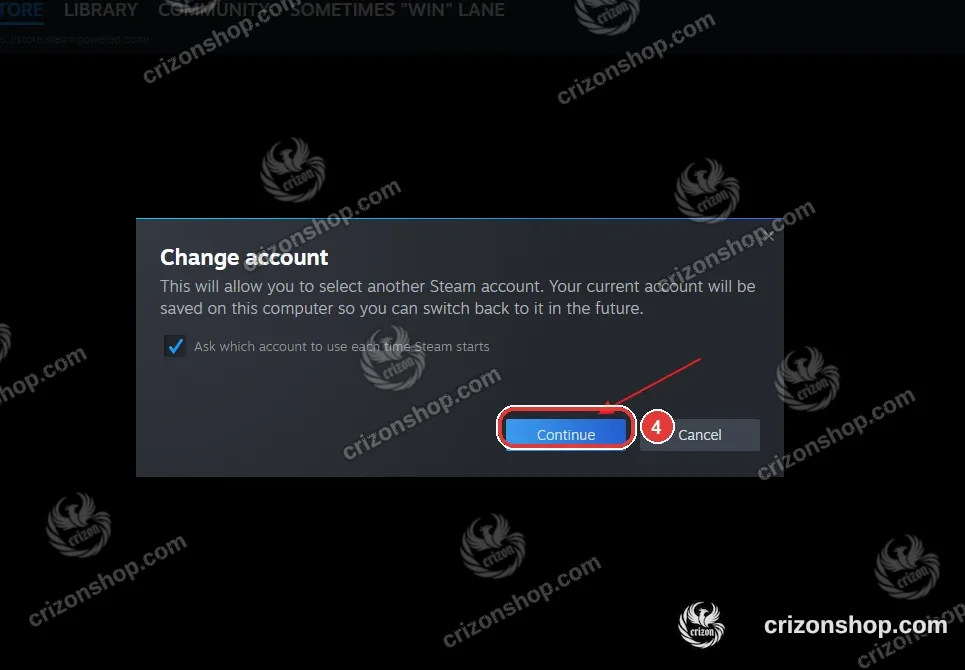
Click Continue. On the account picker, click the + tile to add an account.
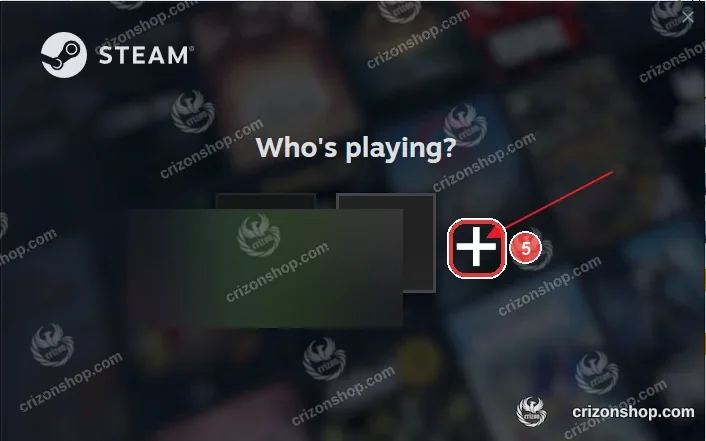
Click + to add an account. Enter the account name and password, check Remember me, then click Sign in.
Enter the Steam Guard code sent to your email, or approve the sign-in in the Steam app on your phone.
Switch between saved accounts
Click the Steam menu and select Change Account....
Click the account you want to use in the list.
Wait for Steam to restart and sign you straight into that account.
As long as the account stays in the list and you haven't signed out of it, Steam won't ask for a Steam Guard code every time you switch.
Frequently asked questions
Usually it's because you fully signed out of that account instead of using Change Account, you didn't check Remember me when you signed in, or the account's password was recently changed. Sign in once more with the new code and make sure to check Remember me. Steam won't ask again the next time you switch.
No. The Steam app runs one account at a time. To use another account, switch with Change Account. You can read more about using accounts on Steam's support page.
Usually not. Games are tied to the account that bought them, so after you switch, your library only shows that account's games. The exception is when the two accounts share their libraries through Steam's family feature.
Check the spam folder of the email linked to the account, wait a few minutes, then request a new code. If you still don't get a code, or you've lost the phone with the Steam app, go to Steam Support and follow the steps to recover access to your account.
Related guides
How to Recover Your Steam Account When You've Lost Access to Your EmailHow to Sign In to Steam and Get a Steam Guard CodeHow to Activate a Steam Game Key (CD Key) on the Web and in the AppStill need help?
Send your order code and we can sort it out faster.
