 Steam · Activate
How to Redeem a Steam Wallet Code on Your Steam Account
To redeem a Steam Wallet code, open the Redeem a Steam Gift Card or Wallet Code page and enter your code. Click Continue, then fill in your address if Steam asks for it. The funds go into your wallet right away.
This guide shows you how to add a Steam Wallet code or a Steam Gift Card to your Steam account's wallet. You can use the desktop app, a web browser, or the Steam mobile app. Your wallet funds can be used to buy games, software, and items sold on Steam.
What you need
Redeem your Steam Wallet code
Open the Steam app and sign in to your account.
Click your account name in the top-right corner and select View my wallet.
Select Redeem a Steam Gift Card or Wallet Code.
Type the code into the Steam Wallet Code field and click Continue.
If Steam asks for your address, fill it in and click Continue again to finish.
Go to the Redeem a Steam Gift Card or Wallet Code page and sign in to your Steam account.
Type the code into the Steam Wallet Code field and click Continue.
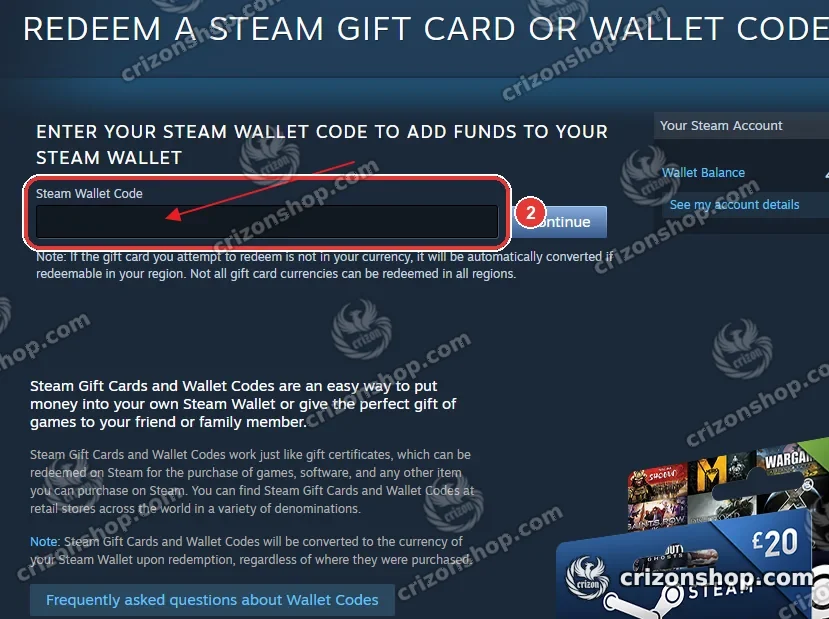
Enter the code in the “Steam Wallet Code” field, then click “Continue”. If Steam asks for your address, fill it in and click Continue to finish.
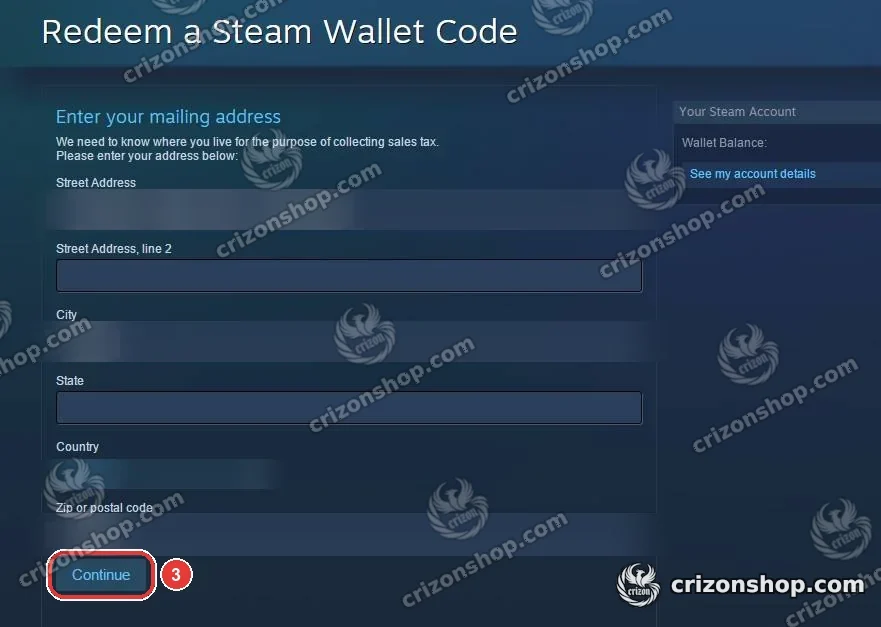
Fill in your address details, then click “Continue”.
Open the Steam app and tap the Menu button (the three-line icon) on the left side of the screen.
Under Store, tap Account details.
Tap + Add funds to your Steam Wallet.
Tap Redeem a Steam Gift Card or Wallet Code.
Type the code into the Steam Wallet Code field and tap Continue.
If your app doesn't show these options, open the redeem page in your phone's browser and follow the Browser tab.
Entering your address the first time you redeem
If your account has never had funds added to its wallet, Steam may show an extra screen asking for your address after you click Continue. Steam uses this information to confirm where you are and which currency your wallet will use.
Fill in the address fields with the place you currently live, select the correct country, and click Continue. You usually won't see this step when you redeem codes later.
Check your balance after redeeming
If the code is valid, Steam confirms that it was redeemed and adds the funds to your wallet right away. To check your balance, click your account name in the top-right corner and select View my wallet.
According to the note on Steam's redeem page, Steam Wallet codes and Steam Gift Cards are converted to your wallet's currency when you redeem them, no matter where you bought them. Because of this, the amount in your wallet may not be a round number like the value printed on the code.
Frequently asked questions
Check each character again, especially look-alike pairs such as the number 0 and the letter O, or the number 1 and the letter I. Then make sure it's not a game key, because game keys can't be added to your wallet. If you entered it correctly and still get an error, contact the seller you bought the code from or submit a request through Steam Support to have it checked.
According to Steam's redeem page, Steam Wallet codes and Steam Gift Cards are converted to your wallet's currency when you redeem them, no matter where they were bought. The amount you get in your wallet is the value after conversion.
Yes. Open Steam's redeem page in a browser on your computer or phone, sign in to your account, and enter the code as usual.
In the Steam desktop app, click + Add a Game in the bottom-left corner, select Activate a Product on Steam..., and follow the on-screen instructions. If you're using a browser, open Steam's key activation page and enter your key there.
Related guides
How to Recover Your Steam Account When You've Lost Access to Your EmailHow to Sign In to Steam and Get a Steam Guard CodeHow to Switch Between Multiple Steam Accounts on One ComputerStill need help?
Send your order code and we can sort it out faster.
