 Corel · Activate
How to Install and Activate a Corel PhotoMirage Express Key
Install PhotoMirage Express and open the app. Click Purchase now, then Already purchased and need to activate? Paste your serial number and click Activate to unlock the full version.
This guide shows you how to install Corel PhotoMirage Express on a Windows PC. You'll then enter a serial number (key) to turn the trial into the full version. If you already have your key, it only takes a few minutes.
Before you start
Step 1. Download and install PhotoMirage Express
Download
PhotoMirage_EP.exefrom Corel's download server.Open the file you just downloaded.
If Windows asks whether to allow the app to make changes to your device, click Yes.
Follow the installer until setup is complete.
Step 2. Open the activation window
Open PhotoMirage Express from the Start menu or the desktop shortcut.
In the trial window that appears, click Purchase now.
Next, click Already purchased and need to activate?.
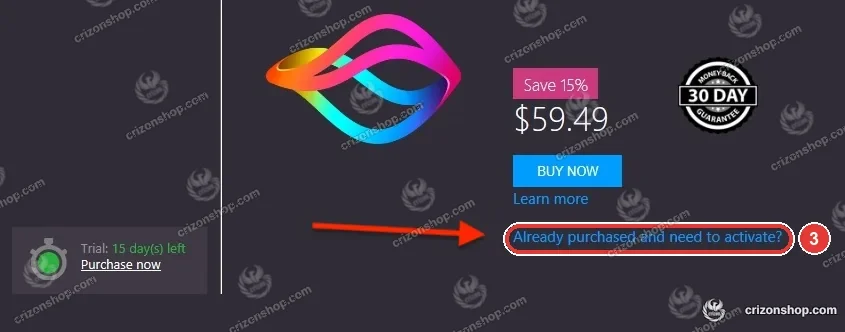
Click “Already purchased and need to activate?”
Step 3. Enter your key and activate
Paste your serial number into the field at the top of the window.
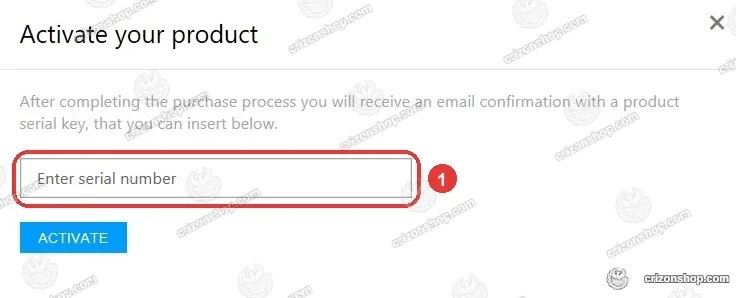
Paste your serial number into the “Enter serial number” field. Click Activate. Some versions label this button Connect.
Wait while the app checks your key. Once activation succeeds, the trial becomes the full version.
How Express differs from the full version of PhotoMirage
| Feature | PhotoMirage Express | PhotoMirage |
|---|---|---|
| Save projects with Save and Save As | No | Yes |
| Custom export option | No | Yes |
| Upgrade to the other edition | Not possible | Not applicable |
Express can't save projects. Finish your animation and export it before you close the app, or you'll have to start over.
Frequently asked questions
No. Corel confirms that the two editions use separate keys, and a key for one won't work on the other. If you need to save projects or use custom export settings, you need a key for the full version of PhotoMirage.
If you bought directly from Corel, sign in to your Corel account. Scroll down to Your Order Status & History and click your order number to see the serial number, as Corel explains. The key is usually in your order confirmation email too. If you bought it somewhere else, check the order details from that seller.
Close PhotoMirage Express completely so the trial window appears. Then choose Purchase now or Already Purchased, depending on your version. If the window still doesn't appear, uninstall the app, download the installer again, and reinstall it.
First, make sure the key is for PhotoMirage Express. Then paste it again and keep your computer connected to the internet while you activate. If it still fails, contact the seller you bought the key from or submit a request to Corel Support.
Related guides
How to Activate a GRFX Studio Key for Corel PaintShop ProHow to Activate Corel AfterShot Pro 3 with a Serial NumberHow to Activate Corel ParticleShop with a Serial NumberStill need help?
Send your order code and we can sort it out faster.
