 Corel · Activate
How to Enter Your Corel PDF Fusion Activation Key on Windows
Open Corel PDF Fusion, go to Help › Enter Serial Number, type your key in uppercase and click OK. This guide also covers entering the key during setup and fixing an invalid key error.
This guide shows you how to enter your serial number (key) to upgrade Corel PDF Fusion from the trial to the full version. You can enter the key during installation or later in the app. Both methods give the same result.
Before you start
Step 1. Download and install Corel PDF Fusion
The trial and the full version use the same installer. The key you enter decides which mode the app runs in. Download the installer from the Corel PDF Fusion page or from the link in Corel's installation guide.
Open the CorelPDFFusion.exe file you downloaded.
Read the license agreement, then accept it to continue.
Enter your user name. This name appears as the author of the PDF files you create.
At the serial number step, enter your key now if you have it. To enter it later, choose the trial option.
Keep the default installation folder and wait for the installation to finish.
When the installer asks, register the product, then exit.
Step 2. Enter your key in the app
Use this method if you installed the trial earlier, or didn't enter a key during installation.
Open Corel PDF Fusion.
On the menu bar, click Help.
Select Enter Serial Number.
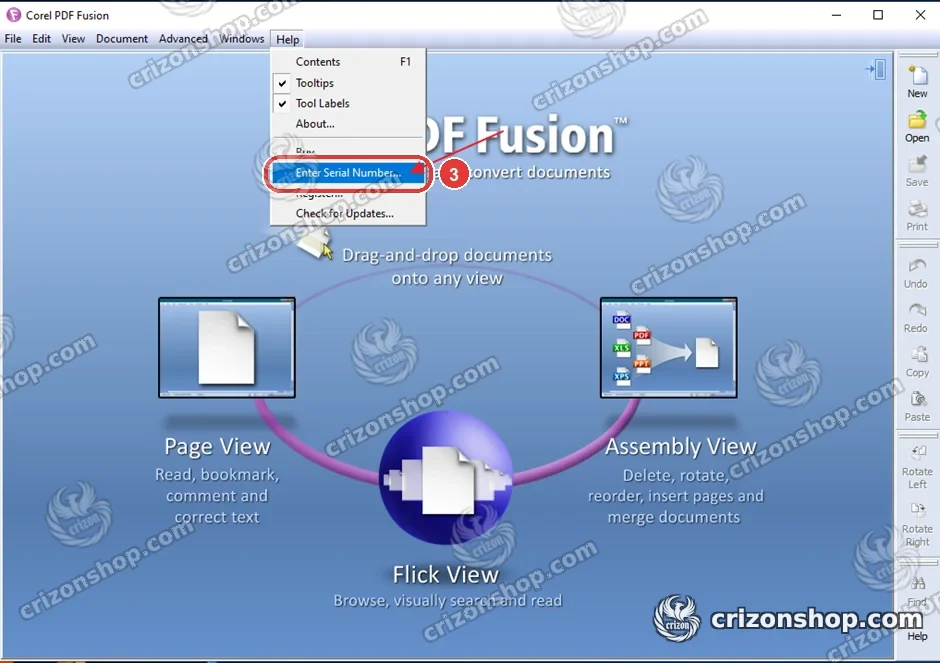
Select “Enter Serial Number...”. Type your key in the Serial Number box.
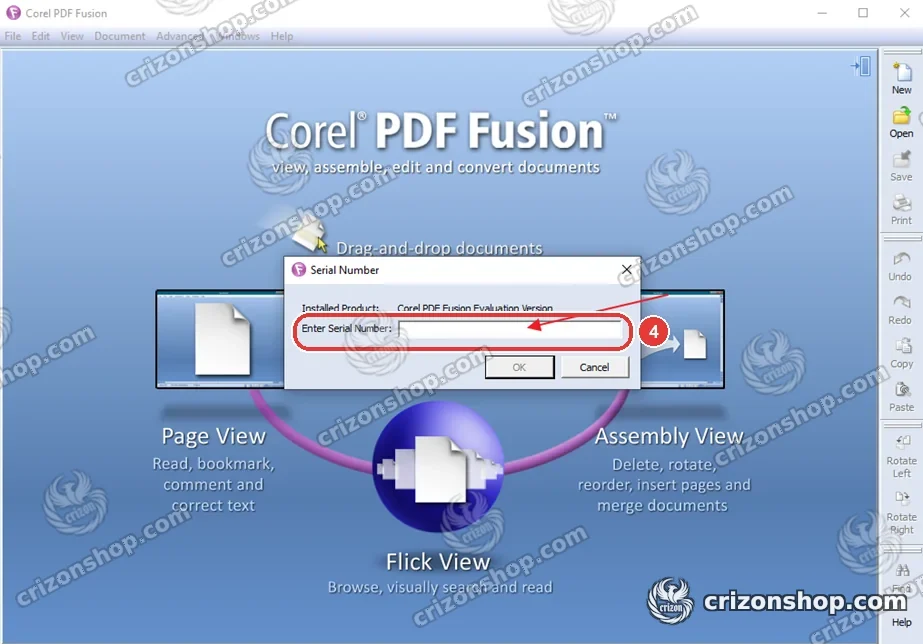
Type your key in the “Enter Serial Number:” field. Click OK.
Key shown in your account   PD01M22-XXXX-XXXX-XXXXXXXX
Part to type into the app XXXX-XXXX-XXXXXXXXCheck that your key was accepted
When the key is valid, PDF Fusion shows a confirmation message. To see the key in use on your computer, go to Help › Enter Serial Number. This is also where you can copy down your key when you need to install on another computer.
If the app says your key is invalid
The Serial number is invalid error is usually caused by how the key was typed, not by a bad key. Try these fixes in order.
- Turn on Caps Lock and retype the whole key. If you paste the key from somewhere else, make sure there are no extra spaces at the start or end.
- Remove
PD01M22-from the start of the key if it's there. - Check that it's actually a Corel PDF Fusion key and not a key for another Corel product.
- If the app is still in trial mode after an incorrect entry, go back to Help › Enter Serial Number and enter the key correctly.
- If it still doesn't work, read Corel's article Error: PDF Fusion Serial Number is invalid or contact Corel support.
FAQ
Your files are still there and the app still opens. According to Corel's documentation, after 30 days you can still view and print documents as usual, but files you save, and edited files you print or attach to an email, get a watermark. Enter your key as described in Step 2 to remove this limit.
On your old computer, go to Help › Enter Serial Number to view and copy down your key. Then uninstall PDF Fusion from the old computer, download the installer on the new one, and enter the key at the serial number step during installation. Corel describes this in its article on moving PDF Fusion to a new computer.
No. Just open the app, go to Help › Enter Serial Number and enter your key as described in Corel's article.
The product page currently lists Windows 10 with the latest updates, while Corel's installation guide also lists Windows 8/8.1, 7, Vista and XP. Corel doesn't list Windows 11 in its system requirements, so if your PC runs Windows 11, install the trial first to test it before you enter your key.
Related guides
How to Activate a GRFX Studio Key for Corel PaintShop ProHow to Activate Corel AfterShot Pro 3 with a Serial NumberHow to Activate Corel ParticleShop with a Serial NumberStill need help?
Send your order code and we can sort it out faster.
