 Corel · Activate
How to Enter a Serial Number to Activate Corel VideoStudio Pro X9
With VideoStudio Pro X9, you enter your code on the installer's very first screen. Choose Serial Number, enter the code, click Next, then accept the terms and register your email to install the full version.
This guide shows you how to install Corel VideoStudio Pro X9 and enter your serial number (license code) to use the full version instead of the trial. One thing to keep in mind: VideoStudio asks for the code on the very first screen of the installer, not after installation.
Before you install
Download the installer
The X9 installer is hosted on Corel's download server. Click VideoStudioX9_Installer.exe to download it, then save it to a folder that's easy to find, such as Downloads.
Enter the serial number in the installer
Double-click the VideoStudioX9_Installer.exe file you downloaded.
If Windows asks whether you want to allow this app to make changes to your device, click Yes.
On the first screen, choose Serial Number, not the trial version.
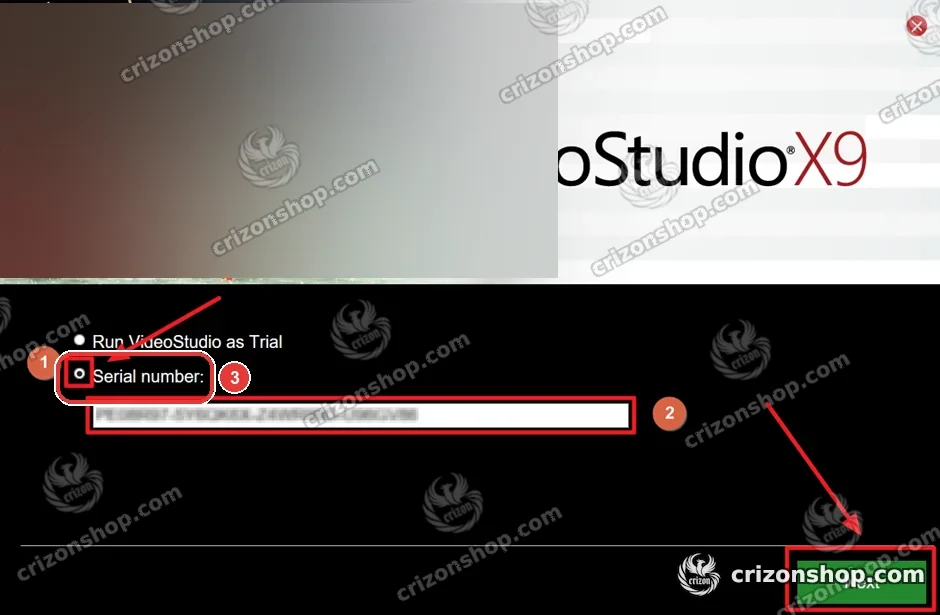
Select “Serial number”. Type or paste your serial number into the code field.
Click Next to continue.
Accept the terms and finish installing
The screens after the code entry may vary slightly depending on the installer version, but they usually follow this order.
Read the End User License Agreement, then check the box to accept it and continue.
Fill in your registration details, including the email address that will be linked to your license.
Click the install button, usually Download/Install.
Wait while the installer downloads and installs the main program, followed by its bundled content packs.
If you're prompted to install additional Windows components, drivers, or other supporting programs, follow the on-screen instructions.
When the screen says the installation was successful, open VideoStudio from the Start menu to get started.
If the installer says your code is invalid
If you see an invalid serial number message, try the following fixes one at a time, based on Corel's guide.
- Type the entire code in uppercase, since some serial numbers are case-sensitive.
- Remove any extra spaces at the start and end if you pasted the code from somewhere else.
- Type each character by hand instead of pasting.
- Check the first two letters of the code. Corel uses them to identify the product, for example DR is CorelDRAW and PR is Painter, so a code for a different product won't be accepted.
Find a serial number you already bought
If you bought directly from Corel, your serial number is stored in your Corel account.
Sign in to your Corel account.
Scroll down to Your Order Status & History at the bottom of the page.
Click the order number to open the order confirmation page, which shows your serial number.
If you don't see the order you're looking for, click See All Orders to view all your orders.
For boxed copies, the serial number is printed on a sticker on the disc sleeve or the box.
Reinstall or move to another computer
Under Corel's terms, you can install and reinstall multiple times on the same computer, as long as its drive hasn't been reformatted. When you move to a new computer or reinstall Windows, you can still install it, but only a limited number of times, and you must use the same email you registered with the first time.
To uninstall VideoStudio X9 from your computer, follow these steps.
Open Control Panel in Windows.
Under Programs, click Uninstall a program.
Select Corel VideoStudio X9 from the list of apps.
Click Uninstall/Change, then follow the on-screen instructions.
Frequently asked questions
The surest fix is to uninstall the version you just installed using the steps in the section above. Then run the installer again and choose Serial Number on the first screen to enter your code.
Yes, as long as you use the same email you registered with the first time. Corel only allows installs on a new or reformatted computer a limited number of times. If you're told you've exceeded the install limit, contact Corel Support.
Corel recommends installing the patches before contacting support. For X9, there's Service Pack 1, Service Pack 3, and the X9.5 update. You can find them in Corel's list of VideoStudio updates.
Related guides
How to Activate a GRFX Studio Key for Corel PaintShop ProHow to Activate Corel AfterShot Pro 3 with a Serial NumberHow to Activate Corel ParticleShop with a Serial NumberStill need help?
Send your order code and we can sort it out faster.
