 Corel · Activate
How to Activate Corel AfterShot Pro 3 with a Serial Number
Install the AfterShot Pro 3 trial from Corel's website, open and close the app, choose Already Purchased, enter your serial number, and confirm to unlock the full version.
This guide shows you how to enter a serial number to switch Corel AfterShot Pro 3 from the trial to the full version. It also covers what to do if the software says your serial number is invalid. The steps follow Corel's guide to activating downloaded products.
Before you start
| Operating system | Supported versions (per Corel) | Minimum RAM | Free disk space |
|---|---|---|---|
| Windows | Windows 11, 10, 8.1, 8, 7 with the latest service pack (64-bit) | 2 GB (4 GB recommended for HDR processing) | 400 MB |
| macOS | OS X 10.9 or later, including macOS 10.15 (64-bit) | 2 GB | 250 MB |
| Linux | Fedora 19 or Ubuntu 14.04 or later (64-bit) | 2 GB | See the product page |
Step 1. Install AfterShot Pro 3
Go to Corel's AfterShot Pro 3 page and click Download trial to download the installer.
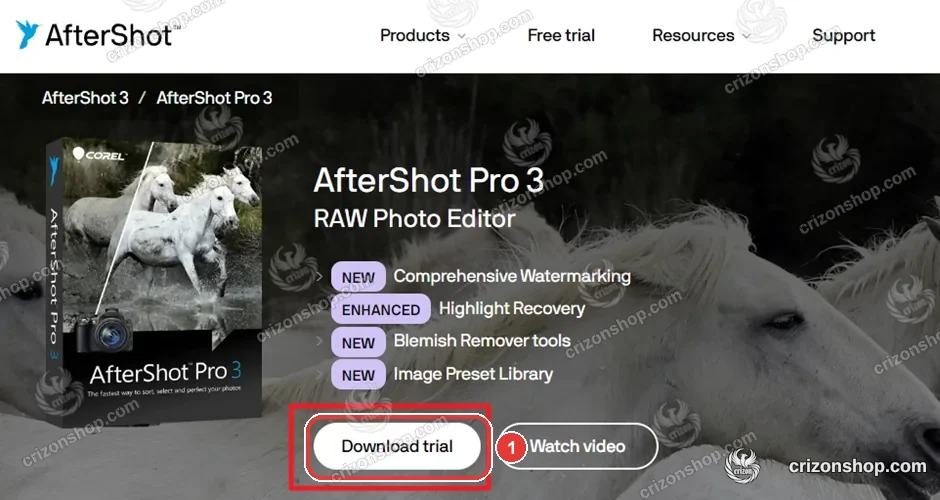
Click “Download trial” to download the installer. Open the file you downloaded and follow the installer.
Unless you need a specific location, keep the default install folder and click through until the installation finishes.
Step 2. Enter your serial number
Option 1. From the trial dialog
Open AfterShot Pro 3. If the trial dialog doesn't appear on its own, close the app right after opening it to bring up the dialog.
There are two buttons in the bottom-left corner of the dialog. Click Already Purchased.
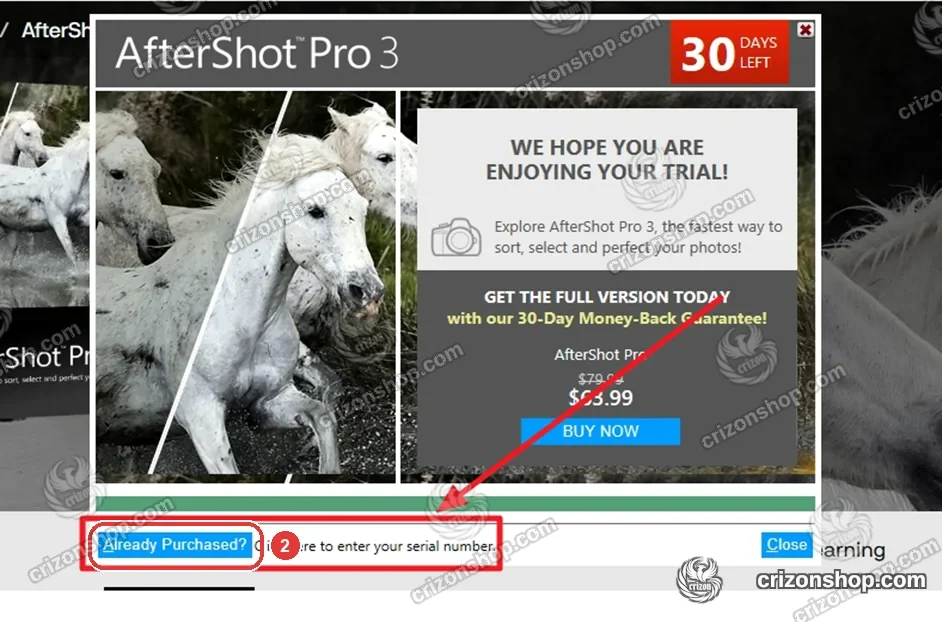
Click “Already Purchased?” In the next window, enter your serial number in the field at the top.
Click Connect to send the serial number to Corel's server. Some versions show a Continue button instead of Connect.
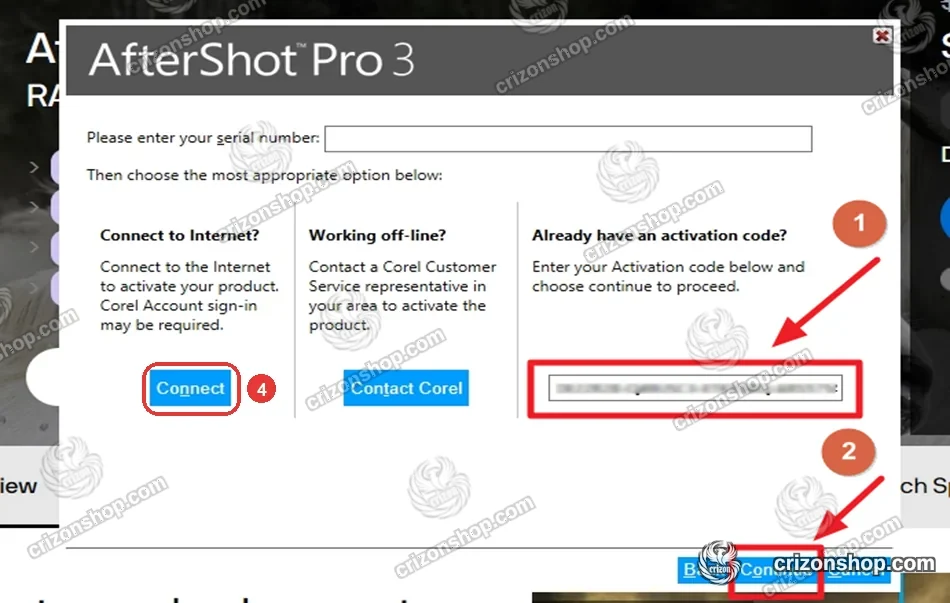
Click “Connect” (or “Continue”) to send the serial number to Corel's server. Reopen AfterShot Pro 3 and check whether the trial message still appears.
Option 2. From the Help menu
If you already closed the trial dialog, you can still open the serial number screen from inside the app.
Open AfterShot Pro 3 and go to the Help menu.
Choose Unlock AfterShot Pro. The exact name may vary slightly depending on your version.
Enter the License Name (the name the license is registered to) and the Serial Number.
Click OK or Unlock to finish.
If your serial number isn't accepted
- Clear the field and type the whole serial number again by hand in capital letters. Don't paste it.
- Make sure the serial number is for AfterShot Pro 3. Serial numbers for older versions of AfterShot Pro, for the AfterShot 3 bundled with Toast, or for other Corel software won't unlock this version.
- Uninstall the software and download the installer again from the official link. For Corel Store orders, use the link in your receipt. Reinstall and enter your serial number again.
- If it still doesn't work, check Corel's AfterShot Pro troubleshooting page or contact Corel Support. Include your serial number and a screenshot of the error message.
Frequently asked questions
No. According to Corel, when you enter a serial number in the trial installed on your computer, the software unlocks as the full version. You don't need to reinstall it.
AfterShot 3 in the Toast bundle is a different product from AfterShot Pro 3. Following Corel's instructions, install the AfterShot 3.pkg file from the Pro Apps folder in the Toast installer. Then click Enter Serial Number in the Trial Expired window, enter the AfterShot 3 serial number that came with Toast, and click Unlock.
Yes. The Connect button sends your serial number to Corel's server for verification, so you need to be online when you activate. If a firewall or antivirus software blocks the connection, temporarily allow AfterShot Pro to access the network and try again.
Corel's product page lists support for OS X 10.9 or later, including macOS 10.15, and doesn't mention newer versions. The safest approach is to install the trial, open it, and try editing a few RAW photos on your computer before you buy a serial number.
Related guides
How to Activate a GRFX Studio Key for Corel PaintShop ProHow to Activate Corel ParticleShop with a Serial NumberHow to Enter a Serial Number to Activate Corel Painter Essentials 8Still need help?
Send your order code and we can sort it out faster.
