 Corel · Activate
How to Activate Corel ParticleShop with a Serial Number
Download ParticleShop from Corel, open the plugin in Photoshop via Filter › Painter › ParticleShop, then enter your serial number in the activation window that appears the first time and click Next.
This guide shows you how to install Corel ParticleShop from the official site, open the plugin in your photo editor, and enter your serial number (key) to upgrade from the trial to the full version.
What you need
ParticleShop is a brush plugin that runs inside another photo editing app. It isn't a standalone program. So you need at least one Corel-supported host app on your computer before you install it.
Step 1. Download and install ParticleShop
Open Corel's ParticleShop page on painterartist.com.
Download the trial for your operating system.
Close Photoshop and any other photo editors that are open.
Run the installer you downloaded and follow the on-screen instructions until it finishes.
Step 2. Open ParticleShop in your host app
Open your photo editor and open any image first, because the plugin is usually grayed out when no image is open. Then launch ParticleShop using the menu path for your app below.
Open the Filter menu.
Choose Painter, then ParticleShop.
In Photoshop CC 2014 and later, you can also open the ParticleShop panel via Window › Extensions › ParticleShop.
Switch to the Develop module.
Right-click the image.
Choose Edit In › ParticleShop.
Open the Effects menu.
Choose Plugins › Painter › ParticleShop.
In CorelDRAW, select a bitmap image first, then go to Bitmaps › Plug-ins › Painter › ParticleShop.
In Corel PHOTO-PAINT, go to Effects › Painter › ParticleShop.
Step 3. Enter your serial number to activate
The first time you open ParticleShop, an activation window appears.
If the window shows Buy Now and Already Purchased buttons, click Already Purchased.
Type your serial number in the field.
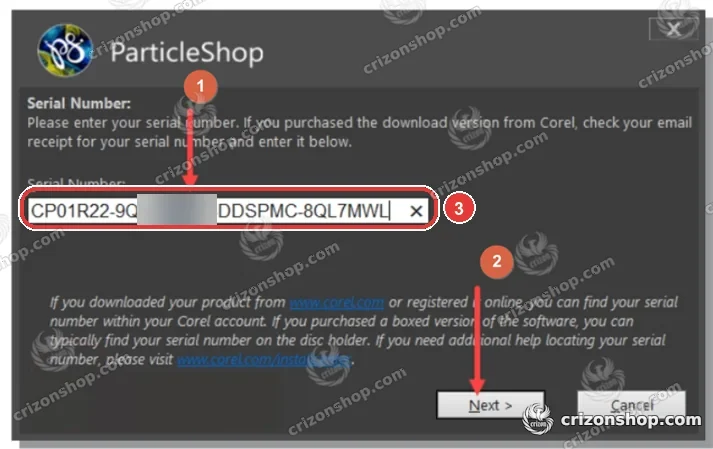
Enter your serial number in the “Serial Number” field. Click Next to submit the serial (some Corel versions label this button Connect).
Wait for the activation success message, then close it and start using the brushes.
ParticleShop doesn't appear in the menu
For host app versions the installer doesn't detect automatically (Corel gives Photoshop 2015.5 as an example), you need to create a shortcut to the plugin file yourself and put it in that app's plugin folder.
Open the
C:\Program Files\Corel\ParticleShopfolder (replaceCwith your install drive if it's different).Open the
PhotoshopPluginfolder, right-click the file ending in.8bf, and choose Create shortcut.Move the new shortcut into the host app's Plug-ins folder.
Reopen the host app and find ParticleShop using the menu path in Step 2.
Find the
ParticleShop.pluginfile in the ParticleShop install folder.Hold Control, click the file, and choose Make Alias.
Move the alias into the host app's Plug-ins folder.
Reopen the host app and check the menu.
Finding your serial number
If you bought directly from Corel, sign in to your Corel account, scroll down to Your Order Status & History, and click the order number to open the confirmation page that shows your serial. For boxed versions, the serial is on the sticker on the disc case.
Frequently asked questions
No. According to Corel, just open the installed trial, choose Already Purchased, and enter your serial. The trial then unlocks to the full version.
Type the serial again by hand in capital letters instead of pasting it, and watch for easily confused characters like 0 and O. Corel also notes that the first two letters of a serial show which product it belongs to, so make sure it's a ParticleShop serial and not one for another Corel product. If it still doesn't work, contact the seller you bought the serial from or Corel support.
No. ParticleShop is a plugin, so it only runs inside a host app like Photoshop, Lightroom, PaintShop Pro or CorelDRAW. The activation window also only appears when you open the plugin from one of these apps' menus.
The system requirements on Corel's product page currently list only 64-bit Windows 7, 8.1 and 10. Install the trial and test it on your computer before you use your serial.
Related guides
How to Activate a GRFX Studio Key for Corel PaintShop ProHow to Activate Corel AfterShot Pro 3 with a Serial NumberHow to Enter a Serial Number to Activate Corel Painter Essentials 8Still need help?
Send your order code and we can sort it out faster.
