 Avast · Activate
How to Enter an Avast Ultimate Activation Code on Computers and Phones
On Windows, open Avast Premium Security, go to Menu › Enter activation code, paste the code with its dashes, then click Activate & install. On Mac and mobile, you enter the code right in the Avast app.
This guide shows you how to enter your Avast Ultimate activation code (key) to activate your subscription on Windows, Mac, Android, and iPhone. Button names come from Avast's official documentation and mostly match the English version of the apps.
Before you enter the code
Avast Ultimate comes in several editions, and each one only activates on certain platforms. Check which edition you have before installing so you don't enter the code in the wrong app.
| Edition | Works on | Devices |
|---|---|---|
| Avast Ultimate (Multi-Device) | Windows, Mac, Android, iOS | Up to 10 devices at the same time |
| Avast Windows Ultimate | Windows only | 1 PC |
| Avast Mac Ultimate | Mac only | 1 Mac |
| Avast Mobile Ultimate | Android only | Up to 5 devices |
Enter the code on your device
On Windows, you enter the code in Avast Premium Security. Once it accepts the code, the app installs the other apps in the Ultimate bundle.
Download the Avast Premium Security installer using the download button in Avast's guide to activating Avast Ultimate.
Right-click the
avast_premium_security_setup_online.exefile and select Run as administrator.Choose a language in the top-right corner if you want, click Install, and wait for the installation to finish.
Open Avast Premium Security, click ☰ Menu, then select Enter activation code.
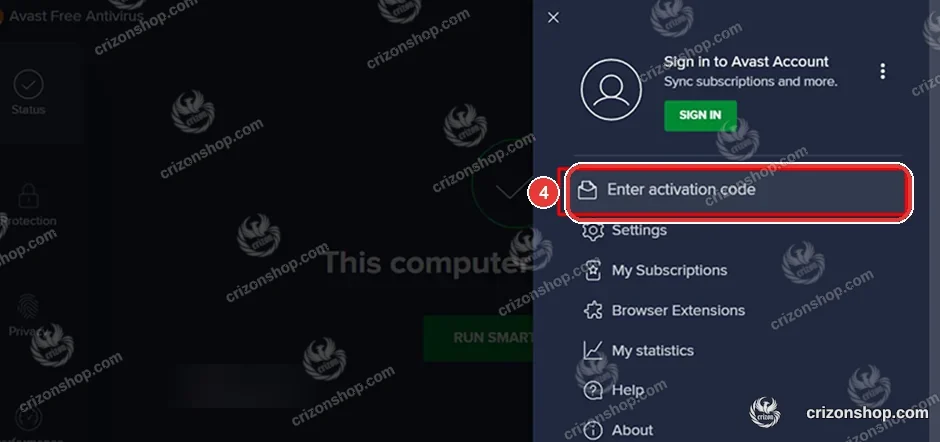
Click Enter activation code (☰ Menu). Paste the code into the empty box and click Enter.
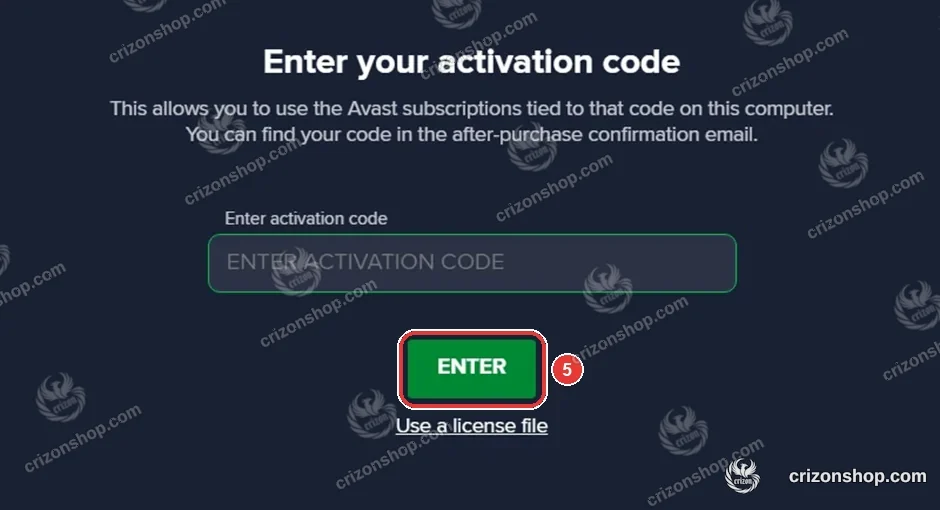
Paste the code into the empty box, then click ENTER. Click Activate & install so Avast installs and activates the apps included in your subscription.
At the last step, the Ultimate bundle on Windows includes SecureLine VPN, Cleanup Premium, and AntiTrack. If you don't want an app yet, untick it before clicking Activate & install.
On Mac, you enter the code in the Avast Security app.
Download Avast Security from the Avast website, then double-click the
avast_security_online.dmgfile.Double-click the Install Avast Security icon and click Allow when prompted.
Review the privacy policy, click Continue, accept the terms with Agree, then click Install.
Open the app and go to ☰ Menu › My subscriptions.
Click Activate paid features, enter the code, then click Activate.
Click See my apps and install the other apps in the bundle one by one (SecureLine VPN, Cleanup Premium, AntiTrack).
On Android, you enter the code in the Avast Mobile Security app.
Open Google Play, then search for and install Avast Mobile Security.
Open the app and tap the Settings gear icon.
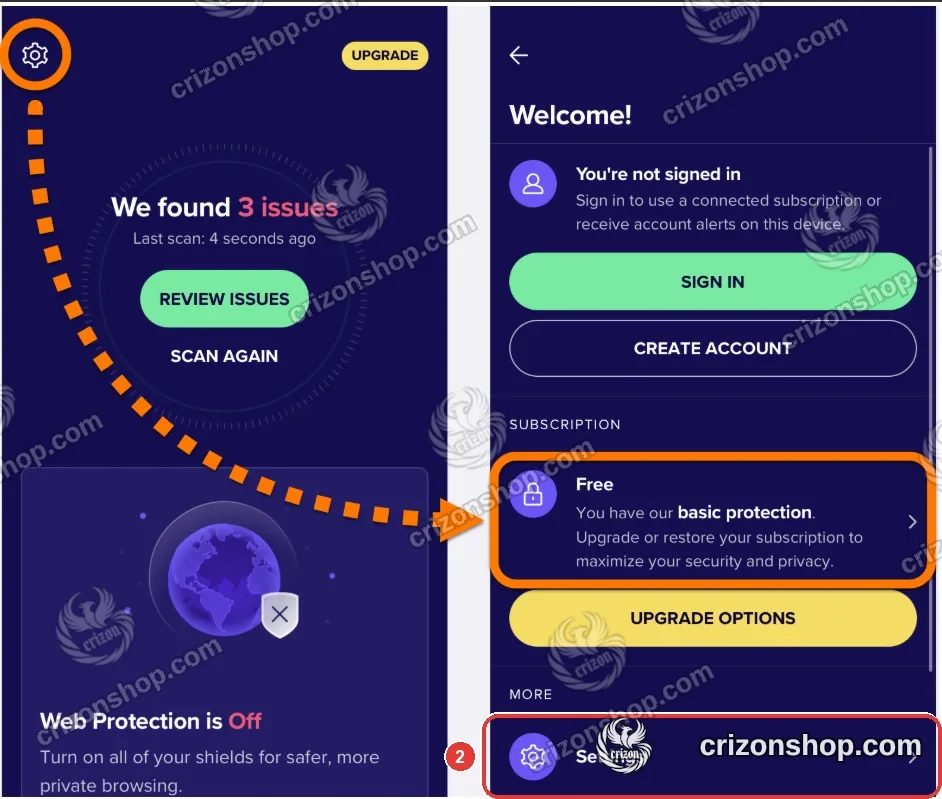
Tap Settings. Select Subscription, then tap Enter activation code.
Type or paste the code into the empty box, then tap OK.
Some app versions put the code entry somewhere else. If you don't see Subscription, tap the three-dot icon ⋮ in the top-right corner, choose Already purchased? › Redeem an activation code, enter the code, then tap Use this code.
The Ultimate bundle on Android also includes SecureLine VPN and Cleanup Premium. These are separate apps. Install each one from Google Play and activate it inside that app.
Only Avast Ultimate (Multi-Device) works on iPhone. You enter the code in the Avast Mobile Security app.
Install Avast Mobile Security from the App Store.
Open the app and tap Upgrade in the top-right corner.
Select Already purchased?, then select Enter Avast subscription code.
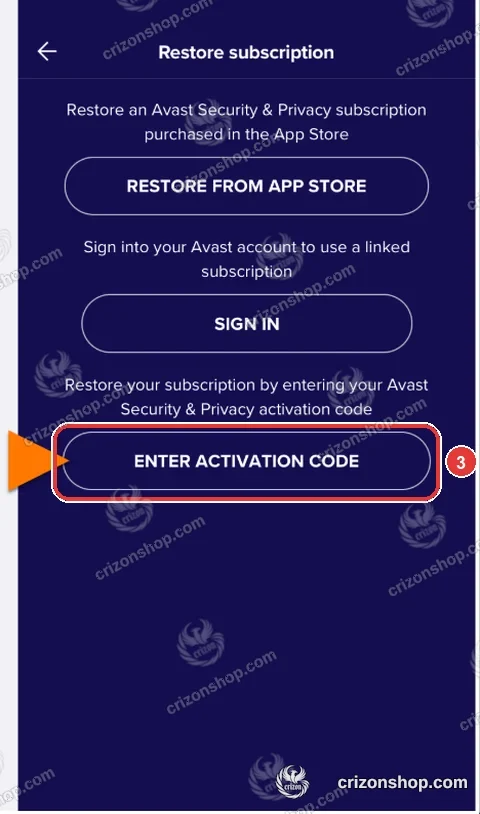
Tap ENTER ACTIVATION CODE (Already purchased?) to enter your subscription code. Enter the code and tap OK, then tap OK once more to finish.
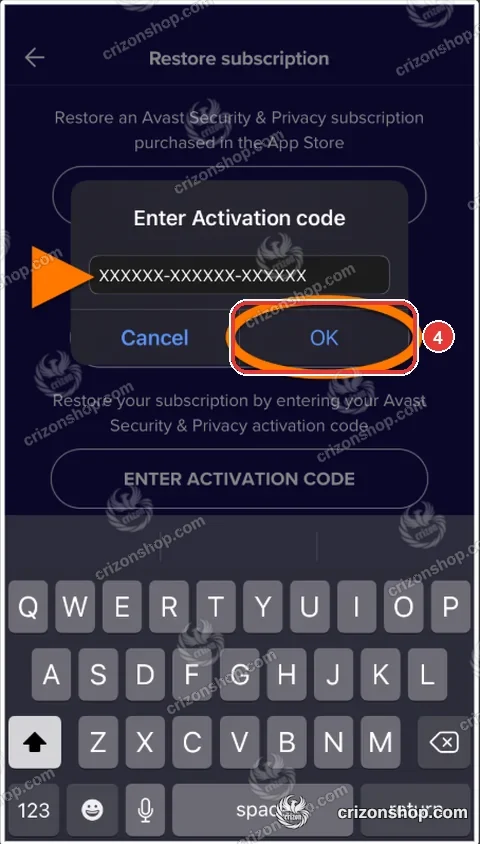
Enter the code, then tap OK.
On iPhone, the bundle also includes SecureLine VPN. Install it from the App Store and activate it separately inside the app.
If Avast says the code is invalid
- Make sure the code includes all the dashes, and check that you haven't mixed up the letter O with the number 0, or the letter I with the number 1.
- Check that your Ultimate edition matches the device you're installing on. A Windows Ultimate code won't work on a Mac or phone, and Mobile Ultimate only works on Android.
- Check how many devices are already activated. Once your subscription has used all its allowed devices, the code won't accept any new ones.
- If your subscription is linked to an Avast Account, try signing in to that account in the app instead of entering the code.
If you've tried all of the above and it still doesn't work, see Avast's guide to entering an activation code or contact Avast Support to have your code checked.
FAQ
It depends on the edition. Multi-Device covers up to 10 devices at the same time across Windows, Mac, Android, and iOS. Windows Ultimate and Mac Ultimate cover 1 computer only, while Mobile Ultimate covers up to 5 Android devices.
Not on Windows. When you click Activate & install, Avast installs and activates the included apps automatically. On Android and iPhone, each app in the bundle is installed and activated separately.
Tap the three-dot icon ⋮ in the top-right corner, choose Already purchased?, then choose Redeem an activation code. If you still don't see it, update Avast Mobile Security to the latest version on Google Play.
No. If you have an activation code, you can enter it directly in the app. Signing in to an Avast Account is only an alternative when your subscription is linked to an account and entering the code fails.
Related guides
How to Activate Avast BreachGuard with a Sign-in KeyHow to Enter an Avast AntiTrack Premium Activation Code on Your ComputerHow to Enter an Avast Driver Updater Activation Code on WindowsStill need help?
Send your order code and we can sort it out faster.
