 AVG · Activate
How to Enter an AVG Driver Updater Activation Code on Windows
Download and install AVG Driver Updater from AVG's website, open the app, go to Menu › Enter activation code, paste your code, and click Enter. If the code is rejected, get a new one at avg.com/activation.
This guide shows you how to install AVG Driver Updater on a Windows PC and enter an activation code to use the paid version. The steps below have been checked against AVG's installation guide.
Before you start
Step 1. Download and install the app
Open AVG's AVG Driver Updater installation page and click the link to download the installer.
Open the
avg_driver_updater_online_setup.exefile you just downloaded. Unless you changed the location, it's in your Downloads folder.If Windows asks whether you want to allow this app to make changes to your device, select Yes.
Click Install, then follow the on-screen instructions until setup is complete.
Step 2. Enter your activation code
Double-click the AVG Driver Updater icon on your desktop to open the app.
Click ☰ Menu, then select Enter activation code.
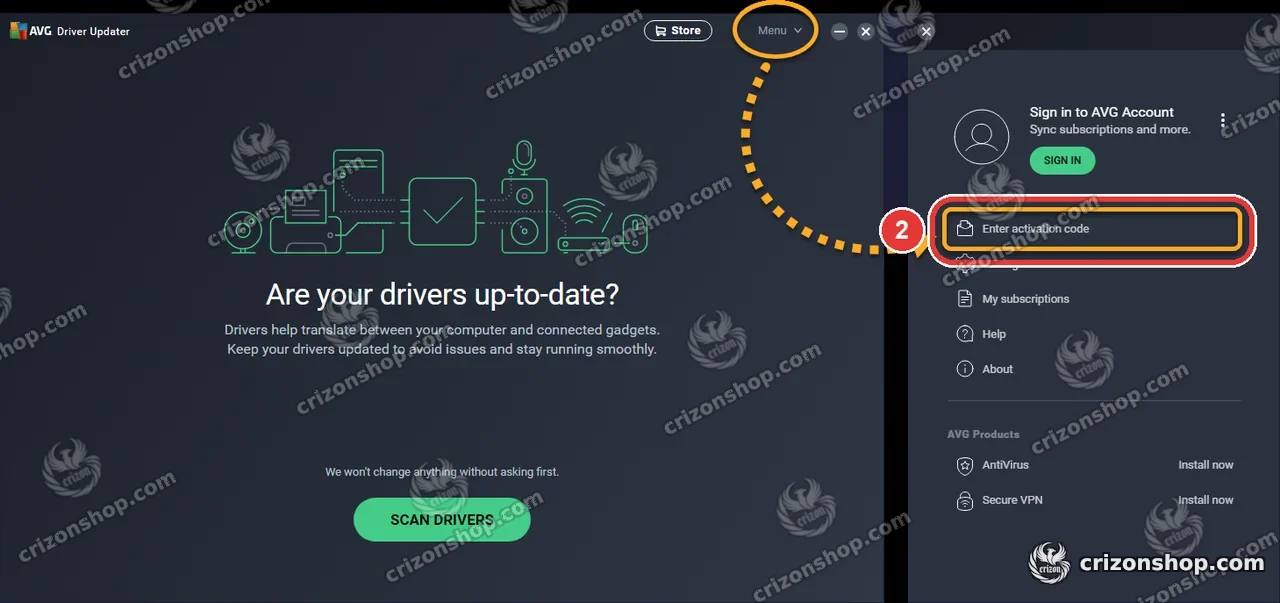
Click “Enter activation code” (☰ Menu). Click the code field and paste your code with Ctrl + V.
Click Enter to submit the code.
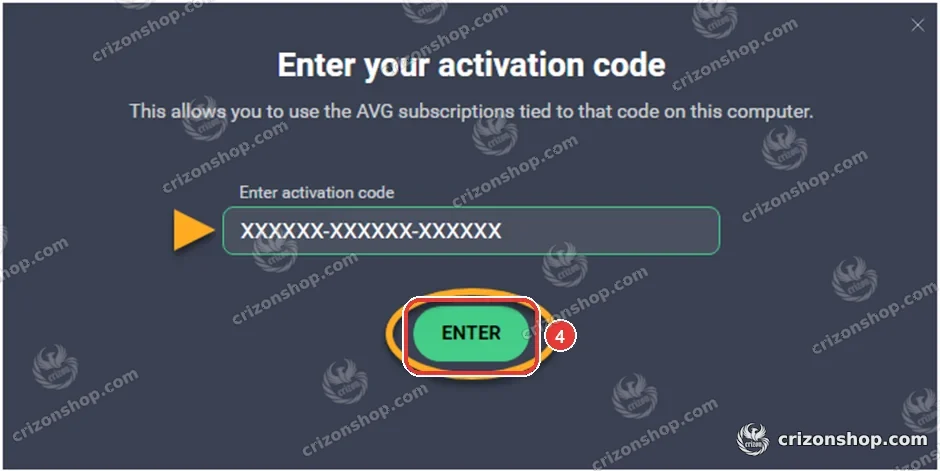
Click “ENTER” to submit the code. If the app asks for your name, email address, and postal code, fill them all in and confirm.
Once activation is complete, reopen the app from the desktop icon to start using the paid version.
If your code covers multiple AVG products
Some activation codes work for several AVG apps. With this type of code, you may see a subscription screen after entering it, with apps you haven't installed listed under Other available subscriptions. Click Activate & install next to the app you want, and AVG will install and activate it for you. If your code is only for AVG Driver Updater, you won't see this screen.
If your activation code is rejected
According to AVG, if your subscription is still active but the app won't accept your code, you can use the activation form on AVG's website to get a working code through your AVG Account.
Go to avg.com/activation.
Sign in to your AVG Account, or create one if you don't have one yet.
Enter the rejected code in the form and follow the instructions on the page.
Go back to the app, open ☰ Menu › Enter activation code, and enter the new code you received.
Frequently asked questions
It depends on the plan you bought. According to AVG's guide, AVG Driver Updater Multi-Device works on up to 10 devices. Other plans cover the number of devices listed on the plan. On each computer, install the app and enter the same code using the steps above.
Not when you enter the code in the app. The app may only ask for your name, email address, and postal code. You only need an AVG account if you have to use avg.com/activation to get a working code.
According to AVG's product page, AVG Driver Updater runs on Windows 11, 10, 8.1, and 7 (both 32-bit and 64-bit), but it doesn't support PCs with ARM chips, such as some laptops with Snapdragon chips. To check which chip your PC has, go to Settings › System › About and look at the System type line.
Related guides
How to Activate AVG AntiTrack Premium with an Activation CodeHow to Activate AVG Ultimate with an Activation CodeHow to Enter an AVG Internet Security Activation Code on Your ComputerStill need help?
Send your order code and we can sort it out faster.
