 AVG · Activate
How to Activate AVG AntiTrack Premium with an Activation Code
Download AVG AntiTrack from AVG's website, open the app, and choose Already purchased?. Then paste your activation code with all its hyphens and click Continue to unlock Premium.
This guide shows you how to install the official version of AVG AntiTrack on your computer and enter an activation code to unlock Premium. The steps work on both Windows and Mac. At the end, you'll learn how to check that your plan is active and what to do if your code is rejected.
Before you start
- Your AVG AntiTrack Premium activation code.
- A computer running Windows 10, Windows 11, or macOS, with a user account that has permission to install software.
- Chrome, Edge, or Firefox if you also want to use AntiTrack's anti-tracking browser extension.
The activation code has three groups of six characters joined by hyphens, as shown below. The latest version of AntiTrack accepts codes in exactly this format.
XXXXXX-XXXXXX-XXXXXXInstall and enter your activation code
Pick the tab for your operating system. The button names below match what you'll see in the app.
Open the AVG AntiTrack installation page on AVG's site and click the download button.
Go to your Downloads folder and open
avg_antitrack_setup.exe.Click Install and follow the on-screen instructions until setup finishes.
Double-click the AVG AntiTrack icon on your desktop to open the app.
Select Already purchased?.
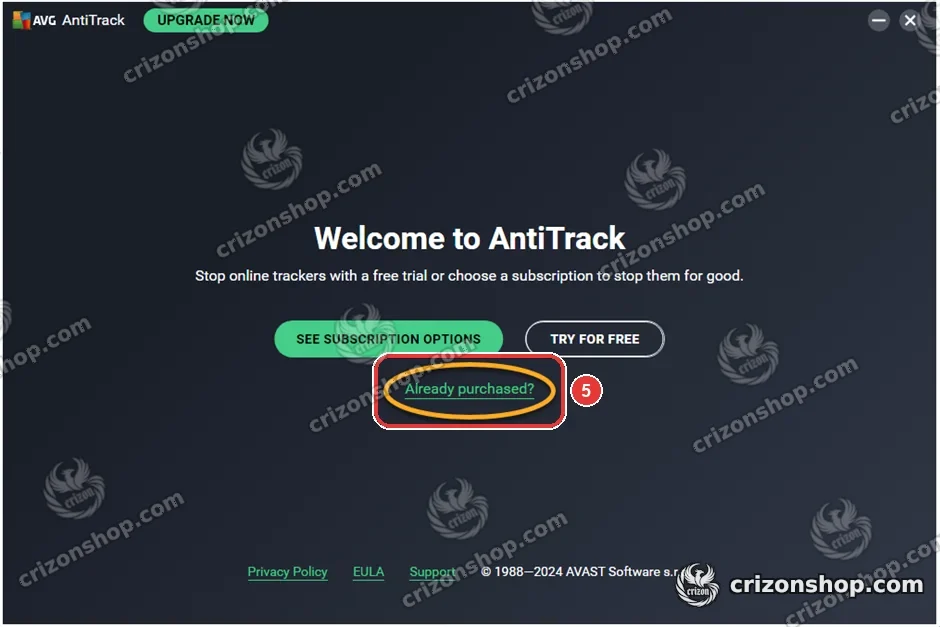
Click “Already purchased?”. Click the code field and paste your activation code with Ctrl + V.
Click Continue. If the app asks for your name, email, or postal code, fill them in and continue.
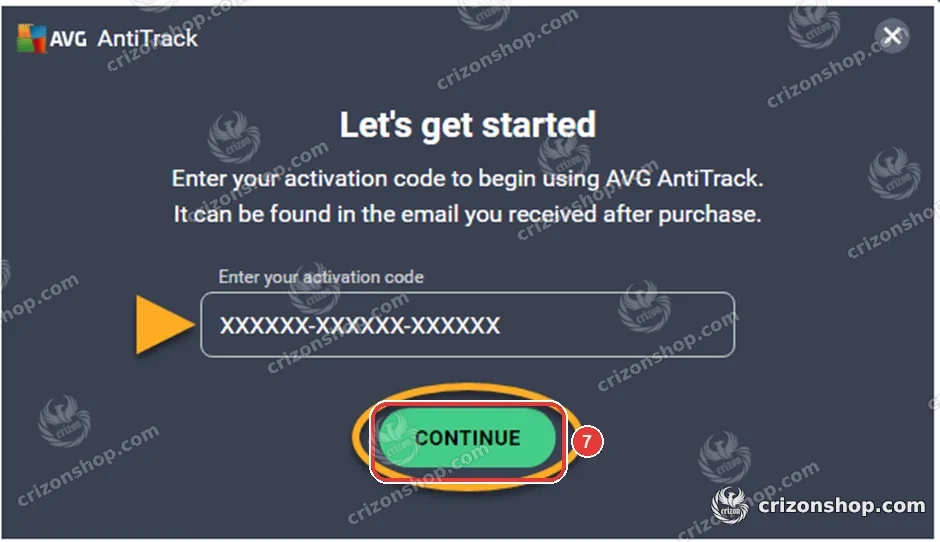
Click “CONTINUE” to proceed. When the app confirms activation, click the confirmation button on screen (usually Got it) to close the message.
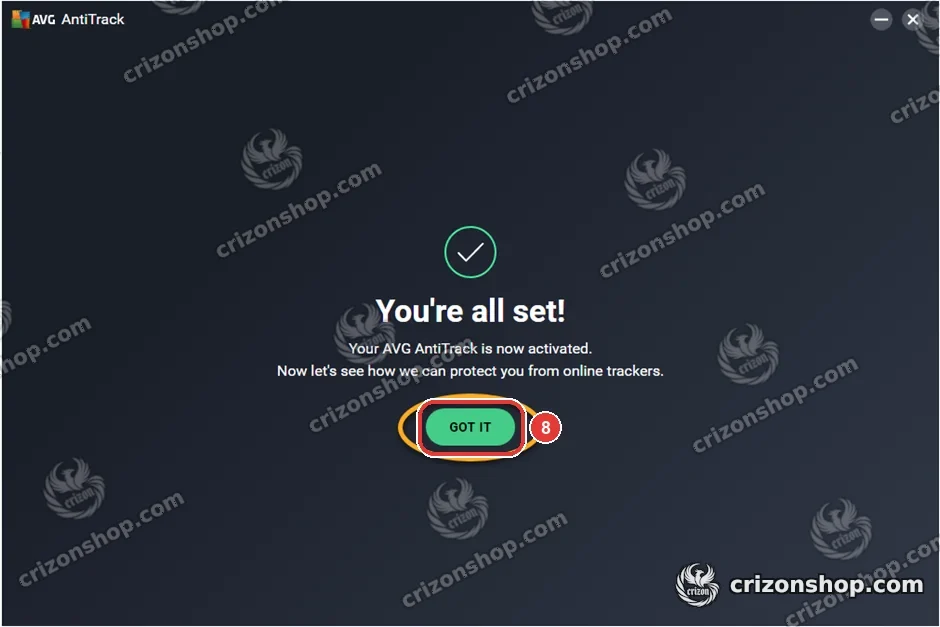
Click “GOT IT” to close the message.
Open the AVG AntiTrack installation page on AVG's site, choose the Mac section, and click the download button.
Go to your Downloads folder and open
avg-antitrack.dmg.Drag the AVG AntiTrack icon into the Applications folder, then follow the on-screen instructions.
Open AVG AntiTrack from the Applications folder and click Next through the intro screens.
Paste your activation code into the code field with Cmd + V.
Click Activate. If the app asks for more details, fill them in and continue.
Once activation is done, AntiTrack will suggest adding its extension to your browser. We recommend installing it so anti-tracking works on the websites you visit.
Check that Premium is active
Open the app's settings to confirm your plan is now Premium and to see its expiration date.
Open the AVG AntiTrack app.
Click Menu in the top-right corner.
Select Settings.
Check Your subscription status to see your plan status and expiration date.
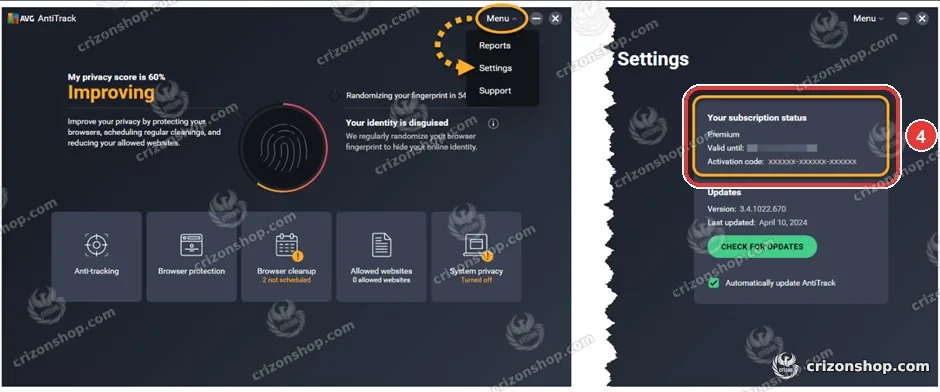
Check “Your subscription status” for your plan status and expiration date.
If your activation code is rejected
If your subscription is still active but the code keeps getting rejected, enter it in AVG's activation form. The form will give you a working code through your AVG Account.
Frequently asked questions
If you bought directly from AVG, the code is in the confirmation email sent from [email protected]. You can also sign in to the AVG Account that holds your AntiTrack subscription to view the code again.
It depends on your plan. AVG offers standard AntiTrack and AntiTrack Multi-Device for multiple computers. Check the number of devices listed on your plan, then install it on the other computer using the same steps above and enter the same code.
The app still works without the extension, but we recommend installing it so AntiTrack can block tracking right in your browser. On Windows, AntiTrack supports Chrome, Edge, and Firefox.
Open the app, click Menu, then select Settings. The subscription status section shows the expiration date, so you can renew in time.
Related guides
How to Activate AVG Ultimate with an Activation CodeHow to Enter an AVG Driver Updater Activation Code on WindowsHow to Enter an AVG Internet Security Activation Code on Your ComputerStill need help?
Send your order code and we can sort it out faster.
