 Google · Before you buy
How to Check Your Google Family Group History Before Switching Groups
Check your current group on Google's Family page, search Gmail for Google's emails to see when you joined and left each group, then add 12 months to the date you last joined a new group.
If you plan to join a new Google family group to share YouTube Premium or Google One, first check whether your account has switched groups recently. This guide shows you how to see your current group, find the dates you joined and left past groups in Gmail, and work out the earliest date you can join another group.
Google's rules for switching family groups
According to Google's support page, if you have a paid Google subscription such as YouTube Premium, Play Pass or Google Play Family Library, you can only switch to a different family group once every 12 months. Here's what that means in practice.
- Leaving your old group and joining a new one counts as one switch. From the day you join the new group, you have to wait 12 months before you can join a different one.
- Leaving a group without joining another one doesn't count as a switch.
- Google doesn't limit how many times you leave and rejoin the same group.
Beyond the 12-month rule, to join a group you also need a personal Google Account (not a work or school account). You must live in the same country as the family manager and not already be in another family group. YouTube Premium family plans also require every member to live at the same home address as the manager.
See which family group you're in
First, find out whether your account is in a group right now. If it is, you'll have to leave that group before you can join another one.
Open your Google Family page and sign in with the account you want to check.
Look at the family manager's name and the member list shown on the page.
If there's no member list and the page only suggests creating a new group, your account usually isn't in a group.
Open the Google Play Store app.
Tap your profile picture in the top-right corner.
Tap Settings, then Family.
Tap Manage family members to see the group you're in and who else is in it.
The Family page only shows your current group. To find out when you joined and left earlier groups, you'll need to look up Google's emails in Gmail, as described below.
Find your join and leave history in Gmail
Each time you join or leave a family group, Google usually sends a notification to that account's Gmail. These emails tell you which groups you've been in and when you joined and left them.
Open Gmail on your computer, or the Gmail app on your phone.
Make sure you're signed in to the account you want to check.
Click the search box at the top.
Type the search below and press Enter.
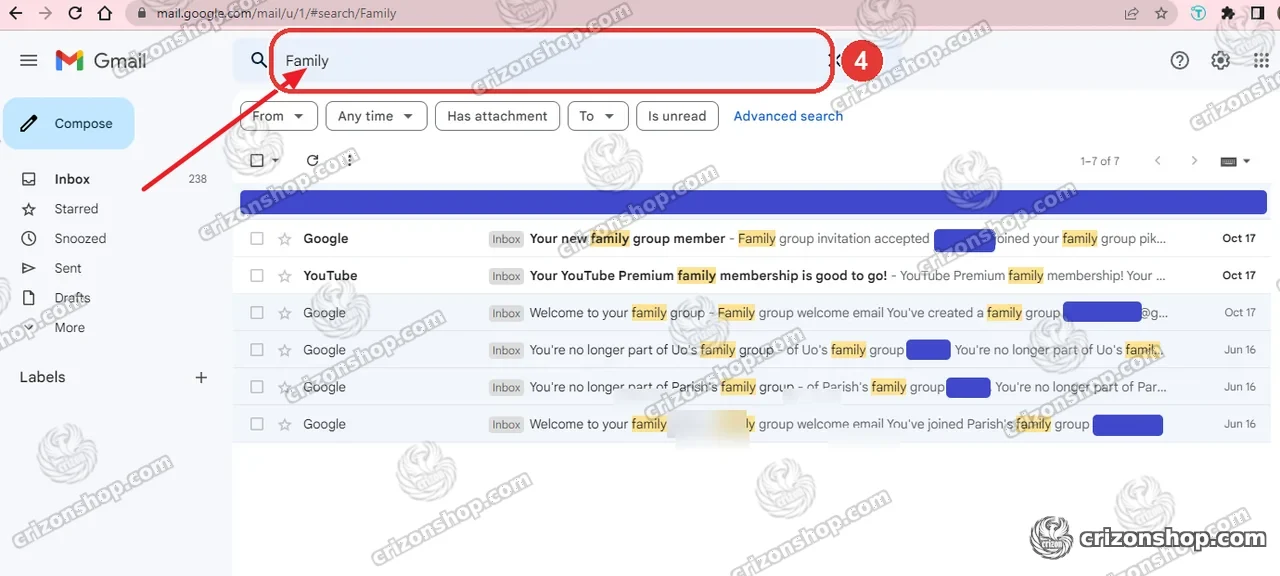
Type “Family” in the search box and press Enter.
If your Google account is set to English, use this search.
in:anywhere "family group"If that doesn't return anything, try this broader search.
in:anywhere familyReading the search results
- Only look at emails sent by Google. Skip promotional emails and messages from other people that happen to mention "family".
- Each email usually says whether you joined or left a group, and whose group it was. Note down the family manager's name and the date of the email.
- Put these dates in order. The most recent time you left one group and joined another is the date that matters.
Work out the earliest date you can join another group
The 12-month clock starts on the day you join the new group, not the day you leave the old one. Take the date you most recently joined a group (after leaving a previous one) and add 12 months.
| Date | What you did | What it means |
|---|---|---|
| Feb 3, 2026 | Left group A | Doesn't count as a switch yet |
| Feb 8, 2026 | Joined group B | The 12-month clock starts |
| Feb 8, 2026 to Feb 8, 2027 | Want to join group C | Not allowed yet, but you can still leave and rejoin group B as usual |
| After Feb 8, 2027 | Want to join group C | 12 months have passed, so you can switch |
In this example, the account has to wait until after Feb 8, 2027 to join any family group other than group B.
Frequently asked questions
Gmail can't recover permanently deleted emails, and the Family page only shows your current group. In that case, you can only go by when you remember last joining a group. If you're not sure, the safe option is to wait a full 12 months from the latest date you could have joined, then leave your current group.
No. Google doesn't limit how many times you leave and rejoin the same group. The 12-month rule only applies when you switch to a different group.
Google says the limit applies if you have a paid Google subscription such as YouTube Premium or Play Pass. Since people usually join a family group to share a paid subscription, it's still worth checking the 12-month mark first to be safe.
No. Family groups only accept personal Google Accounts. If your email was provided by your work or school, you'll need to use a separate personal Google Account to join.
Related guides
How to Join a Google Family Group by InvitationHow to Create a Google Family Group and Get an Invite LinkHow to Create a New Gmail Account for Personal UseStill need help?
Send your order code and we can sort it out faster.
