IObit · Activate
How to Activate Smart Defrag Pro with a License Code
Install the latest Smart Defrag from IObit's website and open the app. Click Enter Code in the bottom-right corner, paste your code into the License Code box, and click Register Now to upgrade to Pro.
This guide shows you how to install IObit's Smart Defrag and enter a license code to upgrade from the free version to Pro. You can also follow it when you renew with a new code or when your code shows an error.
What you need
Download and install Smart Defrag
If Smart Defrag isn't on your computer yet, download the latest version directly from IObit's website. It may be newer than the version number in older guides, but you enter the code the same way.
Wait for your browser to finish downloading smart-defrag-setup.exe.
Double-click the file to start the installation.
Follow the installer's steps until setup is complete.
Enter your code to upgrade to Pro
Open Smart Defrag.
On the main screen, click Enter Code in the bottom-right corner to open the registration window.
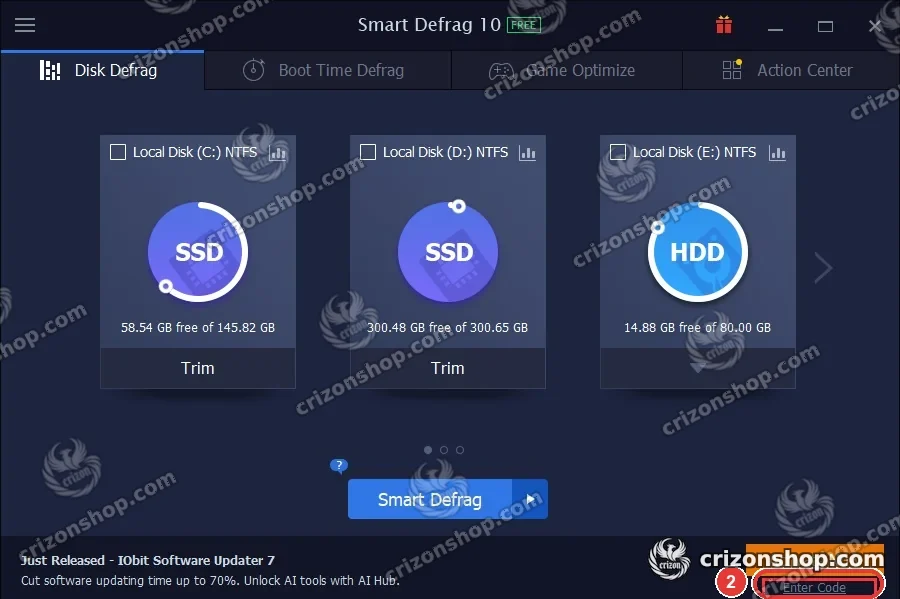
Click Enter Code to open the registration window. Paste your license code into the License Code box.
Click Register Now to activate.
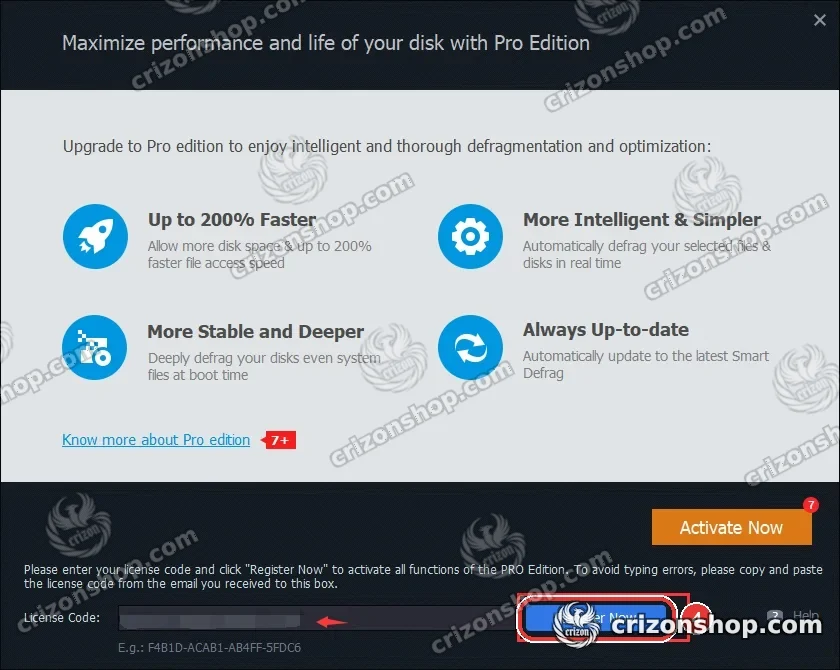
Click Register Now to activate.
Check that your code was accepted
Once registration succeeds, a Manage License link appears in the bottom-right corner. Click it, or click PRO at the top center of the window, to open the license manager and see details about the code you're using.
The Pro version can update the program automatically. To use this feature, go to Settings and turn on Automatically update the program.
Renew with a new code
When you have a new code or a renewal code, you don't need to uninstall and reinstall the software. Just follow these steps.
Open Smart Defrag Pro.
Click Manage License in the bottom-right corner, or PRO at the top center, to open the license manager.
Click the Refresh link to open a new registration window.
Paste the new code into the code box and click Register Now.
If your code shows an error
| Problem | Common cause | Fix |
|---|---|---|
| The code is reported as wrong or invalid | A mistyped character, or the code belongs to another IObit product | Copy and paste the code again, and make sure it's actually a Smart Defrag Pro code |
Shows The license ... has been activated for maximum PCs and cannot be used | The code has already been activated on the maximum number of PCs allowed | Reset the code through IObit's Reinstall Product option or contact IObit support |
| You reinstalled Windows, replaced your hard drive, or moved to another PC | The code is still tied to the old PC | Use Reinstall Product or Transfer to Another PC to reset the code while it's still valid |
You'll find Reinstall Product and Transfer to Another PC in IObit's Smart Defrag support center. IObit says moving a code to another PC is free as long as the code hasn't expired. For more code-related errors, see IObit's license FAQ page.
Frequently asked questions
No. Install Smart Defrag from IObit's website, then enter your code in the app with the Enter Code button. The software upgrades to Pro on the copy you already installed.
No. You can use the code again if it's still valid. If the software says the code has been used on the maximum number of PCs when you re-enter it, go to Reinstall Product in IObit's support center to reset the code, then enter it again as usual.
It depends on the code's plan. IObit offers single-PC and multi-PC plans, so check the details that came with your code. Once the code has been activated on the maximum number of PCs, the software shows a maximum PCs error on the next one.
Open Manage License, click Refresh, paste the new code, and click Register Now. You don't need to uninstall or reinstall the software.
Related guides
How to Activate IObit Driver Booster PRO with a License CodeHow to Activate IObit Malware Fighter Pro with a License CodeHow to Activate IObit Software Updater Pro with a License CodeStill need help?
Send your order code and we can sort it out faster.
