IObit · Activate
How to Activate IObit Software Updater Pro with a License Code
Install IObit Software Updater from the IObit website and open the app. Click Enter Code in the bottom-right corner, paste your code into the License Code box, then click Activate to upgrade to Pro.
This guide shows you how to install IObit Software Updater on a Windows PC and enter a license code to upgrade from the Free version to Pro. The end of the guide covers how to check your license and fix common errors when you enter a code.
Before you activate
Step 1. Download and install IObit Software Updater
Go to the IObit Software Updater page on the IObit website and download the installer.
Double-click the
iobit-software-updater-setup.exefile you downloaded to start the installation.Follow the setup screens until the installation is complete.
Open IObit Software Updater. At this point, the app is still the Free version.
Step 2. Enter your license code to upgrade to Pro
On the IObit Software Updater main screen, look at the bottom-right corner.
Click Enter Code, just below the Activate Now button, to open the registration window.
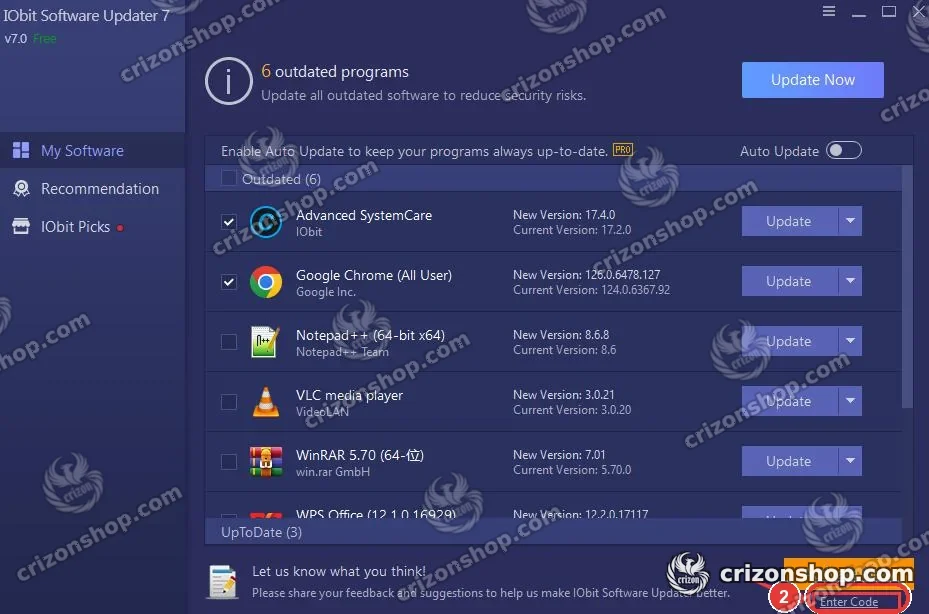
Click “Enter Code” under Activate Now to open the registration window. Paste your license code into the License Code box.
Click Activate.
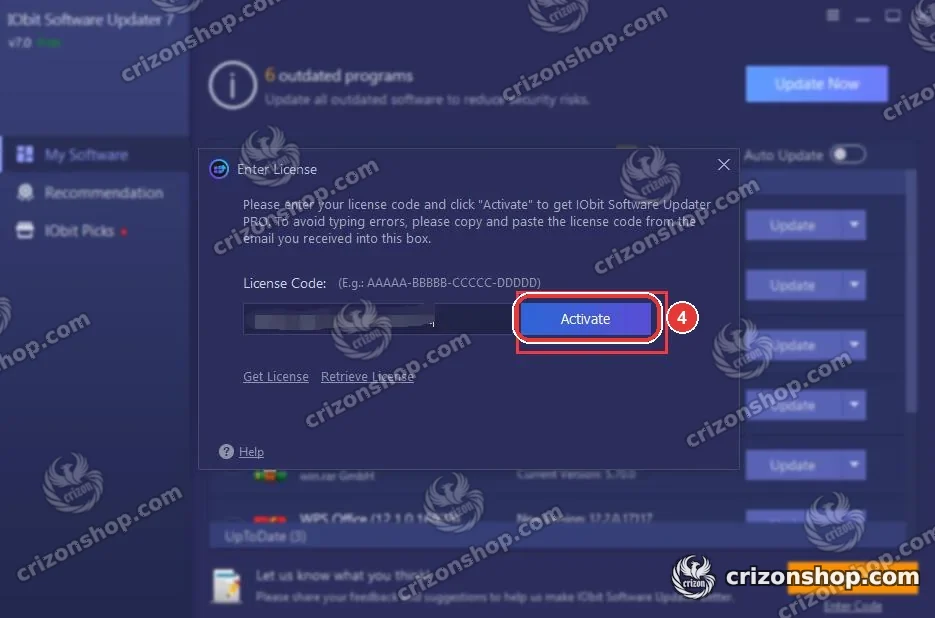
Click “Activate” to activate your code. Wait for the app to confirm that the code is valid, then close the registration window.
Check and manage your license
After you upgrade to Pro, a Manage License link appears on the main screen. Click it to view your license status, refresh the code, or export the code so you have a copy in case you reinstall your system.
Renew with a new code
Open IObit Software Updater while it's on the Pro version.
Click Manage License.
Click Refresh.
Paste the new code into the code box.
Click Activate to update your subscription period.
Fix activation errors
The two messages below are the most common errors people see when entering a code. The fixes are based on IObit's FAQ page.
| On-screen message | Common cause | How to fix it |
|---|---|---|
Invalid license code! Please enter a valid license code | The code was mistyped or belongs to a different IObit product | Copy and paste the code again, and make sure it's for IObit Software Updater |
The license xxx has been activated for maximum PCs and cannot be used | The code is already registered on the maximum number of PCs, or it's a free giveaway code that can't be registered again | If it's a paid code that hasn't expired, reset it on IObit's license reset page. Otherwise, you'll need a new code |
Frequently asked questions
It depends on the plan your code is for. On IObit's store page, IObit Software Updater Pro comes in a 1-PC plan and a 3-PC plan, both billed yearly. Check the information that came with your code to see how many PCs you can activate.
According to IObit, paid codes that are still within their subscription period can be upgraded to the new version for free. Just install the latest version from the IObit website and enter your code as usual. Giveaway codes don't work with newer versions.
Yes, as long as the code hasn't expired. IObit lets you move a code to another PC for free by resetting it on their license transfer page. Then install the app on the new PC and enter the code again as shown in Step 2.
The Free version only lets you run bulk updates twice a day. Pro removes this limit. It also adds automatic updates when new versions come out, scheduled updates and automatic patching of security vulnerabilities. You can also exclude apps you don't want to update.
Related guides
How to Activate IObit Driver Booster PRO with a License CodeHow to Activate IObit Malware Fighter Pro with a License CodeHow to Activate IObit Uninstaller PRO with a License CodeStill need help?
Send your order code and we can sort it out faster.
