IObit · Activate
How to Enter a License Code to Activate Advanced SystemCare Pro
Install Advanced SystemCare from the IObit website and open it. Click Enter code in the bottom-left corner, paste your code into the License Code box, then click Register Now to upgrade to Pro.
This guide shows you how to enter a license code to upgrade IObit's Advanced SystemCare from Free to Pro. It also explains how to enter a new code when you renew and how to fix a few common activation errors.
What you need
Download and install Advanced SystemCare
You don't need a separate Pro installer. IObit's instructions say to install the regular Advanced SystemCare and then enter your code in the app to upgrade to Pro.
Go to the Advanced SystemCare page on the IObit website.
Click Free Download to download the installer.
Run the file you downloaded and follow the setup wizard until it finishes.
Enter your license code to upgrade to Pro
Open Advanced SystemCare.
In the bottom-left corner of the main screen, click Enter code.
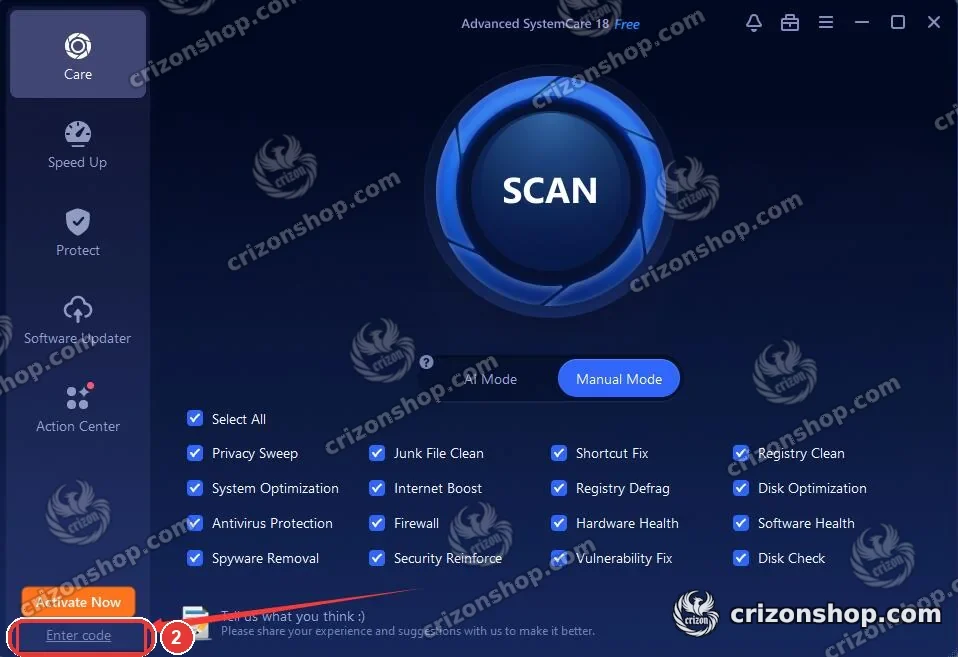
Click “Enter code” in the bottom-left corner. When the registration window opens, paste your code into the License Code box.
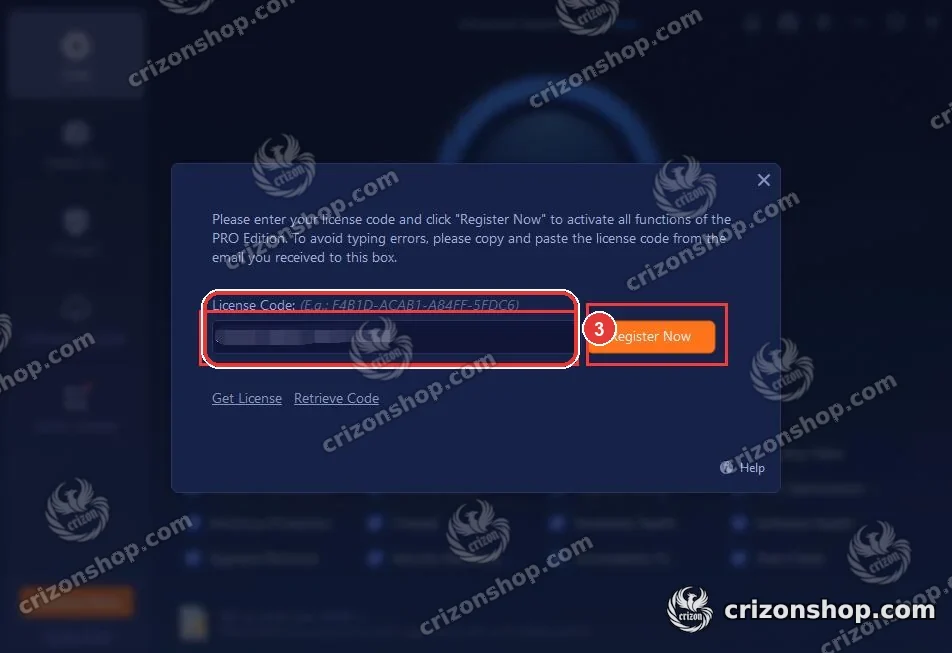
Paste your code into the “License Code” box. Click Register Now to finish.
After activation, click the Options icon in the top-right corner and select My Subscription to check the status of your Pro plan on this PC.
Enter a new code when you renew
If your PC already runs the Pro version and you have a renewal code, IObit says to enter it from the subscription menu.
Open Advanced SystemCare Pro.
Click the Options icon in the top-right corner.
Select My Subscription from the menu.
Click Refresh to open the registration window.
Paste your new code into the License Code box.
Click Register Now.
If your code won't activate
| Problem | Common cause | How to fix it |
|---|---|---|
| Invalid license code error | A typo, or a code for a different IObit program | Copy and paste the code again, and make sure it's for Advanced SystemCare Pro |
| Code already registered on the maximum number of PCs | The code is already active on as many PCs as it allows | Reset the code on IObit's Reinstall page |
| Moving to a new PC | The code is still linked to your old PC | Uninstall the software from the old PC if it still works, then reset the code on the Transfer page |
| Can't find your code | You lost the email with the code | Use IObit's resend code page |
On the Reinstall or Transfer page, select Advanced SystemCare™ PRO from the product list. Enter your license code, your email, and the verification code. Then click Next and follow the instructions on the page.
FAQ
IObit says an active Advanced SystemCare 19 Pro code can register version 20 Pro. Free codes from promotions and giveaways can't be used to upgrade to a new version. If your code is for an older version, install the latest version from the IObit website and try entering the code. If you get an error, contact the seller you bought the code from.
No. IObit lets you move your code to another PC for free as long as the code hasn't expired. Uninstall the software from the old PC if you can. Then use the Transfer page as described above.
Click Options in the top-right corner, select My Subscription, and then click Refresh. In the registration window that opens, paste your new code and click Register Now.
Related guides
How to Activate IObit Driver Booster PRO with a License CodeHow to Activate IObit Malware Fighter Pro with a License CodeHow to Activate IObit Software Updater Pro with a License CodeStill need help?
Send your order code and we can sort it out faster.
