IObit · Activate
How to Activate IObit Malware Fighter Pro with a License Code
Open IObit Malware Fighter and click Enter Code under the Activate Now button in the bottom-right corner of the main screen. Paste your license code, then click Register Now to upgrade to Pro.
This guide shows you how to install IObit Malware Fighter on a Windows PC and enter a license code to unlock the Pro version. It's based on version 14, which is the version IObit currently offers on its website.
Before you activate
Download and install the software
Go to the IObit Malware Fighter page on the IObit website.
Click Free Download to download the installer.
Double-click the
.exefile you just downloaded.Follow the installer's steps until setup is complete.
Enter your code to upgrade to Pro
Open IObit Malware Fighter.
In the bottom-right corner of the main screen, click Enter Code, just below the Activate Now button.
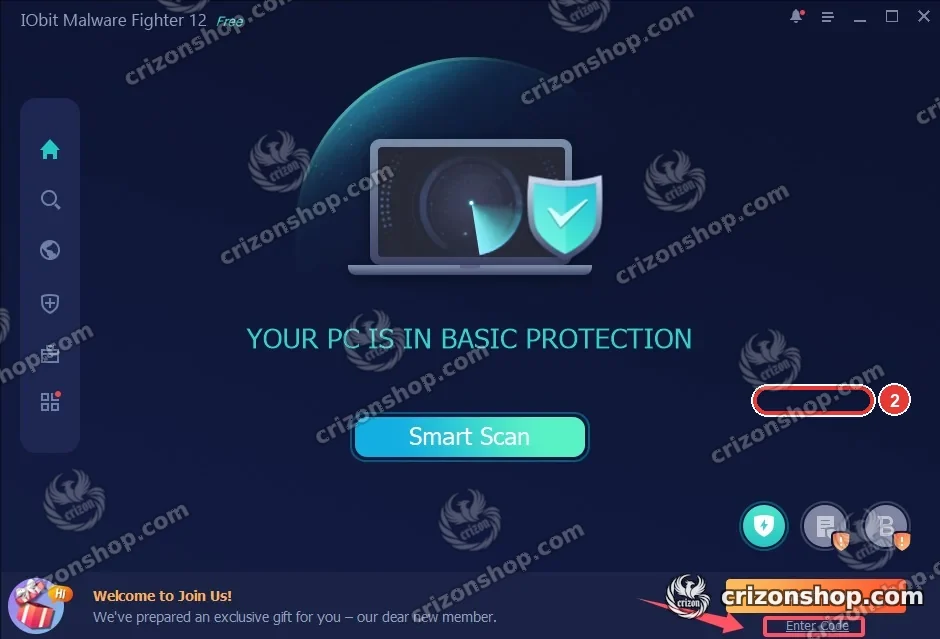
Click Enter Code (under Activate Now) in the bottom-right corner. In the registration window that opens, paste your code into the License Code box.
Click Register Now. If the code is valid, the software switches to the Pro version.
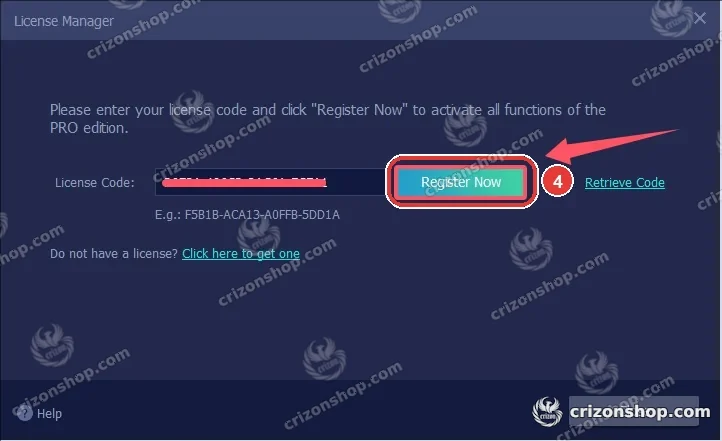
Click Register Now to activate the Pro version.
Check and manage your license
Once you're on Pro, a Manage License link appears in the bottom-right corner of the main screen. Click it to open the license manager. There you can view details of the code you're using, refresh your license, or export the code to keep a copy.
Replace your code when you renew
Open IObit Malware Fighter Pro.
Click Manage License in the bottom-right corner.
In the License Manager window, click the Refresh link.
Paste your new or renewal code into the code box.
Click Register Now to update your license.
Frequently asked questions
No. According to IObit's instructions, just open the Free version, click Enter Code and enter your code, and the software upgrades to Pro. If your installed version is outdated, download the latest version from the IObit website before you enter the code.
Copy the code again from where you originally saved it and paste it again. Make sure there are no extra spaces, and that it's a code for IObit Malware Fighter Pro, not for another IObit product. If you still get an error, the code may have expired or already be used on the maximum number of PCs. In that case, contact the seller you bought the code from so they can check it.
If the software is still on Pro, open Manage License to view the code and export it to keep a copy. If you bought directly from IObit, the IObit Malware Fighter user manual links to a page where buyers can retrieve their code.
Related guides
How to Activate IObit Driver Booster PRO with a License CodeHow to Activate IObit Software Updater Pro with a License CodeHow to Activate IObit Uninstaller PRO with a License CodeStill need help?
Send your order code and we can sort it out faster.
