 Scribd · Sign in
How to Sign In to Scribd on Desktop and Mobile
To sign in to Scribd, click Sign in in the top-right corner of the website or tap Account in the app. Then choose the same method you used to create your account.
This guide shows you how to sign in to Scribd in a desktop browser and in the mobile app. It also covers what to do when Scribd asks for a verification code or you forget your password.
Check how you created your account
Scribd lets you sign in with an email and password, a Google account, a Facebook account, or Apple on iPhone and iPad. Choose the same method you used to create your account. Otherwise you won't get into your existing account with your subscription and saved documents.
How to sign in
Open scribd.com in your browser.
Click Sign in in the top-right corner.
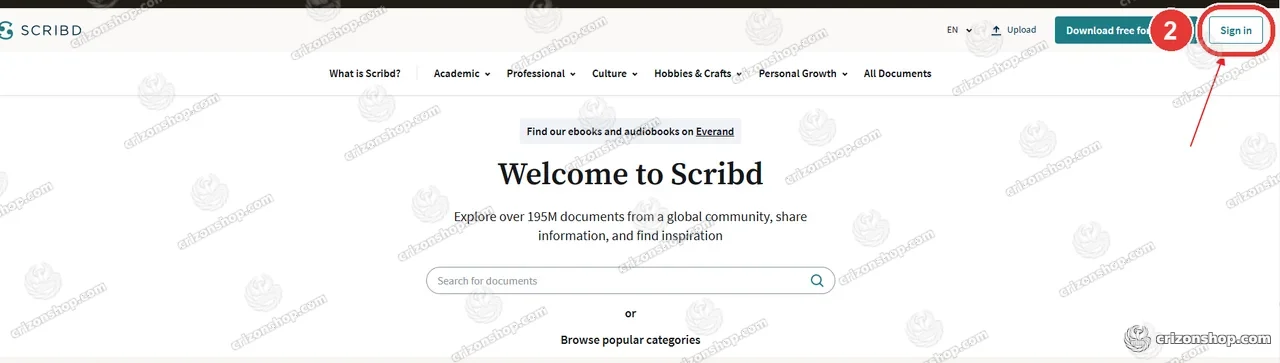
Click Sign in. In the window that opens, choose Continue with Scribd, Continue with Google, Continue with Facebook or Sign in with email. Pick the one that matches how you signed up.
If you're signing in with email, enter your email (or username) and password, then click Continue.
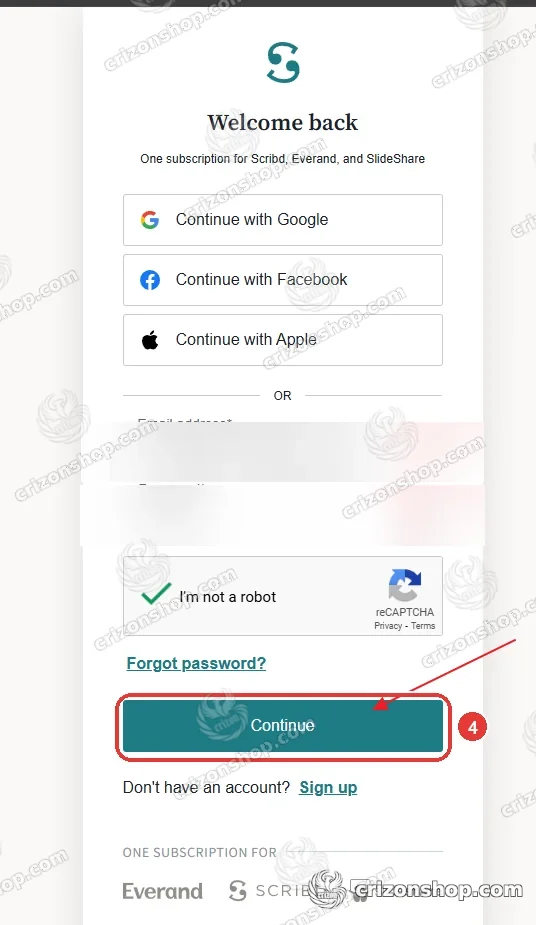
Click Continue to proceed. If you chose Google or Facebook, confirm the Google or Facebook account that's linked to Scribd.
Open the Scribd app on your phone or tablet.
Tap Account in the bottom-right corner of the screen.
Tap Sign in next to Already have an account? at the top.
Choose Sign in with Apple, Sign in with Facebook, Sign in with Google or Sign in with email.
Enter your email and password, or confirm the matching Apple, Google or Facebook account.
When Scribd asks for a sign-in code
Sometimes Scribd asks for a verification code before it lets you into your account. The code goes to the email address linked to your Scribd account, so you'll need access to that inbox.
Keep the code entry screen open on Scribd. Don't close it.
Open the inbox for the email you use with Scribd.
Find the latest email from Scribd and copy the code.
Go back to Scribd, enter the code and click the confirm button on screen.
Reset a forgotten password
You can reset your password yourself on the website or in the app. Scribd sends a reset link to the email address you signed up with.
On scribd.com, click Sign in in the top-right corner.
Choose any button that starts with Continue with....
Click Forgot Password?.
Enter the email or username you signed up with.
Click Send email.
Open the email from Scribd and click the link to create a new password.
Open the Scribd app and tap Account in the bottom-right corner.
Tap Sign in, then choose Sign in with email.
Tap Forgot Password?.
Enter the email you signed up with.
Tap Reset Password.
Open the email from Scribd and tap the link to set a new password.
Frequently asked questions
You most likely signed in with a different method than the one you used to sign up. For example, you clicked Facebook, but your original account was created with email. In that case, Scribd created a new account. Sign out, then sign in again with the method you used originally.
If you turned on Apple's Hide My Email feature when you signed up, your Scribd account may be linked to an email address Apple created instead of your real one. Find that address in your Apple account settings on your iPhone. Then reset your Scribd password for that email, following the Reset a forgotten password section above. After that, you can sign in with that email and your new password on any device.
Contact Scribd support. Give them your full name, your username, any email addresses you might have used and a link to your profile page. They'll use these details to find the email on your account.
The fastest way is the virtual assistant that appears on every page of the Scribd Help Center. It's available 24/7. If you need a person, email [email protected] with your account email and a clear description of the problem. Scribd doesn't currently offer phone support.
Related guides
 How to Sign In to DataCamp and What to Do When You Can't Get In
 How to Log In to Your JetBrains Account on the Web and in the IDE
 How to Log In to Bookmate with Email or Google
Still need help?
Send your order code and we can sort it out faster.
