 XSplit · Activate
How to Redeem an XSplit Premium License Key on Your Account
Open XSplit Broadcaster, go to Help › Redeem License key..., paste your code and click Redeem. If the app isn't installed, redeem the code at xsplit.com/redeem after verifying your email.
This guide shows you how to add an XSplit license key to your account to unlock Premium. The quickest way is to redeem it right inside the XSplit Broadcaster app. If you haven't installed the app, you can still redeem the code on the XSplit website.
Before you start
Redeem the code in XSplit Broadcaster
This is the method XSplit recommends. The app already knows which account you're signed in to, so you don't need to verify your email again.
Open XSplit Broadcaster on your computer and sign in to the account that should receive the plan.
In the menu bar, choose Help › Redeem License key....
Paste your license key into the code field.
Click Redeem.
Wait for the confirmation message. The plan has now been added to your account.
Redeem the code on the XSplit website
Use this method if Broadcaster isn't installed on your computer or you want to redeem the code from your phone. The redeem page works in Chrome, Firefox, Safari, or Edge.
Go to xsplit.com/redeem.
Select Broadcaster. If your code is for VCam, follow the section below instead.
Enter the email linked to your XSplit account and click Send Code.
Open your inbox, copy the verification code XSplit just sent, enter it on the page, and click Confirm Code.
Paste your license key into the code field and click Redeem.
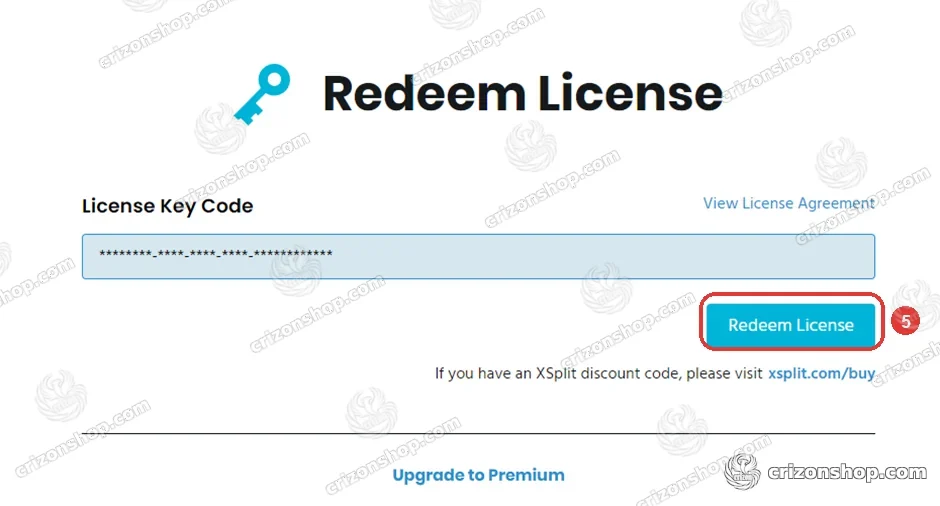
Paste your license key into the code field, then click Redeem License. Once you see the confirmation message, you're done.
Redeem a code for XSplit VCam
VCam codes are redeemed through the VCam dashboard, not through Broadcaster. You need to sign in to your account before entering the code.
Open the code redemption page on the VCam Dashboard, or go to xsplit.com/redeem and select VCam.
Sign in to your VCam account if the page asks you to.
Paste your license key into the code field and confirm to activate it.
Frequently asked questions
Check your Spam and Promotions folders, then wait a few minutes, since the email can sometimes arrive late. If it still doesn't show up, check the email address for typos and click Send Code again.
Sign out of XSplit Broadcaster, then sign back in with the same email you used to redeem the code so the app reloads your plan details. If it still isn't applied, contact XSplit support through the chat on the XSplit support site or email [email protected].
Usually the code was copied with missing characters or extra spaces, or you're redeeming a VCam code under Broadcaster (or the other way around). Paste the code again and make sure you've selected the right product. If the error persists, take a screenshot of the message and send it to XSplit support along with your code so they can check it.
Related guides
 How to Activate a GRFX Studio Key for Corel PaintShop Pro
 How to Activate Adobe Acrobat Classic with a Serial Number
 How to Accept Your Canva Pro Invitation and Check Your Upgrade
Still need help?
Send your order code and we can sort it out faster.
