 Adobe · Activate
How to Activate Adobe Acrobat Classic with a Serial Number
Acrobat Classic activates with a 24-digit serial number. Download the installer from Adobe's site, run Setup.exe, enter your serial when the app asks, then sign in to your Adobe account.
This guide shows you how to install Adobe Acrobat Classic (the one-time purchase version that activates with a serial number) from Adobe's official source, then enter your serial to activate it. At the end, you'll find fixes for when your serial number shows an error.
Check before you install
Acrobat has two license types, and each one uses its own installer. Acrobat Classic activates with a serial number. The monthly or annual subscription (formerly called Acrobat DC) only needs you to sign in to the Adobe account that bought the plan. There's no serial number step. Check your invoice to see which type you have before you download the installer.
Download the official installer from Adobe
Open the Download Acrobat Pro 2024 page on Adobe's support site.
Choose the installer for your operating system, then click Download.
Copy the downloaded .zip file to any folder on your computer.
Extract the .zip file into that folder.
Open the extracted folder and double-click Setup.exe.
Follow the on-screen steps until the installation finishes.
On a Mac, open the installer file you downloaded and follow the steps in the installer.
Enter your serial number and activate
With Acrobat Classic, Acrobat asks for your serial number during installation or the first time you open the app.
Open Acrobat once the installation is complete.
On the activation screen, choose the option to enter a serial number (in some versions, it's called I have a serial number).
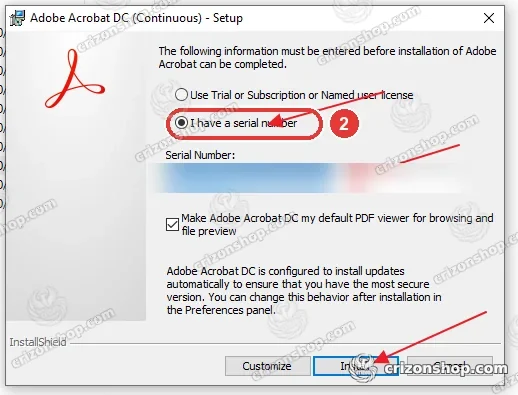
Select 'I have a serial number' to enter your serial number. Enter all 24 digits of your serial number, then double-check each group.
Click the continue button on the screen.
When Acrobat prompts you, click Sign In Now and sign in to your Adobe account, or create a new account if you don't have one.
Wait for the app to confirm that activation was successful, then close Acrobat and open it again.
If your serial number won't activate
| Symptom | Common cause | Fix |
|---|---|---|
| Acrobat only asks you to sign in, with no place to enter a serial | The subscription installer is installed on your computer | Uninstall the current version, then download the Classic installer that matches your serial's version |
| The serial number is reported as invalid | A typo, or the serial belongs to a different version or edition | Re-enter each group of digits and compare against the version on your invoice |
| The activation limit has been reached | The license is in use on two other computers | Deactivate it on one of the old computers via Help › Deactivate, then try again |
| Acrobat keeps asking for the serial | Your computer can't reach Adobe's activation servers | Check your internet connection, temporarily turn off any VPN or proxy, and make sure your firewall isn't blocking Acrobat |
If you've tried everything above and still get an error, see Adobe's article Prompted for serial number or Adobe ID or contact Adobe Support at helpx.adobe.com.
Frequently asked questions
No. Subscription versions activate when you sign in to the Adobe account that bought the plan. If Acrobat still asks for a serial, you most likely installed the Classic installer by mistake. Uninstall it and reinstall using the subscription installer.
You can install and activate Acrobat on up to two computers. To move it to a third computer, deactivate it on one of the two old computers first.
Adobe ended support for Acrobat 2020 on November 30, 2025. That means no more technical support and no more security patches. If you keep using it, avoid opening PDF files from unknown sources, because newly discovered vulnerabilities won't be patched.
No. You have no way of knowing whether the file has been modified or bundled with malware. The installer from Adobe's support site is much safer and gives you exactly the version you need.
Related guides
How to Redeem an Adobe Partner Code on Your Adobe AccountHow to Redeem an Adobe Redemption Code to Activate Your PlanHow to Fully Remove Adobe Apps with the Creative Cloud Cleaner ToolStill need help?
Send your order code and we can sort it out faster.
