 Adobe · Activate
How to Redeem an Adobe Redemption Code to Activate Your Plan
To redeem an Adobe code, go to redeem.adobe.com, sign in to your Adobe account, paste the 24-character code, and click Redeem code. The plan is added to the account you're signed in to when you redeem the code.
This guide shows you how to redeem a redemption code on your own Adobe account to unlock the plan that comes with it, such as Creative Cloud or Photoshop. You do everything in a web browser, and it only takes a few minutes.
Before you start
How to redeem the code
Go to redeem.adobe.com in your browser.
Sign in with your Adobe account. If you don't have one, choose Create an account and follow the on-screen instructions.
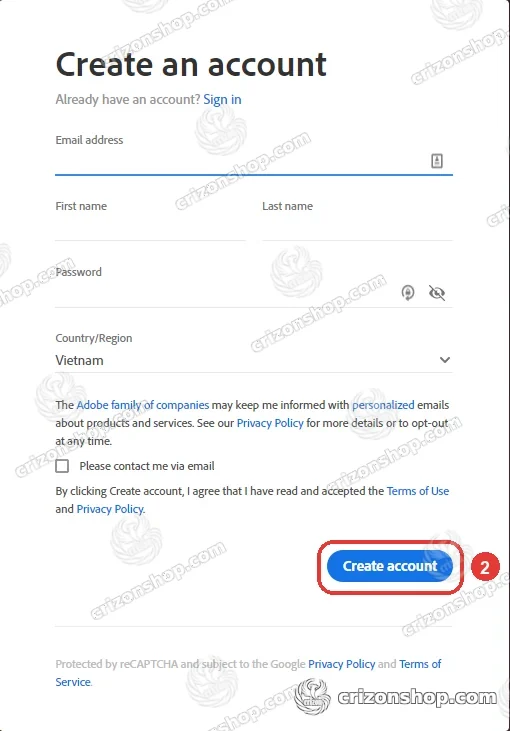
Click “Create account” (Create an account) to create your account. Paste the 24-character code into the code field.
Click Redeem code (some pages show a Redeem button instead).
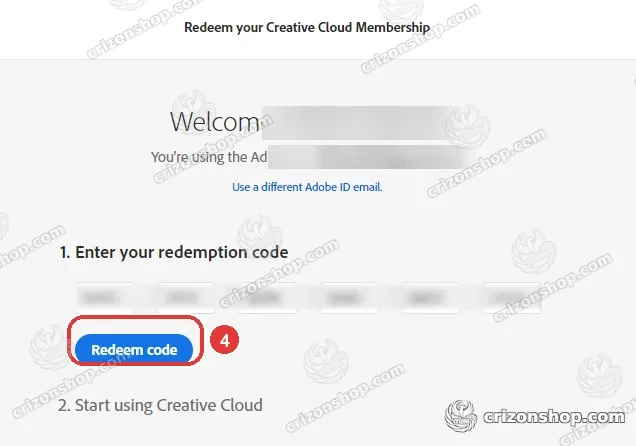
Click “Redeem code”. Finish any remaining confirmation steps on screen until the page confirms that your plan is active.
Check your plan and start using it
Go to account.adobe.com and sign in to the account you used to redeem the code.
Open the plan management section (Plans) to see your new plan and its end date.
Download the Creative Cloud app or the apps included in your plan.
Open the app and sign in with the Adobe account you used to redeem the code.
If your account already has an active Adobe plan
You can still redeem a code if your account already has a paid plan. According to Adobe's guide, how Adobe handles your plan dates depends on whether you redeem the code on the same account or on a different one.
| Situation | What happens after you redeem the code |
|---|---|
| Same account, same plan, annual plan billed monthly (Annual, paid monthly) | Adobe stops charging your card for as long as the code lasts. When the code's term ends, Adobe starts charging you again as before |
| Same account, same plan, prepaid annual plan (Annual prepaid) | The code's term is added to the end of the period you've already paid for |
| A different Adobe account | The plan from the code runs alongside the paid plan on the other account |
If the code shows an error
- Check each character again. The code must be exactly 24 characters, with no spaces at the start or end.
- Go to account.adobe.com and see if the plan is already there. The code may have already been redeemed on this account.
- Sign out and sign back in on redeem.adobe.com to make sure you're using the right account.
- If it still doesn't work, see Adobe's redemption code help page or contact the seller who sold you the code.
Frequently asked questions
If your account doesn't have a paid plan, redeeming the code has nothing to do with your card. If you already have the same plan on Annual, paid monthly billing on the same account, Adobe pauses charges for as long as the code lasts and starts charging again when it expires.
The plan from the code is tied to the account you used to redeem it, so you need to sign in to that account in the app to use the plan. If you want to move the plan to another account, contact Adobe Support so they can look into it.
This usually happens when the app is signed in to a different Adobe account. Sign out of the Creative Cloud app, sign back in with the account you used to redeem the code, then reopen the app.
Yes. redeem.adobe.com is a website, so you can sign in and redeem the code from your phone's browser just as you would on a computer. You can then use the plan on a computer or phone, depending on the apps included in it.
Related guides
How to Activate Adobe Acrobat Classic with a Serial NumberHow to Redeem an Adobe Partner Code on Your Adobe AccountHow to Fully Remove Adobe Apps with the Creative Cloud Cleaner ToolStill need help?
Send your order code and we can sort it out faster.
