 Turnitin · Sign in
How to Log In to Turnitin and Open Your Class on the Web
Go to home.turnitin.com, log in with your Turnitin email and password, enter the verification code if asked, then click your class name to see your assignments.
This guide shows you how to log in to Turnitin in your browser with your own student account, then open your class to view and submit assignments. At the end, you'll find fixes for a few common login problems.
Before you log in
Log in to Turnitin on the web
Turnitin has moved to a new login page at home.turnitin.com. If you open the old login page, you'll be redirected to the new one automatically, so you don't need to worry about ending up in the wrong place.
Open home.turnitin.com in a browser on your computer.

Click “Log In” to sign in. Enter the email address you used to sign up for your Turnitin account.
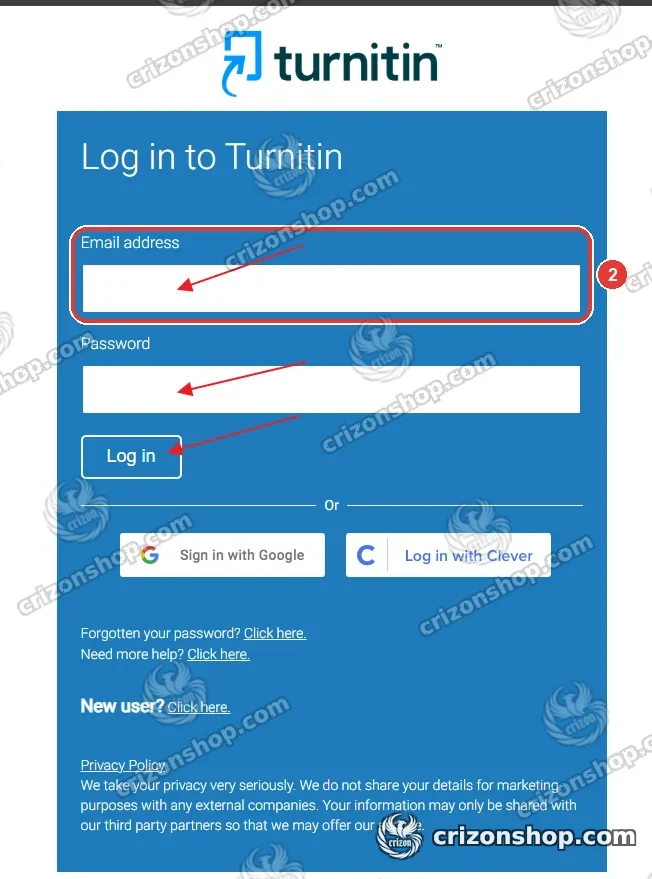
Enter your registered email in the “Email address” field. Enter your password and confirm to log in.
If Turnitin asks for a verification code, open the inbox for your registered email and find the one-time code that was just sent.
Enter that code in the verification code field to finish.
Once you're logged in, you'll see the student homepage with a list of the classes you're enrolled in.
Open your class to view assignments
On the student homepage, find the class you need in the list.
Click the class name to open the class page.
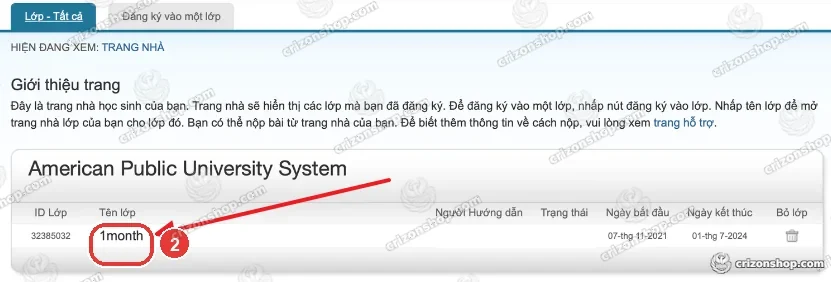
Click the class name “1month” to open the class page. Choose the assignment you want to submit or review from the list your instructor has created.
Whether you can view the Similarity Report or resubmit your work depends on the settings your instructor chose for each assignment. If you don't see the option you need, ask your class instructor directly.
No account or no classes showing
Turnitin student accounts are tied to classes created by an instructor or school. If you don't have an account yet, you need an email invitation from your instructor. Or ask your instructor for the Class ID and enrollment key so you can enroll yourself.
If you can log in but your class list is empty, you usually haven't been added to any class yet. Contact your instructor to get a new invitation or the correct enrollment details.
Can't log in? What to check
| Problem | What to do |
|---|---|
| No verification code arrived | Wait a few minutes, then check your Spam or Junk folder. If the code is more than 15 minutes old, request a new one. |
| Forgot your password or got a wrong password error | Use the password reset option on the login page, then follow the email Turnitin sends you. |
| Your details are correct but you still can't get in | Turn on cookies for turnitin.com or turnitinuk.com in your browser, then log in again. |
| Your school uses Canvas, Moodle, or Blackboard | Log in through your school's system, not at turnitin.com. |
If you want to read more, Turnitin has its own FAQ page about the new sign-in experience: New sign-in experience FAQ.
Frequently asked questions
No. According to Turnitin, your classes, assignments, submissions, grades, and account details all stay the same. The change only affects how you log in.
No. When Turnitin is integrated with your school's learning system, you log in to that system and open the Turnitin assignment right inside your course. Turnitin's new login page doesn't change how you access it through your school's system.
The code is sent to the exact email you registered with Turnitin. Check your Spam or Junk folder, make sure you're looking in the right inbox, and request a new code if the old one is more than 15 minutes old.
The student homepage only shows classes you're enrolled in. If the list is empty, ask your instructor to send you an invitation or give you the Class ID and enrollment key so you can join the class.
Related guides
 How to Sign In to DataCamp and What to Do When You Can't Get In
 How to Log In to Your JetBrains Account on the Web and in the IDE
 How to Log In to Bookmate with Email or Google
Still need help?
Send your order code and we can sort it out faster.
