 Quizlet · Sign in
How to Log In to Quizlet on the Web and the Mobile App
Open quizlet.com or the Quizlet app, tap Log in, then pick the same method you used to create your account: Google, Apple or email. Forgot your password? Reset it by email.
This guide shows you how to log in to your own Quizlet account in a desktop browser or the mobile app. At the end, you'll find out how to get back into your account if you forgot your password or username, or no longer use your old email.
Before you log in
Quizlet lets you create an account with Google, an Apple ID, or an email and password. To get back into your existing account with all your study sets, you need to log in the same way you signed up.
How to log in
Open quizlet.com in your browser.
Click Log in in the top-right corner.
If you signed up with Google, click Log in with Google and choose the right Google account.
If you signed up with Apple, click Log in with Apple and sign in with your Apple ID.
If you signed up with email, enter your email or username and your password in the two fields.
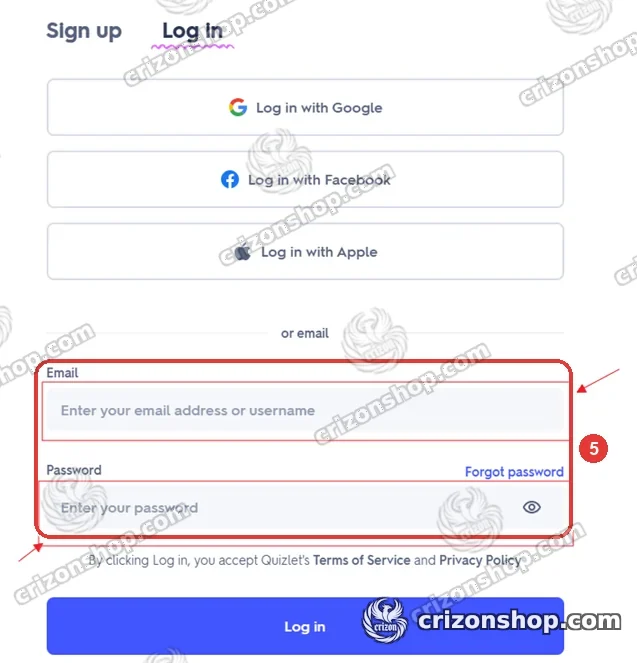
Enter your email or username and your password. Click the Log in button below to open your account.
Open the Quizlet app on your iPhone or Android phone.
On the welcome screen, tap Log in.
Choose Google, Apple or email, the same way you created your account.
For an email account, enter your email or username and your password, then tap Log in.
For an Apple ID, confirm with Face ID, Touch ID or your device passcode when asked.
If you can't log in
Forgot your password
On the login page, click Forgot password.
Enter the email linked to your Quizlet account.
Click Reset password.
Open the email Quizlet just sent and click the link inside to set a new password.
Go back to the login page and log in with your new password.
Log in quickly with an email link
If you don't want to change your password right now, you can have Quizlet send a login link to your inbox.
Open the Quizlet login page in your browser.
Select Use magic link instead.
Enter the email linked to your account and click Send login link.
Open the email from Quizlet and click the link to go straight to your account.
Forgot your username
In Quizlet's username recovery section, enter the email linked to your account and click Submit. Quizlet will send you an email listing every username linked to that email, so you'll know whether you have one account or several.
You can't access your old email anymore
In this case, you need Quizlet Support to change the email for you. Send a request through Quizlet's contact page and include your username, the date of birth on your account, your old email and the new email you want to use.
For more details, see Quizlet's own guides Trouble logging in and Forgotten username or password in the Quizlet Help Center.
Frequently asked questions
You've most likely logged in to a different account. For example, you originally signed up with email but this time clicked the Google login button. Log out, then log back in using the same method you used to create your account. If you're not sure, use the username recovery option to see which accounts are linked to your email.
Check your Spam or Promotions folder, and make sure the email you entered is the one linked to your Quizlet account. If your account was created with Google or Apple, you don't need to reset a Quizlet password. Just click the Google or Apple login button.
When you hide your email, Quizlet doesn't know your real email address, so typing an email into the login field won't work. In your browser, click Log in with Apple and sign in with the same Apple ID you used to sign up.
Related guides
 How to Sign In to DataCamp and What to Do When You Can't Get In
 How to Log In to Your JetBrains Account on the Web and in the IDE
 How to Log In to Bookmate with Email or Google
Still need help?
Send your order code and we can sort it out faster.
