 QuillBot · Sign in
How to Log In to QuillBot Premium with a Dedicated Account
Get the email and password from My orders on CrizonShop, open quillbot.com/login, paste them in exactly, and click Continue to use QuillBot Premium on one device.
This guide shows you how to log in to QuillBot with the dedicated Premium account from CrizonShop. It covers everything from getting the email and password in your order to reaching the QuillBot site. If you enter the details correctly, it only takes a few minutes.
Get your account details from your order
Your QuillBot account is delivered in your order details on CrizonShop, not by email. You need to log in to crizonshop.com first to see your order.
Log in to crizonshop.com with the account you used to make the purchase.
Go to Account and select My orders.
Open the order that contains QuillBot Premium to see its details.
Click the show/hide icon in the password field if you want to see the password again.
Use the copy button next to each field to copy the email and password.
Log in to QuillBot
Open quillbot.com/login. You can also go to quillbot.com and click the person icon in the top-right corner.
Paste the copied email into the email field.
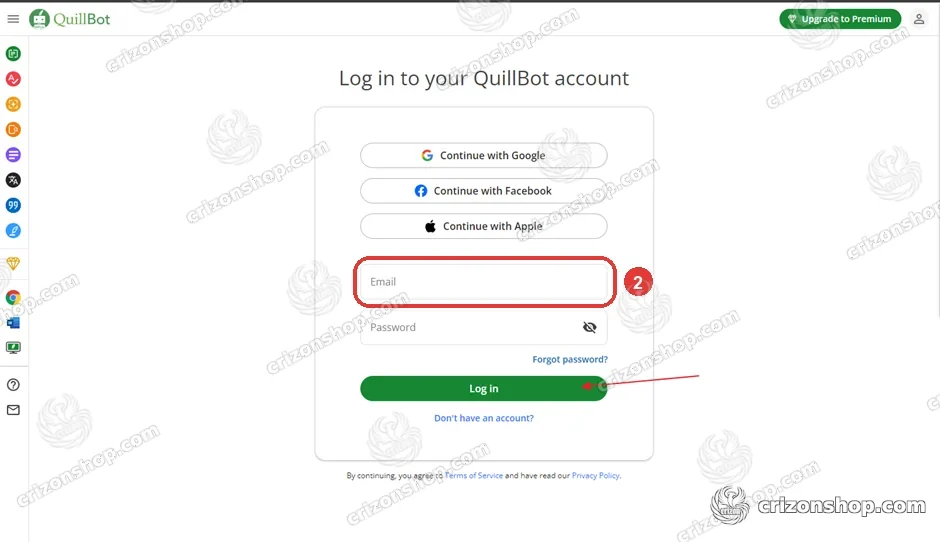
Paste the copied email into the Email field. Paste the password into the password field.
Click Continue to log in.
If the page only shows the email field at first, click Continue, then enter the password on the next screen.
If you use QuillBot inside Word on the same computer, follow these steps to log in.
Open Word and turn on the QuillBot sidebar.
Scroll to the bottom of the sidebar.
Click Log in next to For a better experience.
Log in with the exact email and password from your order details.
For more details, see QuillBot's official login guide: How do I sign up or log in to Quillbot?
Things to keep in mind
- This plan is for 1 device. Stick to one computer instead of logging in from several places.
- Premium is tied to the QuillBot account you were given, not to your device. When you switch devices, log out on the old one and log in again on the new one.
- Don't share or resell the account. Breaking this rule can get the account disabled.
- If you want to change the password or login email, ask via Chat with Support before you do it.
If you can't log in
Most login problems come from a single wrong character in the email or password. Work through the steps below in order.
Frequently asked questions
Check that the email you're logged in with matches the email in your order details. If it does, log out, reload the page, and log in again. If you still don't see Premium, click Report a problem on the product in your order so it can be checked.
Yes. Premium is on the account you were given, so log out on the old computer and log in on the new one with the details from your order. This plan is for 1 device, so only use it on one computer at a time.
No. Just use the account in your order details. Any QuillBot account you created yourself before won't get Premium from this order.
Log in to crizonshop.com, go to Account, then My orders, and open your QuillBot order. Your details are always there, with copy buttons and a show/hide password button.
Related guides
 How to Sign In to DataCamp and What to Do When You Can't Get In
 How to Log In to Your JetBrains Account on the Web and in the IDE
 How to Log In to Bookmate with Email or Google
Still need help?
Send your order code and we can sort it out faster.
