 HelloChinese · Sign in
How to Log In to HelloChinese on Your Phone
Install HelloChinese from the App Store or Google Play, open the app, tap Log in, and use the same login method you used to create your account. Your learning progress and Premium plan will then show up again.
This guide shows you how to install the HelloChinese app and log in to your own account on your phone. Your past learning progress and your Premium plan (if you bought one) will then show up on the device you're using.
Before you log in
Step 1. Install the HelloChinese app
Open the App Store.
Type
HelloChinesein the search box.Select HelloChinese: Learn Chinese by the developer HelloChinese Technology Co., Ltd.
Tap Get and wait for the download to finish.
Open Google Play.
Type
HelloChinesein the search box.Select HelloChinese: Learn Chinese.
Tap Install and wait for the download to finish.
Step 2. Log in to your account
Open the HelloChinese app you just installed.
On the first screen, tap Log in. You'll usually find it in the top-right corner.
Choose the same login method you used when you created your account.
If you signed up with email, enter your email and password in the two fields.
Tap the LOG IN button at the bottom of the screen to open your account.
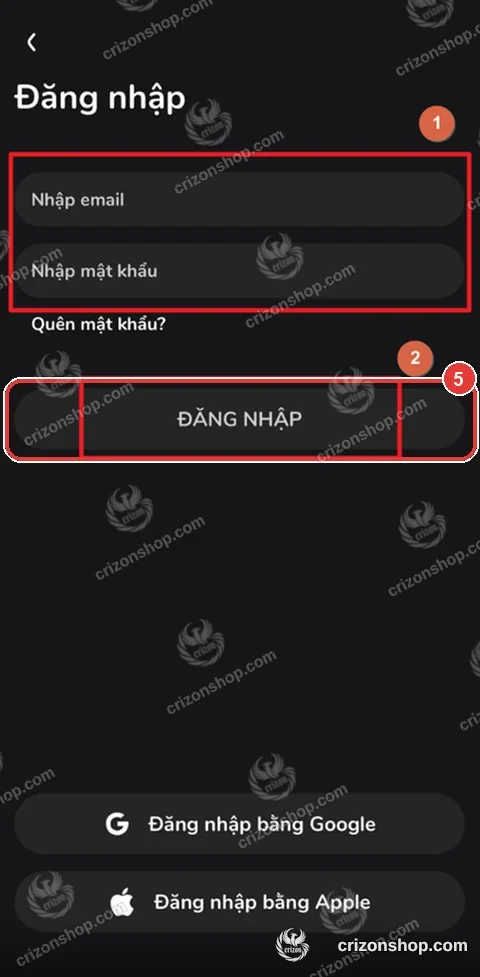
Tap LOG IN to open your account.
Step 3. Check your progress and Premium plan
Once you're logged in, open the lessons you were partway through and make sure your progress has synced. If you bought HelloChinese Premium or Premium+, the paid lessons should be unlocked. If they're still locked, try the steps below one at a time.
- Log out and log back in. Make sure it's the account you paid with.
- If you bought the plan in the app, check that your phone is signed in to the same Apple ID or Google account you paid with.
- Email
[email protected], the HelloChinese address for Premium users. Include your HelloChinese account email and your payment receipt.
Frequently asked questions
Look for the password reset option on the email login screen. Then follow the instructions sent to your inbox. If you can't find this option or the email never arrives, send a request through the HelloChinese contact page or email [email protected]. The contact page says they reply within 48 hours.
You've most likely logged in to a different account, for example by choosing the wrong login method or mistyping your email. Log out, then log back in with the same email or linked account you used to sign up. If your progress still doesn't show up, contact HelloChinese at [email protected] and include your account email.
If you bought the plan on iPhone or iPad, you manage it in your Apple account settings. Turn off auto-renew at least 24 hours before the renewal date. If you bought it on Android, you manage it in Google Play. Deleting the app from your phone doesn't stop the plan from renewing.
For now, the official HelloChinese website only has download links for iOS and Android. The App Store lists the app as compatible with Macs that have an Apple M1 chip or later and run macOS 12.0 or later. If you have one of these newer Macs, you can download the app from the Mac App Store and log in the same way you do on your phone.
Related guides
 How to Sign In to DataCamp and What to Do When You Can't Get In
 How to Log In to Your JetBrains Account on the Web and in the IDE
 How to Log In to Bookmate with Email or Google
Still need help?
Send your order code and we can sort it out faster.
