IDM · Activate
How to Install and Activate Your IDM License Key
Download IDM from the official site, install it, then go to Registration → Registration. Enter your name and email, and paste your key into the Serial Number field. If Help → About shows Full, IDM is activated.
This guide shows you how to download Internet Download Manager (IDM) from the developer's website, install it on a Windows PC, and enter your license key to unlock the full version. If you already have your key at hand, the whole process takes just a few minutes.
What you need
Step 1. Download and install IDM
Open the official IDM download page and download the installer.
Open the
.exefile you just downloaded.Follow the installer's steps until it finishes.
Install the IDM extension for the browser you use (Chrome, Firefox, or Edge). The links are right on the download page.
Step 2. Enter your key to activate IDM
Open IDM.
On the menu bar, click Registration, then choose Registration from the list that appears.
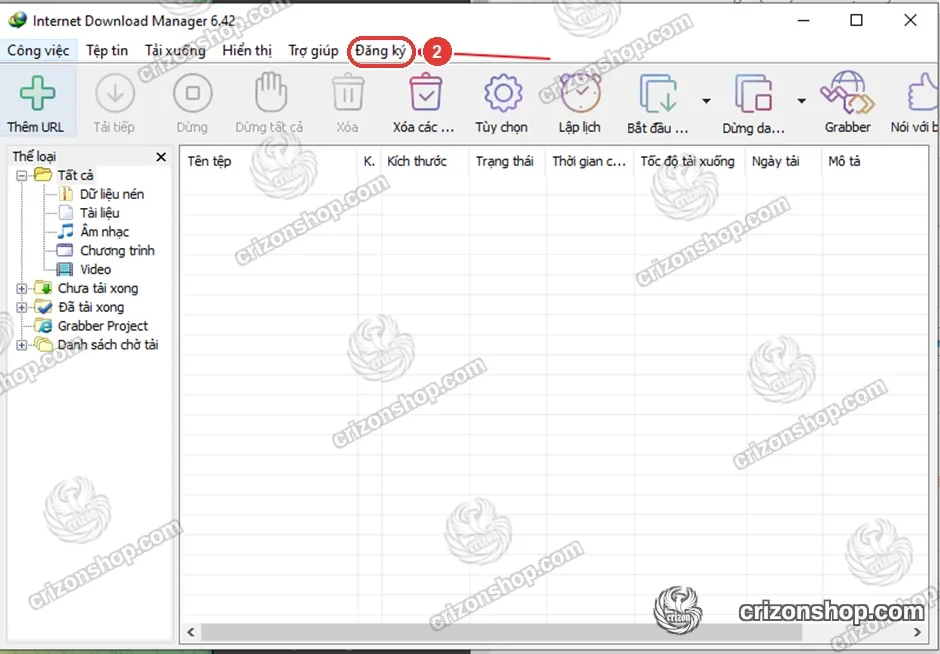
Click Registration to open the list. Enter your first name in First Name, your last name in Last Name, and your email address in Email.
Copy the key from your email or wherever you saved it.
Right-click the Serial Number field and choose Paste.
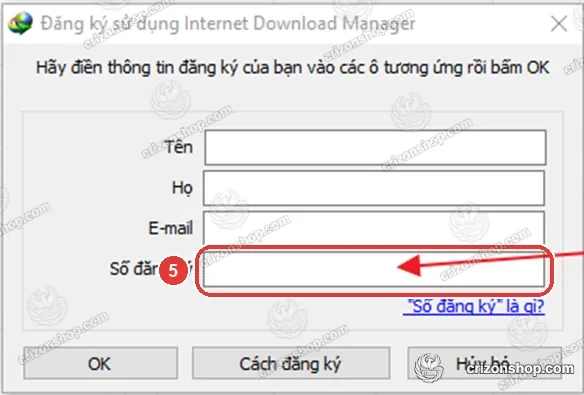
Right-click the Serial Number field, then choose Paste. Click OK to finish.
Step 3. Check that IDM is activated
On the IDM menu bar, click Help → About.
Look at the version line. If you see Full right after the release date and your name appears in the dialog, your key has been accepted.
Troubleshooting activation errors
IDM asks you to register every time you open it
This usually happens because IDM doesn't have enough permissions to save your registration details. Follow these steps in order.
Fully close IDM with Tasks → Exit.
Right-click the IDM icon and choose Run as administrator.
Enter your key again as in Step 2.
Close IDM, then open it again the normal way.
IDM says the key is fake or blocked
If IDM shows the message registered with a fake Serial Number or the Serial Number has been blocked, your computer most likely had a cracked version of IDM before. Try the steps below in order, and reopen IDM after each one to check.
Close IDM with Tasks → Exit, then open it again.
Restart your computer.
If the error is still there, download the latest IDM from the official site, reinstall it, and enter your key.
If you still can't activate IDM, see IDM's registration help.
Frequently asked questions
Yes. The developer lets you reuse the key on the same computer after reinstalling the operating system. If you reinstall often, the developer recommends installing the latest version of IDM each time before entering your key.
No. IDM is licensed per computer, so to use it on several computers at the same time, each one needs its own key. Sharing one key across multiple computers can get it blocked. On the same computer, you can still use it with multiple operating systems or user accounts.
Yes, during the trial period. The version from the official site is free to use for 30 days. After that, you need to enter a key to keep using it.
Go to Help → About. If you see Full after the version's release date, along with the name you entered when registering, IDM is activated.
Related guides
How to Activate IObit Driver Booster PRO with a License Code How to Leave a Microsoft 365 Family Group
 How to Enter a Product Key to Activate Windows 10 and Windows 11
Still need help?
Send your order code and we can sort it out faster.
