 iCallme · Activate
How to Enter an iCallme Premium Activation Code on Your Phone
Open iCallme and sign in to the right account. Go to the Premium tab, tap Have a Premium code? Activate here, enter your code, and tap Confirm to upgrade your account to Premium.
This guide shows you how to install the iCallme app, sign in and enter a Premium code. Premium unlocks paid features such as unlimited phone number lookups. You do every step in your own iCallme account.
Before you start
Step 1. Install the iCallme app
Make sure you download the app named iCallme - Caller ID Lookup from the official app store. You can also go to the iCallme website and tap the download button for iOS or Android.
Open iCallme on the App Store.
Tap Get and wait for the app to install.
If the App Store says the app isn't compatible, update your iPhone to iOS 15.6 or later and download it again.
Open iCallme on Google Play.
Tap Install and wait for the app to install.
If iCallme is already on your phone, tap Update to get the latest version.
Step 2. Sign in to your iCallme account
Open iCallme and sign in to the account you want to upgrade. Premium goes to the account that is signed in when you enter the code. Check that it's the right one before you move on.
Step 3. Enter your Premium code
In the iCallme app, open the Premium tab.
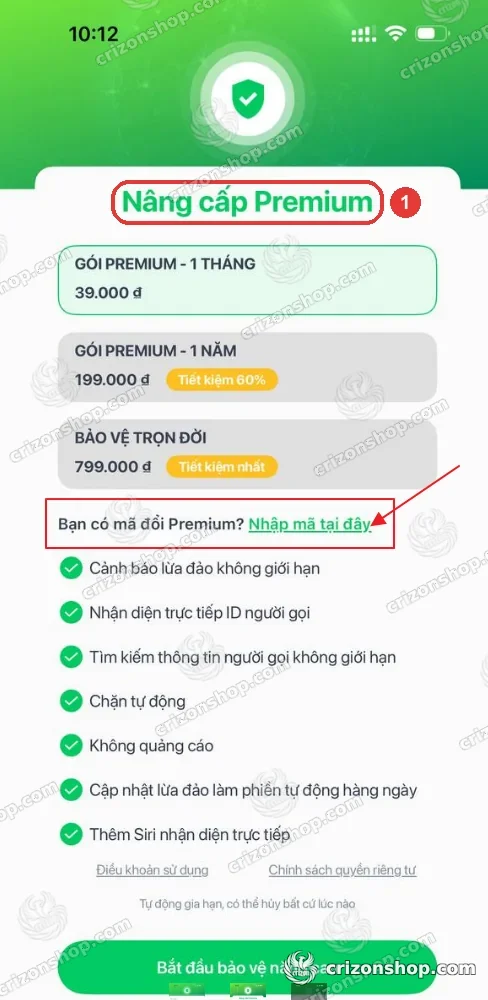
Select “Upgrade to Premium”. Tap Have a Premium code? Activate here.
Paste or type your Premium code into the code field.
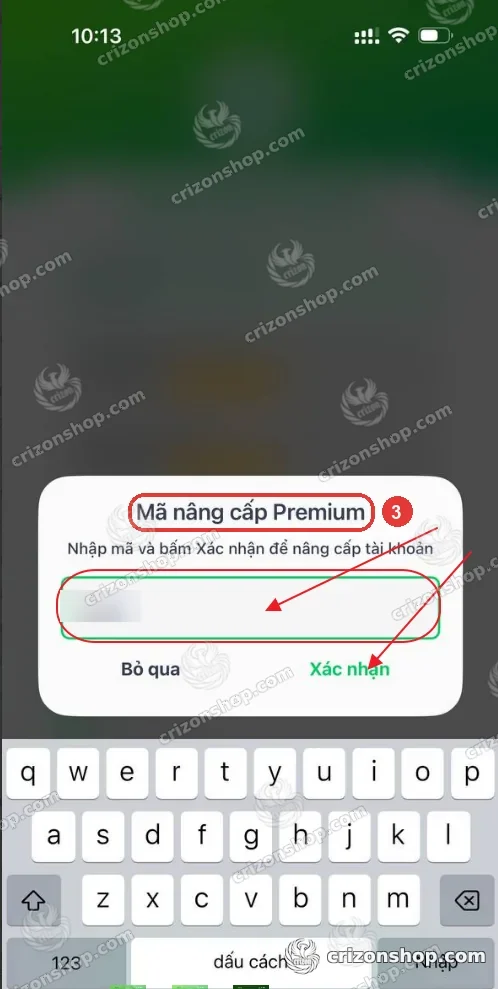
Paste or type your Premium code into the code field. Tap Confirm to finish.
If the code is valid, your account is upgraded to Premium after you tap Confirm.
Frequently asked questions
According to iCallme's FAQ page, the free version lets you look up only 15 numbers a day. Premium gives you unlimited lookups and better caller identification. Senior mode and the feature that reads caller information aloud are currently available only on Android. On iPhone, iOS limits what the app can do, so it shows the caller's name with a red warning icon for scam or spam calls.
First, update iCallme to the latest version and reopen the app. Then look for Have a Premium code? Activate here in the Premium tab. If your version doesn't have this tab, try the Activate Premium now button on the Home screen or Upgrade account in the Profile tab.
Check the code for extra spaces or wrong characters, then enter it again. If the error is still there, the code may have already been used or expired. It may also not work on the device you're using. In that case, contact whoever gave you the code, or reach iCallme support using the contact details on icallme.vn.
Related guides
 How to Activate Avast BreachGuard with a Sign-in Key
 How to Activate AVG AntiTrack Premium with an Activation CodeHow to Activate a Gilisoft Audio Recorder Pro Key on Windows
Still need help?
Send your order code and we can sort it out faster.
