Ashampoo · Activate
How to Enter a License Key to Activate Ashampoo Software on Windows
Download the Ashampoo version that matches your key from ashampoo.com. Run the installer, paste your key into the activation field, then click Activate now and Next. Also covers offline activation and the "key already activated" error.
This guide shows you how to install Ashampoo software on Windows and enter your license key to unlock the full version. The steps are almost the same for WinOptimizer, Backup Pro, UnInstaller and Photo Optimizer. Only the program name is different.
Before you start
Download the installer from Ashampoo
Download the installer directly from the Ashampoo website so you know the file is clean and is the right version. If your key is for an older version, find that exact version number on the product's page.
Open ashampoo.com and look for the product name shown on your key.
Check that the version number on the product page matches your key.
Click the download button and save the setup file (
.exe) to your computer.
Enter the key during installation
Open the setup file you just downloaded.
If Windows asks whether you want to allow this app to make changes to your device, click Yes.
Wait for the installer to ask for your license key.
Open the place where you saved your key, select the whole key, and press Ctrl + C to copy it.
Go back to the installer and click Paste from clipboard to paste the key into the field.
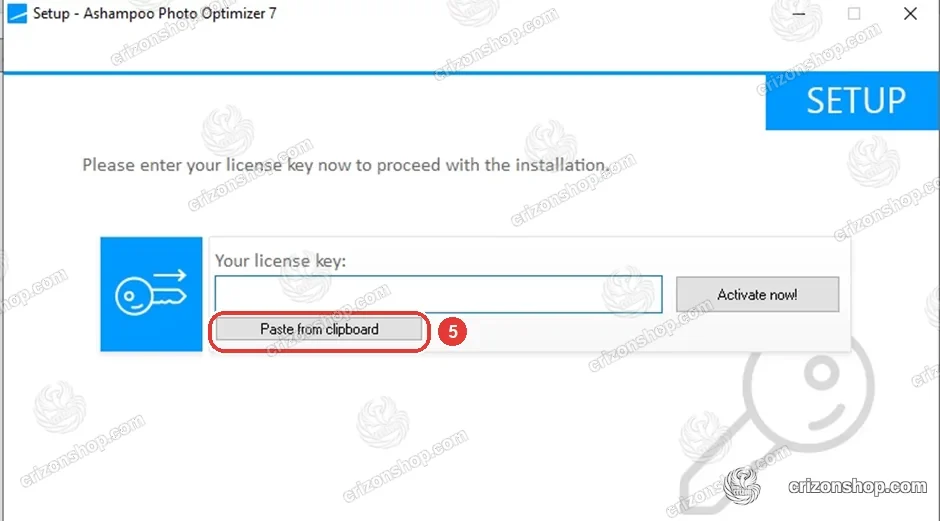
Click “Paste from clipboard” to paste your key into the field. Click Activate now and wait a few seconds while your key is checked.
Once the key is accepted, click Next and continue the installation as usual.
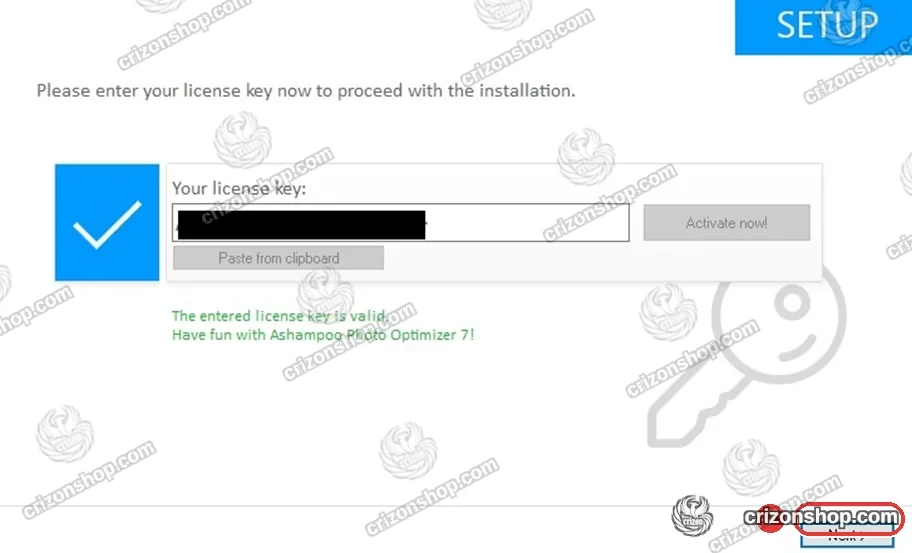
Click “Next >” to continue the installation.
Enter the key in a program that's already installed
If you installed the trial version earlier, or skipped the key step during setup, you don't need to uninstall and reinstall the program.
Open the Ashampoo program on your computer.
When the activation dialog appears, paste your key into the license key field.
Click Activate now and wait for the message confirming that activation was successful.
If the activation dialog doesn't appear on its own, look in the program's menu for an option to enter a license key or activate. Where you'll find it depends on the product and version.
Activate without an internet connection
Ashampoo lets you activate offline by email. You'll need another device with internet access to send and receive the email.
Open the program, enter your key and click Activate now as usual.
Because the program can't connect, it will show your license key and an offline code. Copy both down exactly as shown.
From a device that's online, send an email with your license key and offline code to
[email protected].Wait for a reply from
[email protected]. The email contains an offline license key.Open the program again, enter the offline license key and click Activate now.
Key shows as already activated (Error 157)
The License key already activated message with Error 157 usually appears when you reinstall the software, move to a new computer, or install a major Windows update. Your key is still valid. The system still has your previous activation on record, so you need to reset the key before you can activate again.
Sign in to your Ashampoo account at ashampoo.com/loc/login.
Find the key that shows the error and reset it by following Ashampoo's instructions.
Open the program again, enter your key and click Activate now.
Frequently asked questions
First check that the product name and version number you installed match your key. This is the most common cause. Then clear the field and paste the key again. Make sure there are no extra spaces and that no letters and numbers got mixed up. If it still doesn't work, download the installer for the correct version from ashampoo.com again and reinstall.
No. Just reinstall the program and enter your key as before. If you get a message saying the key is already activated (Error 157), reset the key in your Ashampoo account as described above, then activate again.
You can use the offline email activation method described above instead. Ashampoo also has a support article for this specific problem with more information.
Related guides
How to Activate IObit Driver Booster PRO with a License Code How to Leave a Microsoft 365 Family Group
 How to Enter a Product Key to Activate Windows 10 and Windows 11
Still need help?
Send your order code and we can sort it out faster.
