Allavsoft · Activate
How to Enter Your Allavsoft Video Downloader and Converter License Key
Download Allavsoft from the official website, open the Help menu, choose Register, enter your exact license name and license code, then click Register to remove the trial limits.
This guide shows you how to enter your license key in Allavsoft Video Downloader and Converter, an app for downloading and converting videos. Once you do, the trial becomes the full version. Before you start, have your license name and license code ready.
Before you enter your key
Step 1: Download and install Allavsoft
Download the installer from the official website. This helps you avoid copies that have been modified or bundled with malware.
Go to the Allavsoft homepage and download the Windows version.
Open the installer you just downloaded.
Follow the setup wizard until it finishes, then open Allavsoft.
Go to the Allavsoft homepage and download the Mac version.
Open the downloaded file and install it like any other Mac app.
Open Allavsoft from your Applications folder.
Step 2: Enter your license name and code
Open Allavsoft.
In the menu bar, click Help.
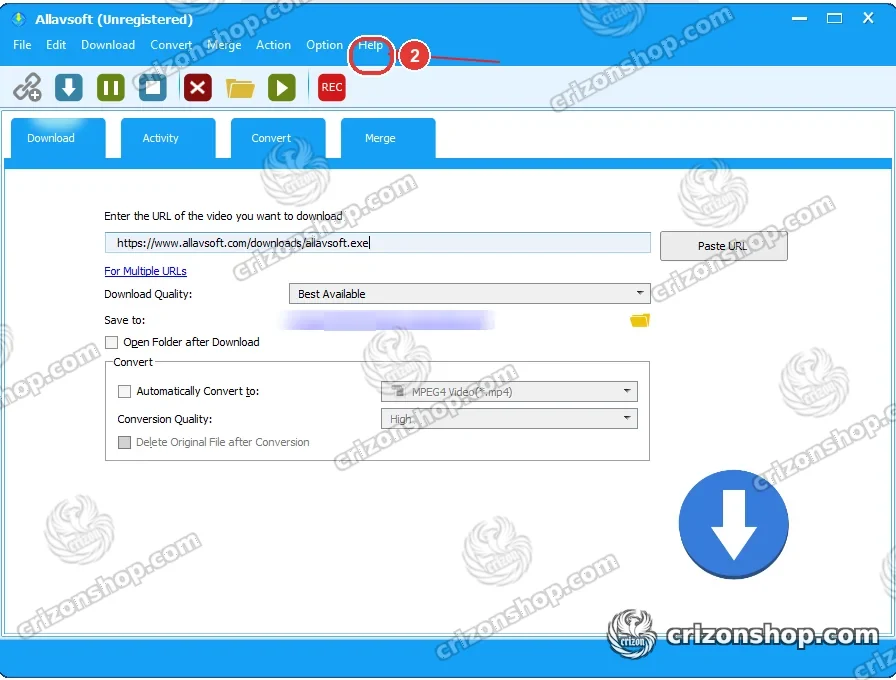
Click Help. Choose Register.
In the name field, enter the exact license name that came with your key.
In the code field, paste your license code.
Click Register to finish.
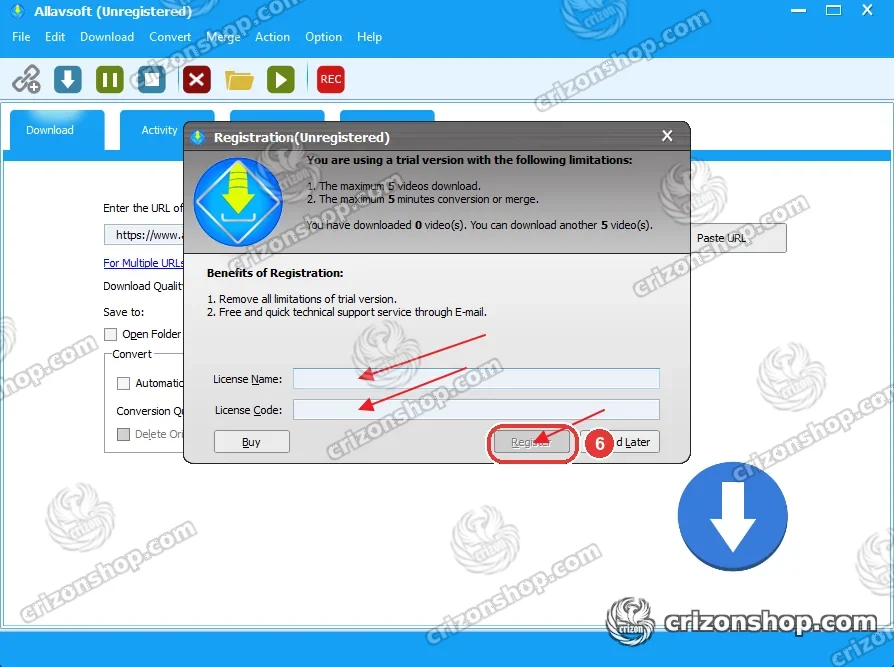
Click Register to finish.
Check that registration worked
According to the developer's purchase page, a valid key removes all trial limitations. Try downloading a video to confirm the app is running as the full version. If you still hit the same limits as in the trial, quit Allavsoft completely, reopen it, and check again.
If the software doesn't accept your key
Most rejected keys come down to one of these causes.
- The license name doesn't match. The name you enter must be exactly the same as the one that came with your key.
- There's an extra space at the start or end of the pasted name or code.
- The key was bought for the Mac version but entered in the Windows version, or the other way around.
- The key has already been used on the maximum number of computers. According to the developer's purchase page, the 1-month and 1-year plans work on 1 to 2 computers, and the lifetime plan works on 1 to 3 computers.
- Your 1-month or 1-year plan has expired.
If you've checked everything above and it still doesn't work, contact Allavsoft's support team through the Allavsoft Support page. Include a screenshot of the error message so they can help you faster.
Frequently asked questions
No. The version you download from the Allavsoft homepage is the one you activate. Just enter your license name and code in it to get the full version.
Reinstall Allavsoft from the homepage, then enter the same license name and code using the steps above. Each plan only works on a limited number of computers. If your key isn't accepted on the new computer, contact Allavsoft's support team.
The developer sells the Windows and Mac versions on separate purchase pages, so use the key that matches the version you installed. If you're not sure which version your key is for, check with the seller or Allavsoft's support team before you enter it.
Related guides
How to Activate IObit Driver Booster PRO with a License Code How to Leave a Microsoft 365 Family Group
 How to Enter a Product Key to Activate Windows 10 and Windows 11
Still need help?
Send your order code and we can sort it out faster.
