 Spotify · Set up
How to Download Spotify Music for Offline Listening
To listen to Spotify offline, your account needs Premium. Add your songs to a playlist, tap the download icon, and wait for it to turn green.

This guide shows you how to download Spotify playlists and albums to your phone or computer so you can listen without an internet connection, like when you're driving through a dead zone or sitting on a plane. The steps below follow the official guide from Spotify.
Before you start
- A Spotify account with Premium. Free accounts can only download podcasts, not music.
- The latest version of the Spotify app on your phone or computer, with an internet connection.
- At least 1 GB of free storage on your device, as Spotify recommends.
Step 1: Add your songs to a playlist
Create a new playlist
Open Spotify and tap Create (the plus icon).
Select Playlist.
Name the playlist and tap Create.
Add songs to the playlist
Find a song you want to download.
Tap the three dots next to the song. On iPhone they're horizontal; on Android they're vertical.
Select Add to playlist.
Check the playlist you just created and tap Done.
Repeat for each song until you have everything you want.
Open Your Library in the left sidebar.
Click the Create button (the plus icon) at the top, then select Playlist. You can also press Ctrl + N on Windows or Cmd + N on Mac.
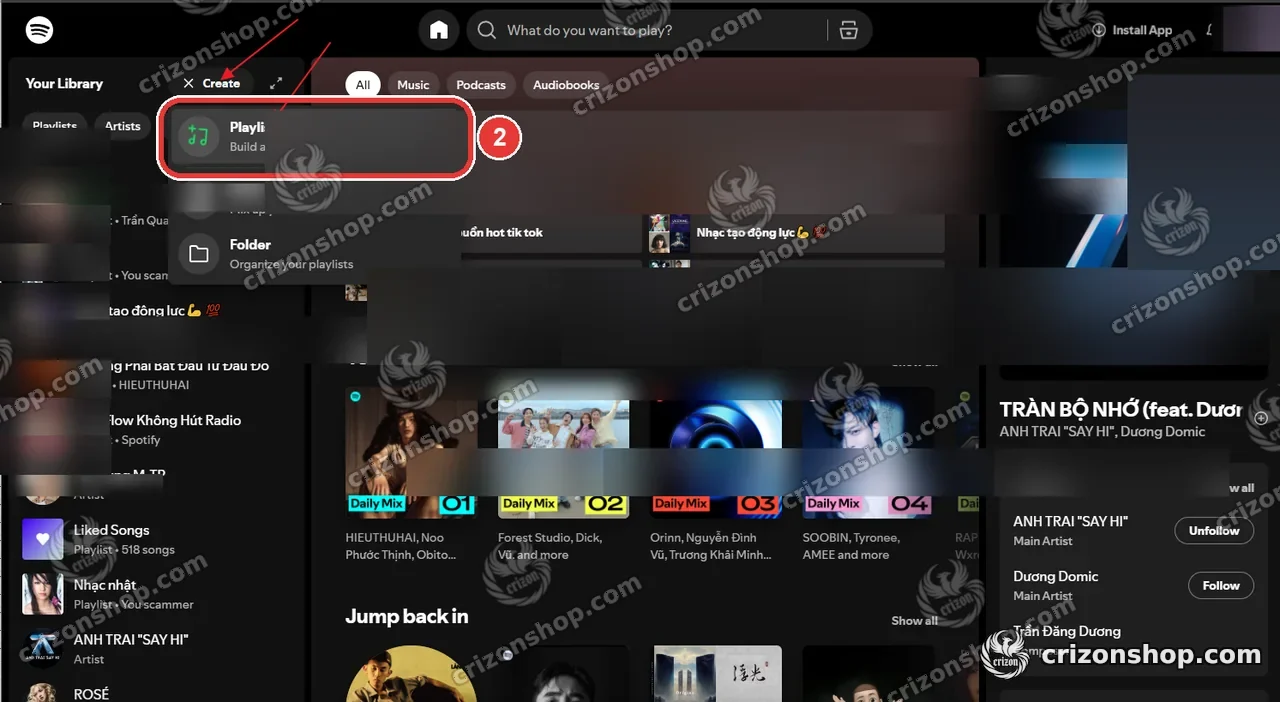
Click Playlist in the Create menu to make a new playlist. Name it and click Save.
For each song you want to add, right-click it or click the three dots, select Add to playlist, then choose your new playlist.
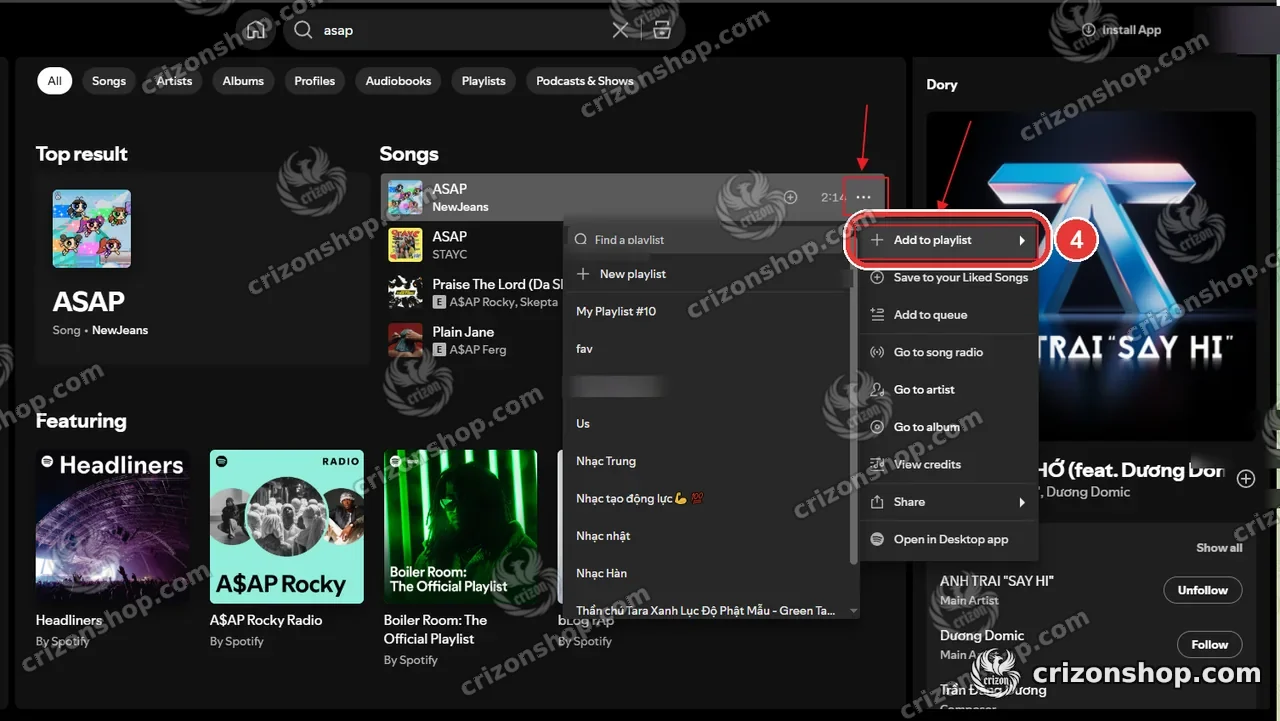
Click Add to playlist, then choose a playlist. If it's easier, drag a song and drop it straight onto the playlist name in the left sidebar.
Step 2: Download the playlist or album
Connect to the internet and open the playlist or album you want to download.
Tap the download icon (a down arrow) below the playlist name.
Stay connected until the download finishes. Your downloads are in Your Library.
Open the Spotify desktop app and go to the playlist or album you want to download.
Click the download button (a down arrow) in the row of buttons above the track list.
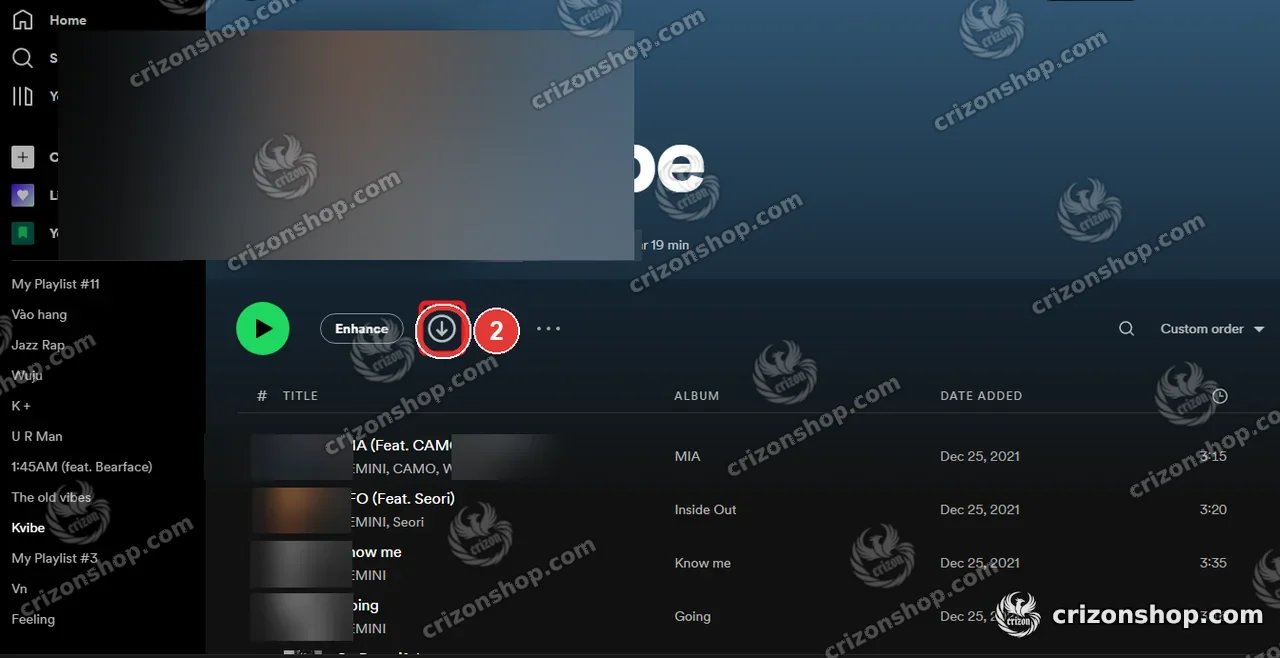
Click the download button (down arrow). Wait for the songs to finish downloading before you go offline.
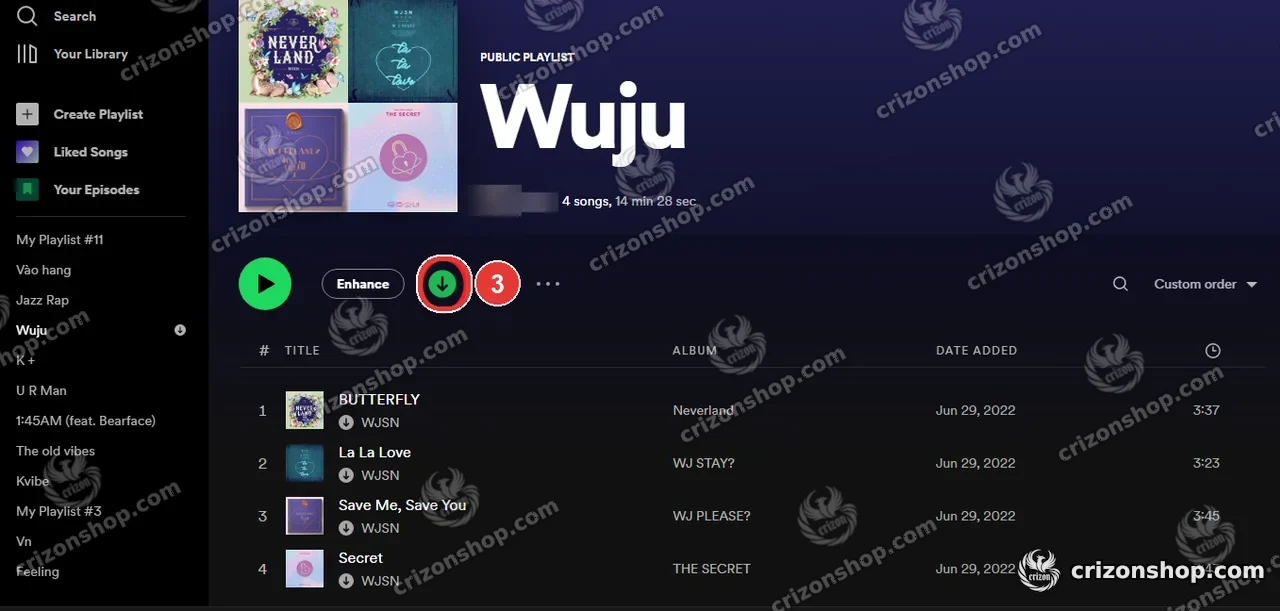
Wait for the songs to finish downloading, then disconnect.
When the download icon turns green, the playlist is saved on your device and plays without an internet connection. If a song still shows a gray download icon or a sync icon, it hasn't finished downloading.
Allow downloads over mobile data
To download music when you're not on Wi-Fi, turn on downloading over 4G/5G on your phone.
Tap your profile picture at the top, then select Settings and privacy.
Go to Data-saving and offline.
Turn on Download using cellular.
Listen to downloaded music offline
When you lose your connection, Spotify automatically switches to playing your downloads. If you want to play only what's on your device, for example to save data, turn on Offline mode. Songs you haven't downloaded will then appear grayed out and won't play.
Tap your profile picture and select Settings and privacy.
Go to Data-saving and offline.
Turn on Offline mode.
- On Windows, click the Spotify menu in the top-left corner, select File, then select Offline Mode.
- On Mac, click Spotify in the menu bar at the top of the screen, then select Offline Mode.
What to check if downloads don't work
If you don't see the download button on a playlist, your account may be on the Free plan. Check your current plan on your Spotify account page. If a plan you bought at CrizonShop doesn't show as Premium or has reverted to Free, go to Account → My orders on crizonshop.com and click Report a problem on the product in your order, or message us through Chat with Support in the corner of the screen.
Frequently asked questions
No. Free accounts can only download podcasts. To download albums and playlists for offline listening, your account needs Premium.
No. Spotify only lets you download playlists, albums, and podcasts. Add the songs to a playlist as shown in Step 1, then download that playlist.
Spotify removes downloads when the app hasn't been online for more than 30 days, when you reinstall the app, when the app is too outdated, or when your memory card has an error. If you download music on a sixth device, your oldest device loses its downloads. If this happens, open the playlist again while you're online and download it again.
Possibly. For Premium accounts on mobile, Android Auto, and Apple CarPlay, Spotify has Offline Backup, which automatically gathers songs you've played recently into a playlist you can play offline. It only appears if you've turned on offline listening in Settings and privacy and have played enough songs recently. Learn more on Spotify's Offline Backup page.
Related guides
How to Set a Spotify Password When You Log In with Google, Facebook, or PhoneHow to switch to a new Spotify account and keep your playlistsHow to Transfer Spotify Playlists from an Old Account to a New OneStill need help?
Send your order code and we can sort it out faster.
