eSIM · Before you buy
How to Check If Your Phone Supports eSIM
On iPhone, go to Settings › Cellular. On Samsung, go to Settings › Connections › SIM manager. If you see an option to add an eSIM, your phone supports it. Also check whether your phone is carrier-locked.
Before you buy or install an eSIM plan, take a few minutes to check two things: whether your phone supports eSIM and whether it's carrier-locked. This guide shows where to look on iPhone, Samsung Galaxy and Google Pixel. It also explains how to check on other Android phones.
What to check
A phone has to meet two conditions to use eSIM. First, it needs an eSIM chip. If it has one, you'll see an option to add an eSIM in your mobile network settings. Second, it can't be locked to a carrier. A locked phone only accepts eSIMs from that carrier.
Check on iPhone
Check if your iPhone is carrier-locked
Open Settings.
Tap General, then tap About.
Scroll down to Carrier Lock.
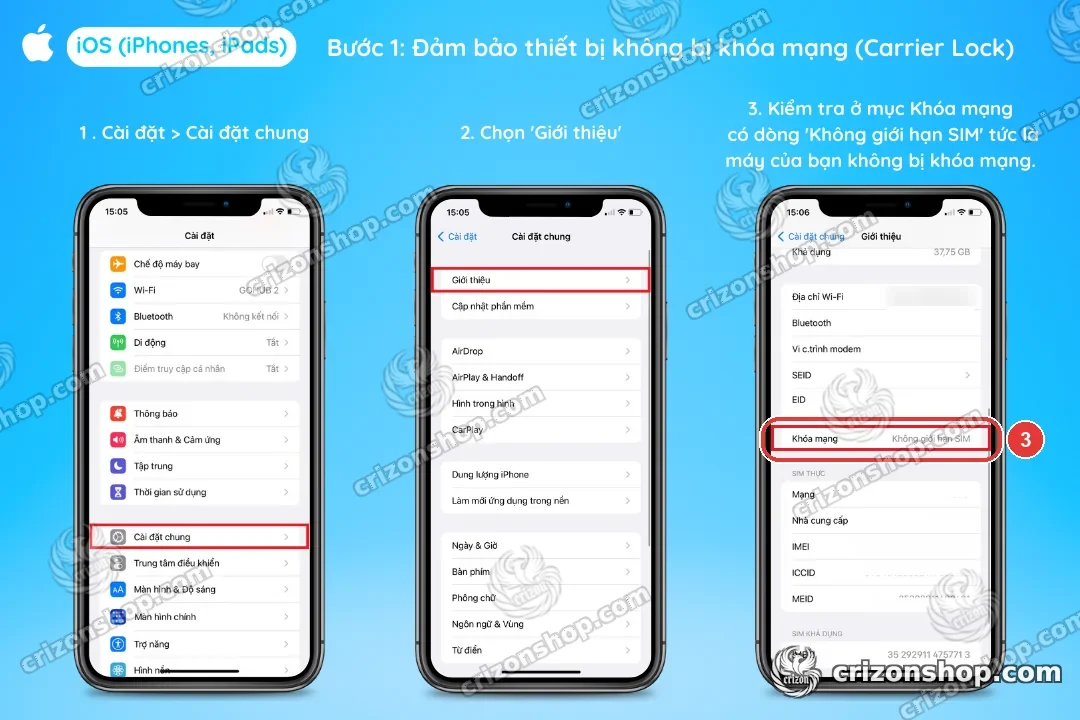
Check the Carrier Lock line. If it says No SIM restrictions, your iPhone isn't locked.
Check if your iPhone supports eSIM
Open Settings and tap Cellular. In some regions, this menu is called Mobile Data.
Look for an Add eSIM, Set Up Cellular or Add Cellular Plan button.
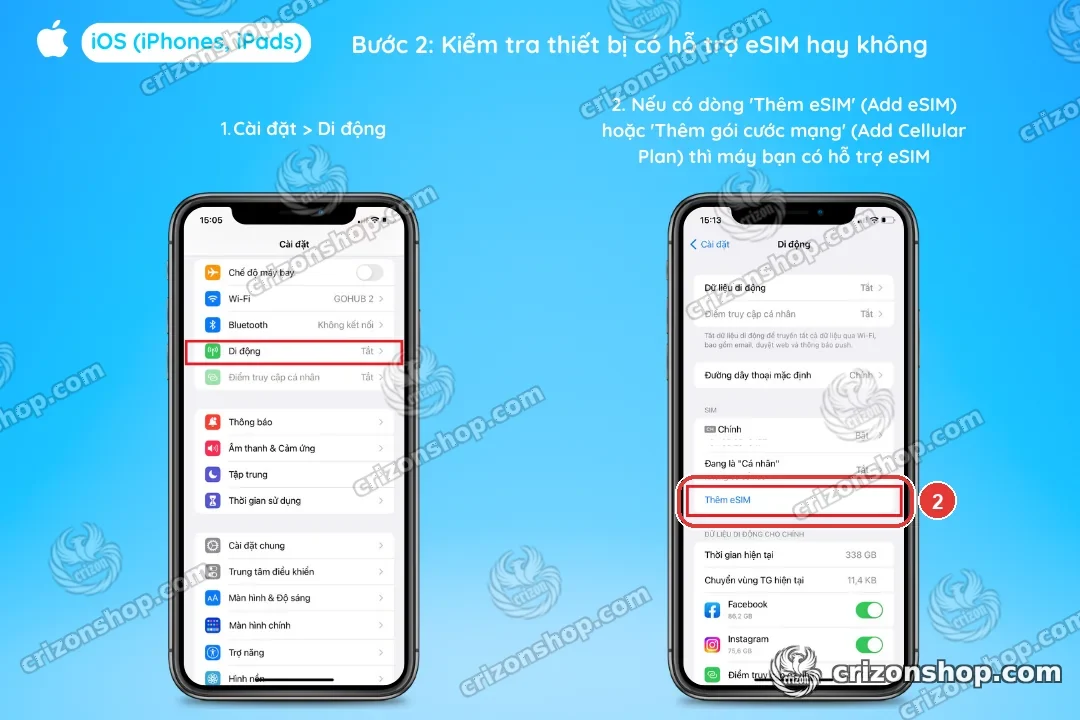
Tap Add eSIM to see the eSIM options. If you see any of these buttons, your iPhone supports eSIM. If you don't have an eSIM plan yet, you don't need to tap it.
According to Apple, iPhone XS, iPhone XS Max, iPhone XR and later models all have eSIM. iPhones sold in mainland China are different: only a few recent models there have eSIM. If your iPhone is a mainland China model, follow the steps above to be sure. For details, see Apple's Set up eSIM on iPhone page.
Check on Android
Each Android brand puts eSIM settings in a different place. Menu names can also change depending on your phone's software version.
Samsung Galaxy
Open Settings and tap Connections.
Tap SIM manager.
If you see Add eSIM, your phone supports eSIM. On older versions of One UI, it may say Add mobile plan instead.
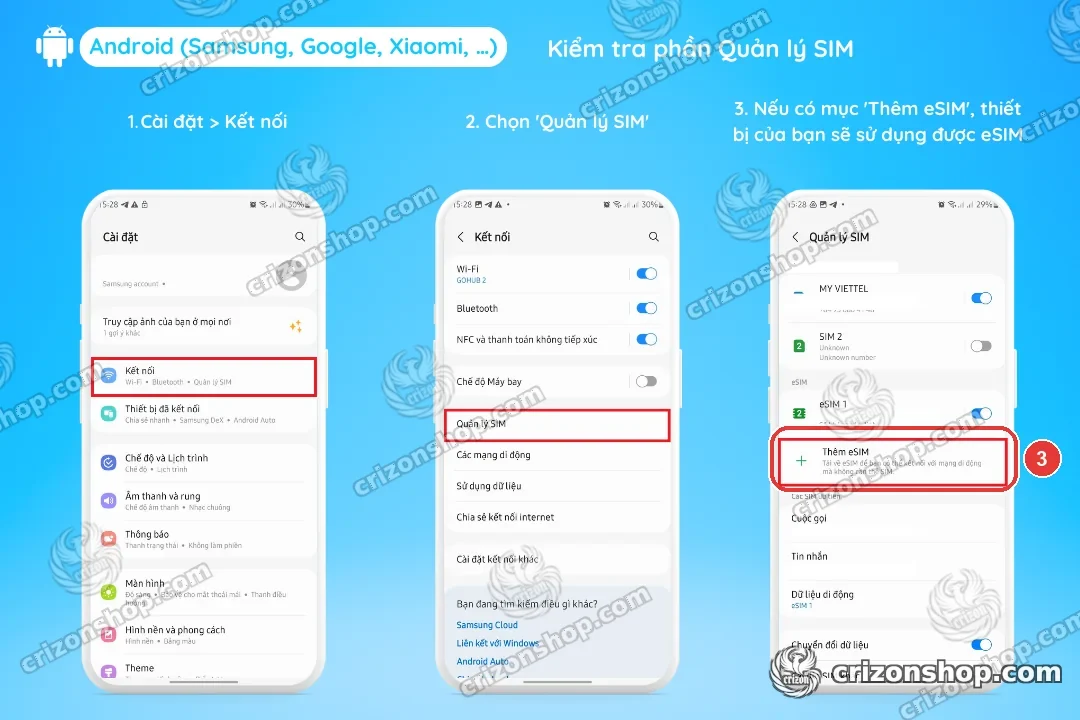
Tap Add eSIM to continue.
Samsung says the Galaxy S20 series and later models support eSIM, along with the Z Fold and Z Flip series. However, some carriers don't support eSIM on Galaxy phones yet. You can see the list on Samsung's Galaxy eSIM and supported network carriers page. Supported models can vary by market, so the most reliable way to check is still on the phone itself.
Google Pixel
Open Settings and tap Network & internet.
Tap SIMs.
Tap Add SIM. If you see Set up an eSIM, your phone supports eSIM.
According to Google, Pixel 3a and later models can use one physical SIM and one eSIM at the same time. Some steps only work on Android 11 and later. To learn more, see the Pixel support page on using dual SIMs.
Other Android brands
On Xiaomi, OPPO, vivo and other brands, the quickest way is to open Settings and type eSIM in the search bar at the top. If an option to manage or add an eSIM shows up, your phone supports it. If nothing comes up, look up your exact model number on the manufacturer's spec page to be sure.
Checklist before you buy an eSIM
Frequently asked questions
The option to add an eSIM only appears if your phone has an eSIM chip. A software update can't add the chip. You can try updating your phone's operating system and checking again. If you still don't see the option, your phone only works with physical SIM cards.
Usually not. A locked phone only accepts SIMs and eSIMs from the carrier it's locked to. According to Apple, only that carrier can unlock it. Contact them before you buy an eSIM from another carrier.
No. When you check, you're just seeing whether the button is there. Wait until you have an eSIM plan with a QR code or activation code. Then tap the button and follow the on-screen instructions.
Not necessarily. Two physical SIM slots and eSIM are different things. Many Android phones have two SIM slots but no eSIM, so check using the steps above.
Related guides
How to Install and Activate an eSIM on iPhone and AndroidHow to Turn On Data Roaming for an eSIM on iPhone and Android How to Join a Google Family Group by Invitation
Still need help?
Send your order code and we can sort it out faster.
