Xilisoft · Activate
How to Enter a License Code to Activate Xilisoft HD Video Converter
Open Xilisoft HD Video Converter, go to Help and choose Enter License Code. Paste your User Name and License Code exactly as you received them, then click Register to unlock the full version.
This guide shows you how to download Xilisoft HD Video Converter from the official website and enter your key (License Code) to unlock the full version on Windows or Mac.
Before you enter your key
Download and install the software
Download the installer from the Xilisoft HD Video Converter page on the official website. This way you avoid modified copies. The Windows version runs on Windows 11, 10, 8, 7, Vista, and XP (SP2 or later). If you use a Mac, download the Mac version.
Open the Xilisoft product page and click the download button.
Run the installer you downloaded and follow the on-screen instructions.
When the installation finishes, open Xilisoft HD Video Converter.
Enter your key to activate the software
In the software's menu bar, click Help. If you don't see a menu bar, click the button with the three-line icon to open the menu.
Select Enter License Code... to open the Registration window.
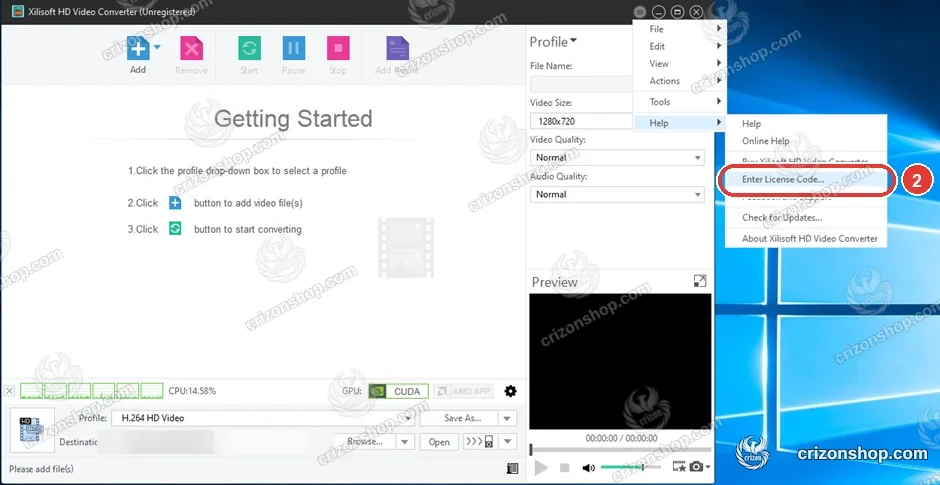
Click 'Enter License Code...' to open the Registration window. Paste your registration name into the User Name field.
Paste your code into the License Code field.
Click Register to finish.
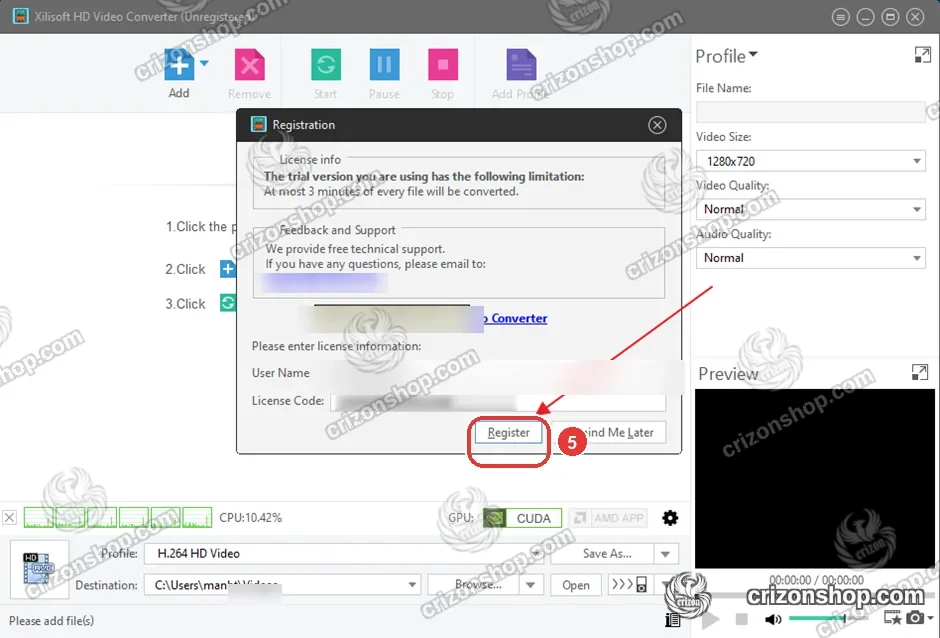
Click 'Register' to finish.
Open the software and look at the macOS menu bar at the top of the screen.
Click the menu with the software's name (Xilisoft HD Video Converter) or the Help menu.
Select Enter License Code... to open the Registration window.
Paste your registration name into the User Name field and your code into the License Code field.
Click Register to finish.
After you click Register, close the software and open it again. This confirms that your license has been recognized before you start converting videos.
If the software says your key is invalid
According to Xilisoft's support page, registration usually fails for one of these reasons.
| Cause | Fix |
|---|---|
| A wrong character or extra spaces from typing by hand | Clear both fields, copy your details again, and paste them |
| The key is for an older version, but you installed an upgrade | Install the version that matches your key |
| You installed a different Xilisoft product by mistake | Uninstall it and download HD Video Converter instead |
| You entered a Windows key in the Mac version, or the other way around | Install the version for your key's operating system |
Frequently asked questions
No. Xilisoft treats the Windows and Mac versions as two completely separate products, and each one needs its own key. To use the software on a Mac, you need a key for the Mac version.
On Windows, try clicking the button with the three-line icon to open the software's menu. On Mac, this option may be in the menu with the software's name in the top menu bar instead of under Help.
Check three things: you installed HD Video Converter, it's for the right operating system, and it's the version that matches your key. A key for an older version or for a different Xilisoft product won't activate the software.
Related guides
How to Enter a License Code in Xilisoft YouTube Video ConverterHow to Enter a License Code to Activate Xilisoft Audio Converter ProHow to Activate IObit Driver Booster PRO with a License CodeStill need help?
Send your order code and we can sort it out faster.
