WonderFox · Activate
How to Enter Your WonderFox DVD Ripper Pro License Key
Open WonderFox DVD Ripper Pro, click Register in the top bar and choose Enter License. Then paste your license code and click Register Now to unlock the full version on Windows.
This guide shows you how to activate WonderFox DVD Ripper Pro with a license code and remove the trial limits. You do everything inside the program on a Windows PC, and it only takes a few minutes.
Before you start
Step 1. Download and install the program
Open the WonderFox DVD Ripper Pro page on WonderFox's website.
Click Free Download to download the installer.
Open the downloaded file and follow the setup wizard until it finishes.
Step 2. Enter your license code
Open WonderFox DVD Ripper Pro.
Click the Register button in the top navigation bar to open the registration window.
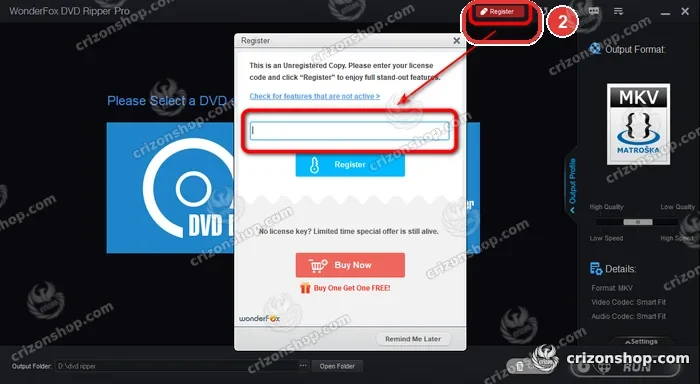
Click Register to open the registration window. Click Enter License in the bottom-left corner of this window.
Paste your license code into the box.
Click Register Now.
Wait for the success message to appear, and you're done.
You can also check these steps in WonderFox's official registration guide.
If the program says your code is invalid
If you click Register Now and see Registration info is invalid, go through these checks one by one. They come from WonderFox's own guidance.
- The code was mistyped or has extra spaces. Open the email with your code again, copy it carefully and paste it into the box.
- You installed the wrong product. WonderFox has several programs with similar names. DVD Ripper Pro codes start with
VC-DRPA, while HD Video Converter Factory Pro codes start withVC-HDPA. - You bought a bundle of several programs and pasted the code for a different program in the bundle.
- You're using a code for an older version with a newer upgrade.
If you've checked all of these and still can't activate, see the WonderFox FAQ page or contact WonderFox support to have your code checked.
Move your license to another computer
Each license code works on one computer. According to WonderFox, you don't need to buy a new code when you switch computers. Just remove the license from your old computer so the code can be activated again. Then install the program on your new computer and enter the code as in Step 2.
Frequently asked questions
The unregistered version can only convert part of each DVD. Once you enter your code successfully, this limit is removed and you get all the features of the Pro version.
Click the Register button in the top navigation bar. In the window that opens, click Enter License in the bottom-left corner, and the code box will appear.
If you bought it on WonderFox's website, you can ask for the code to be resent using your order number or the email you used at checkout. WonderFox says it will resend the code within 24 hours. You'll find how to send the request on the WonderFox FAQ page.
No. WonderFox says this program only runs on Windows, so you need a Windows computer to install and activate it.
Related guides
How to Enter a License Key to Activate WonderFox Document ManagerHow to Install and Activate HD Video Converter Factory ProHow to Activate IObit Driver Booster PRO with a License CodeStill need help?
Send your order code and we can sort it out faster.
