WonderFox · Activate
How to Enter a License Key to Activate WonderFox Document Manager
Download WonderFox Document Manager from the official site and install it. Then open the software, paste your key into the registration box and click Register. This guide also covers what to do if your key shows as invalid.
This guide shows you how to download WonderFox Document Manager from the official site, install it on Windows and enter your key to unlock the registered version. The end of the guide covers common activation errors and how to fix them.
Before you install
Step 1. Download and install the software
Open the WonderFox Document Manager page on WonderFox's official website.
Click the download button on the page to get the
.exeinstaller.Open the file you downloaded. If Windows asks whether you want to allow the app to make changes to your device, choose Yes.
Follow the installer until setup is complete.
Step 2. Enter your key to activate
Open WonderFox Document Manager once it's installed.
A window will ask you to enter your key. If it doesn't appear on its own, find the Register button on the software's top bar.
Copy your key and paste it into the box.
Click Register.
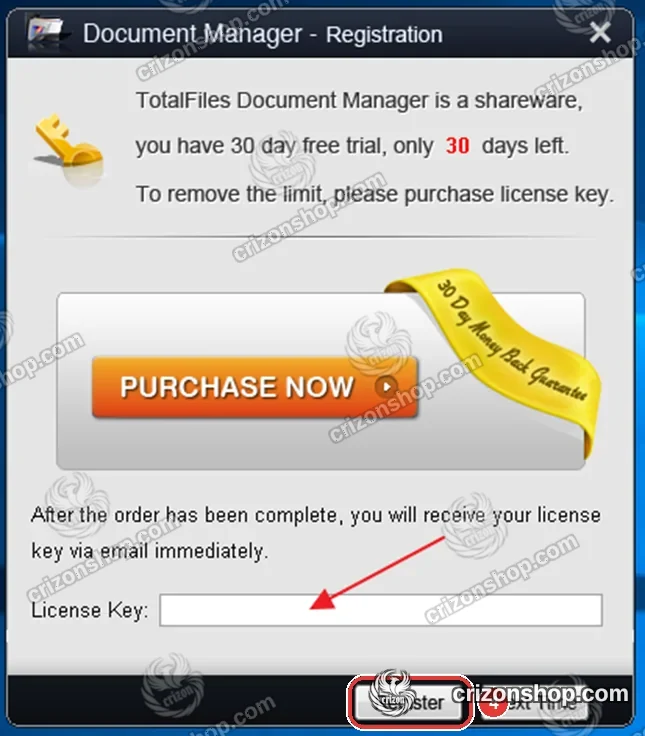
Click Register. Wait for the message confirming that registration was successful.
If your key shows as invalid
According to WonderFox's support page, a rejected key usually comes down to one of the causes below.
| Cause | Fix |
|---|---|
| A typo or an extra space from typing the key by hand | Clear the box, paste the key again and remove any spaces at either end |
| The key is for a different WonderFox program | Make sure the key was issued for WonderFox Document Manager |
| The key only works with the version that was current when you bought it | If you've upgraded to a newer version, get a key for that version from whoever issued your key |
If the software says it's unregistered after you registered it
WonderFox says antivirus software or firewalls sometimes block the registration information, which sends the software back to an unactivated state. Try these steps in order.
Open your antivirus software (for example, Windows Security) and add WonderFox Document Manager to its allow list.
Reopen the software, enter your key and click Register again.
If that doesn't work, uninstall WonderFox Document Manager from your Windows app settings.
Download the latest version from the official site and install it again.
Enter your key in the new installation.
Frequently asked questions
After you click Register, the software shows a message saying registration was successful. In WonderFox software, the registered version usually no longer shows the Register button on the top bar.
If you bought directly from WonderFox, use WonderFox's registration code retrieval system with the email address you used to buy. Follow the instructions on WonderFox's support page. If your key came from somewhere else, contact whoever issued it to you.
The official download page only offers a .exe installer for Windows, so you need a Windows PC to install and activate the software.
Check that the key is for Document Manager and matches the version you have installed. If both are correct, add the software to your antivirus allow list, check your Internet connection and try again.
Related guides
How to Enter Your WonderFox DVD Ripper Pro License KeyHow to Install and Activate HD Video Converter Factory ProHow to Activate IObit Driver Booster PRO with a License CodeStill need help?
Send your order code and we can sort it out faster.
