 Panda Dome · Activate
How to Activate Panda Dome with an Activation Code
Open Panda Dome, go to My products, and click Add product, then Add code. Paste your activation code and click Activate my product. You can also enter the code on the My Panda website.
This guide shows you how to enter an activation code to upgrade Panda Dome from a trial or the free version to a paid plan. You can enter the code in the app or on your My Panda account page. Both methods do the same thing.
Before you start
Step 1. Download and install Panda Dome
Download the installer from Panda's official website by following Panda's getting started guide. You can also get it from the downloads section of your My Panda account. On Android and iOS, the download link opens Google Play or the App Store, where you install it like any other app.
Double-click the installer file you downloaded.
Follow the on-screen instructions until the installation is complete.
Open Panda Dome and sign in with your Panda account.
Step 2. Enter the code in the app
In Panda Dome, click the menu icon in the top-left corner.
Select My products.
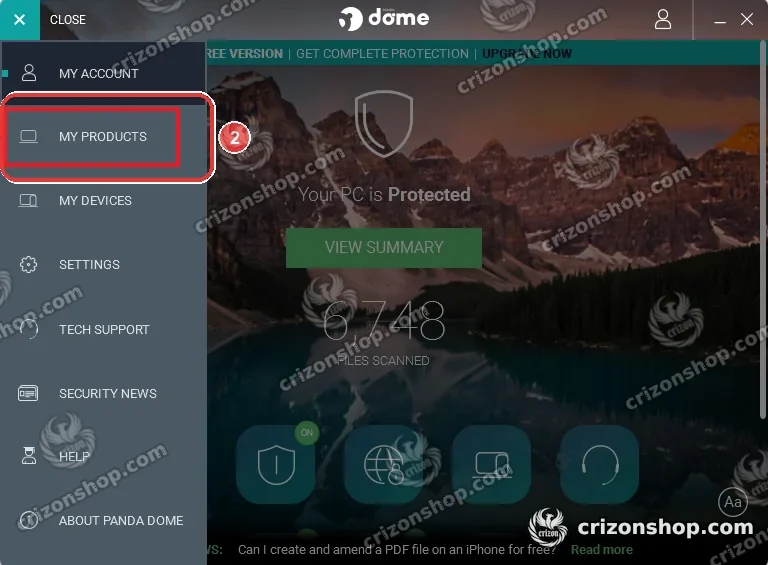
Click “MY PRODUCTS”. Click Add product, then select Add code.
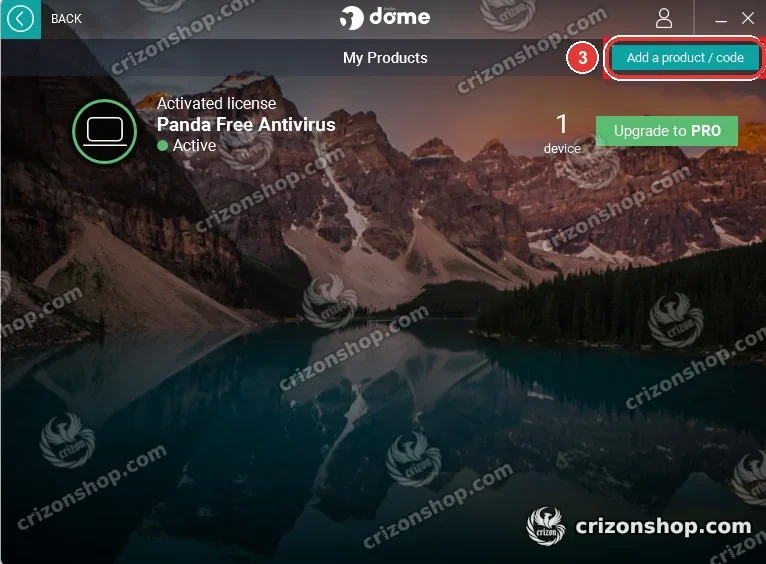
Click “Add a product / code” (Add product) to continue. Paste your activation code into the empty field.
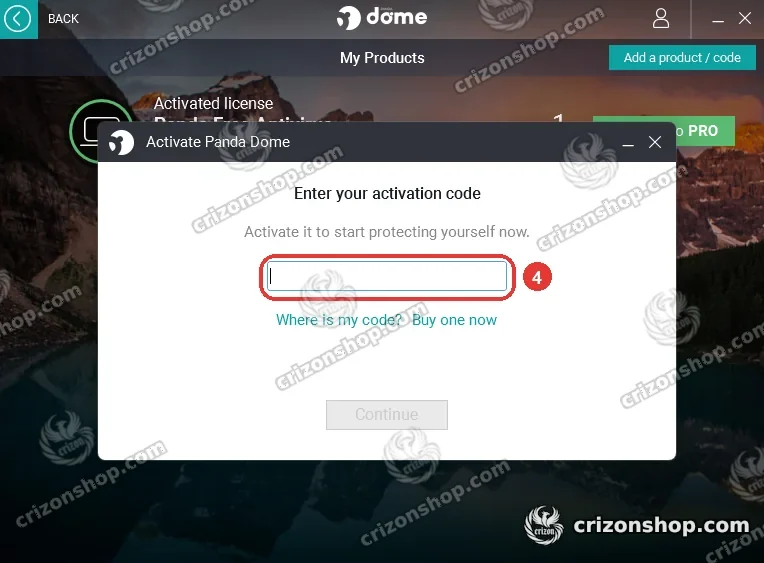
Paste your activation code into the empty field under “Enter your activation code”. Click Activate my product to finish.
Alternative: Enter the code on My Panda
If you can't find the button to add a code in the app, use your web browser instead. Panda recommends signing in on the device you want to protect, so you can download the installer as soon as you add the code.
Go to my.pandasecurity.com and sign in to your Panda account.
In the left-hand menu, select My products.
If your product isn't listed yet, click Add product, then Add code.
Enter your activation code and click Activate my product.
If Panda Dome isn't installed on this device yet, download the installer from this page and install it as described in Step 1.
Check that activation worked
After you enter the code, the app needs a little time to sync with your account. If it still shows the free version or your plan's features aren't all available, close Panda Dome completely and open it again so it can update. Your activated product will show up in the My products list in your account.
Frequently asked questions
If you've already added the code to your account, sign in to My Panda and open My products to see it. If you bought directly from Panda but haven't entered the code yet, look for Panda's welcome email in your inbox. Check your Spam and Promotions folders too. Panda explains more on its product activation help page.
No. According to Panda, one activation code works on every device up to your plan's limit. On each device, install Panda Dome and sign in with the same Panda account. The maximum number of devices depends on the plan you bought.
First, check for extra spaces at the start or end of the code, then paste it again. If you still get the error, the code may already be used on the maximum number of devices, or it may be for a different Panda product. Write down the error message and look it up on Panda's activation errors page, or contact Panda support.
No. The trial and free versions of Panda Dome activate automatically when you sign in to your account. You only need a code when you upgrade to a paid plan or renew.
Related guides
 How to Activate Avast BreachGuard with a Sign-in Key
 How to Activate AVG AntiTrack Premium with an Activation CodeHow to Activate a Gilisoft Audio Recorder Pro Key on Windows
Still need help?
Send your order code and we can sort it out faster.
