Macrorit · Activate
How to Activate Macrorit Partition Expert Unlimited Edition with a Key
Download the Unlimited Edition package from Macrorit's website and unzip it. Then install it or run the Portable version. Open the program, click Activate, paste your key and click Activate again to finish.
This guide shows you how to download the correct Macrorit Partition Expert Unlimited Edition installer from Macrorit's website. Then you'll enter your key to activate your license. You do every step on your own Windows PC, and you don't need to sign in to any account.
Before you start
Download the Unlimited Edition package
Open Macrorit's Unlimited Edition page and pick one of the three download packages listed below. When you click download, the .zip file comes from disk-tool.com. Macrorit uses this server to distribute its software.
| Package on Macrorit's site | Downloaded file | When to choose it |
|---|---|---|
| Install Package | mde-serv-setup.zip | You want to install it on your PC for long-term use |
| Portable Edition | mde-serv-portable.zip | You want to run it right away without installing, which is handy for copying to a USB drive |
| Package with both | mde-serv.zip | You want both the installer and the Portable version |
Unzip and open the program
Right-click the
mde-serv-setup.zipfile you downloaded and choose Extract All….Open the extracted folder and run the setup file inside.
When Windows asks for permission to make changes to your device, click Yes.
Follow the setup wizard until it finishes.
Open Macrorit Partition Expert from the desktop icon or the Start menu.
Right-click the
mde-serv-portable.zipfile, choose Extract All… and extract it to a folder that's easy to find, such as drive D or a USB drive.Open that folder and run the program's .exe file. You don't need to install anything.
When Windows asks for permission to make changes to your device, click Yes.
Enter your key to activate
On the main screen of Macrorit Partition Expert, click Activate.
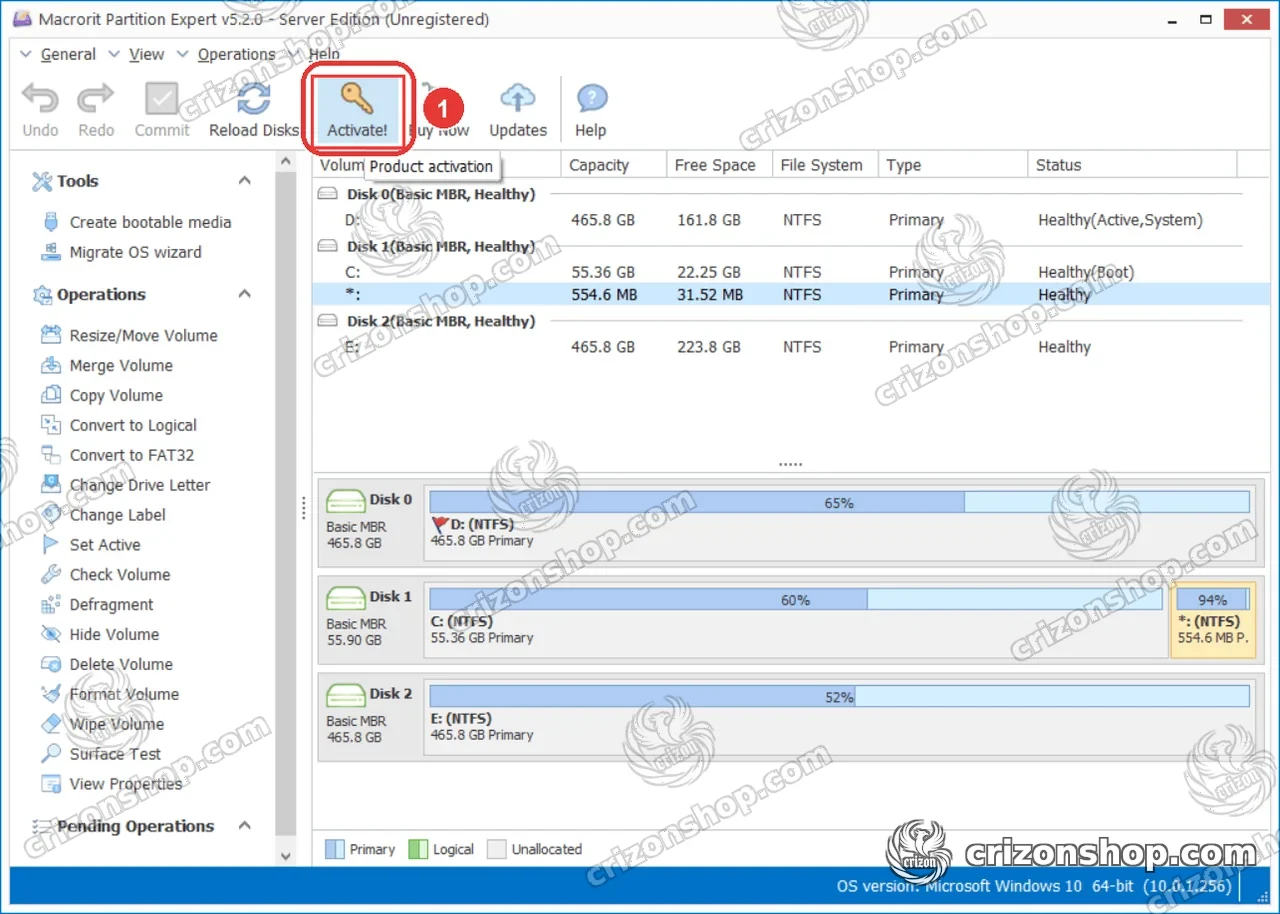
Click “Activate!” to start activation. In the window that opens, paste your key into the input box.
Click Activate to confirm.
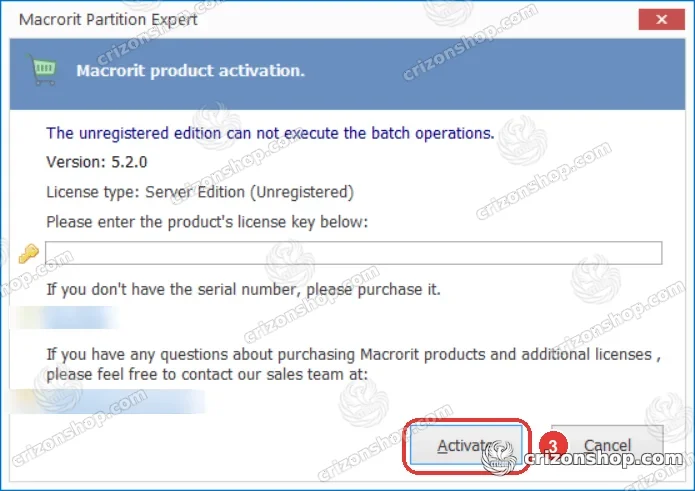
Click “Activate” to confirm activation. Close the program and open it again to check that your license has been registered.
Frequently asked questions
According to Macrorit's edition comparison page, Unlimited Edition can be used on an unlimited number of computers within one company. This covers both regular Windows and Windows Server. If you need the software to provide technical services to outside clients, Macrorit offers a separate Technician edition for that.
Check that you pasted the whole key with no extra spaces. Next, make sure the file you downloaded is the mde-serv package from the Unlimited Edition page. You can also right-click the program, choose Run as administrator and try activating again. If it still fails, take a screenshot of the message and send it to whoever provided your key so they can check it.
The installer suits a computer you use every day and open the program on often. The Portable version runs right away without installing. It's handy when you copy it to a USB drive to manage disks on several computers in your company.
Related guides
How to Activate IObit Driver Booster PRO with a License Code How to Leave a Microsoft 365 Family Group
 How to Enter a Product Key to Activate Windows 10 and Windows 11
Still need help?
Send your order code and we can sort it out faster.
