Gilisoft · Activate
How to Enter a License Key to Activate Gilisoft Full Disk Encryption
Install Gilisoft Full Disk Encryption from the official site, open it, click Register, enter your email and key, then click Register again while you're online so Gilisoft can verify the key.
This guide shows you how to install Gilisoft Full Disk Encryption from the official website and enter your key to unlock the full version. If the program says it can't verify your key, the last section explains how to fix it, based on Gilisoft's own instructions.
Before you activate
Step 1. Download and install the software
Only download the installer from the Gilisoft Full Disk Encryption product page on gilisoft.com. Installers from other sources may have been modified and often cause errors when you enter the key.
Open the Gilisoft Full Disk Encryption product page on gilisoft.com.
Click the download button for the Windows trial version. The downloaded file is named
full-disk-encryption.exe.Open the downloaded file and choose Yes when Windows asks for permission.
Follow the setup wizard until the installation is complete.
Step 2. Enter your email and key
Open Gilisoft Full Disk Encryption from the desktop shortcut or the Start menu.
Click Register in the program window.
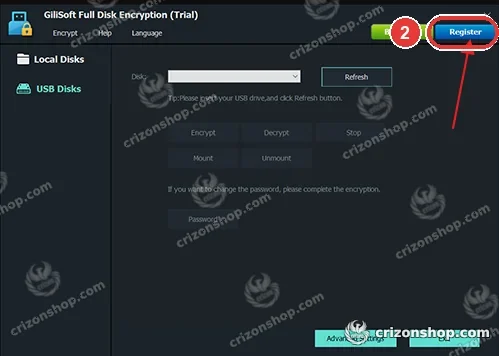
Click Register in the program window. Enter the email that came with your key in the Email field.
Paste your key into the key field.
Click Register to submit your activation details.
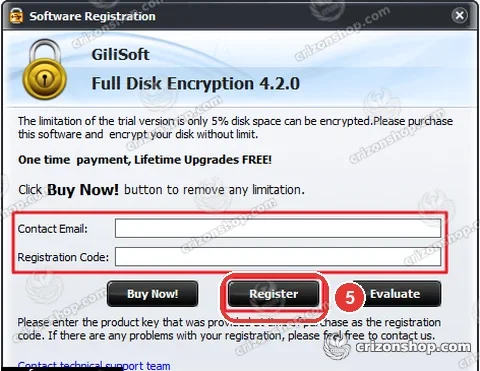
Click Register to submit your activation details. Wait for the program to confirm that registration was successful.
Close and reopen the program to make sure it no longer shows the trial notice.
Before you encrypt a drive
Once the program is activated, you can use all of its features. Gilisoft's user guide explains how to encrypt internal drives on the Local Disks tab and USB drives or memory cards on the Removable Disks tab. Before you click Encrypt, read the two notes below carefully.
If the program can't verify your key
If you click Register and see the message below, the most common cause is the Windows hosts file blocking connections to gilisoft.com. Crack tools often add this blocking line, and it stays there long after the tool has been removed.
The registration code cannot be verified through the network. Please purchase to get a valid key.Follow these steps to remove the blocking line, based on Gilisoft's guide.
Press Win + R, then type
notepad.Press Ctrl + Shift + Enter to open Notepad as administrator, then choose Yes.
In Notepad, choose File › Open.
At the bottom of the dialog, change the file type to All Files.
Go to the
C:\Windows\System32\drivers\etcfolder.Select the
hostsfile (it has no extension) and click Open.Find any lines that contain
gilisoft.com, such as127.0.0.1 gilisoft.com. Select each whole line and delete it.Choose File › Save, then close Notepad.
Reopen Gilisoft Full Disk Encryption, click Register, and enter your email and key again.
Frequently asked questions
Yes. Gilisoft says valid keys are checked directly against its server, so your computer must be online when you click Register. If anyone tells you to go offline or block gilisoft.com to make a key work, that's a sign the key isn't valid, and Gilisoft can block it at any time.
The plan sold on Gilisoft's website is listed as Lifetime / 1 PC, which means you can use it indefinitely on one computer. If your key is for a different plan, check how many computers are allowed in the information that came with your key.
No. Gilisoft clearly states that the software doesn't support encrypting GPT boot partitions. You can still encrypt other data drives, USB drives, or memory cards. The drive Windows is installed on can only be encrypted if your computer boots in MBR mode.
No. Just enter your key in the version you installed from the official site. The program switches to the full version once registration succeeds.
Related guides
How to Activate a Gilisoft Audio Recorder Pro Key on WindowsHow to Activate a Gilisoft EXE Lock Key on WindowsHow to Activate Gilisoft USB Lock with a License KeyStill need help?
Send your order code and we can sort it out faster.
