Gilisoft · Activate
How to Activate a Gilisoft EXE Lock Key on Windows
Download Gilisoft EXE Lock from the official site and open the app. Click Register, enter your email and key, then click Register again. Your PC needs an Internet connection so Gilisoft can verify the key.
This guide shows you how to install Gilisoft EXE Lock from the official site, then enter your email and key to upgrade from the trial to the full version. At the end, you'll find how to fix key errors and a few things to do right after activation.
Before you activate
Step 1. Download and install EXE Lock
Open the GiliSoft EXE Lock page on Gilisoft's website.
Click Download Trial For Windows to download the
exe-lock.exeinstaller.Open the downloaded file and click Yes when Windows asks for administrator permission.
Follow the setup wizard until the installation is complete.
Step 2. Enter your email and key
Open GiliSoft EXE Lock from the Start menu or the desktop icon.
Click the Register button in the app window.
Paste the email that came with your key into the Email field.
Paste the key into the registration code field right below it.
Click Register and wait for the app to confirm that registration succeeded.
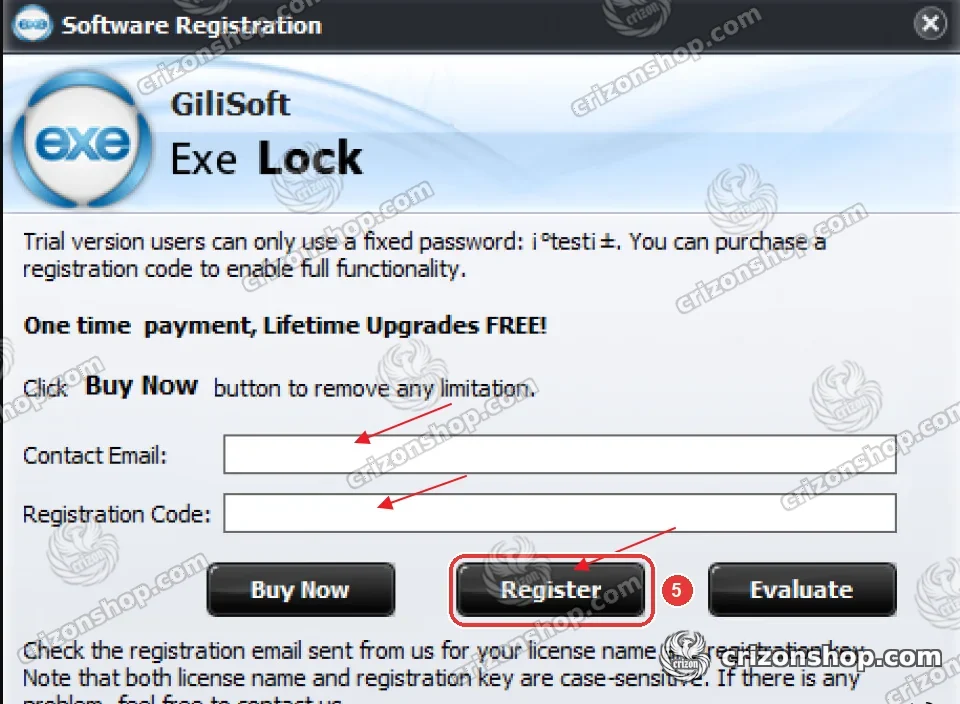
Click Register and wait for the app to confirm that registration succeeded.
If the key shows an error or won't register
According to Gilisoft's support article, the most common registration error happens when your PC can't connect to gilisoft.com to verify the key. This is usually because a cracking tool has added lines to the Windows hosts file that block this domain. Remove those lines as follows.
Press Win + R and type
notepad.Press Ctrl + Shift + Enter and click Yes to open Notepad as administrator.
In Notepad, select File › Open.
Change the file type box to All Files, then open the
C:\Windows\System32\drivers\etcfolder.Select the
hostsfile and click Open.Find and delete every line containing
gilisoft.com, for example127.0.0.1 gilisoft.com.Select File › Save, then close Notepad.
Reopen EXE Lock and enter your email and key once more.
To save time, you can paste this path into the address bar of the Open window.
C:\Windows\System32\drivers\etcIf the key still shows an error after all the steps above, contact the seller you bought the key from, or send a request to Gilisoft support with your key and proof of purchase.
What to do right after activation
According to the EXE Lock user guide, the app uses one shared password to protect its management settings and to allow locked programs to open. Set this password before you lock any program.
Open Settings in EXE Lock.
Under Startup / Release Password, click Change Password and set a new password.
Still in Settings, add a recovery email in case you forget the password.
Switch to the Desktop Apps (EXE) tab, click Add, and select the executable file of the program you want to lock.
Under Lock Policy, choose Password Verification to ask for a password when the program opens, or Direct Block to block it completely.
Check that the main screen shows Protection Status: Running to make sure protection is active.
Frequently asked questions
The Gilisoft plan sold on the product page is listed as 1 year for 1 computer (1 Year / 1 PC). If you buy a key elsewhere, confirm the term and the number of PCs before you buy.
If you've added an email in Settings, EXE Lock will send the password to that email. That's why you should set up a recovery email right after you set your password for the first time.
Gilisoft's product page only lists support for Windows 10 and Windows 11. On older versions of Windows, Gilisoft doesn't guarantee that the app will install or run reliably.
Check that your PC can access the Internet, then check whether the hosts file has any lines blocking gilisoft.com, as described in the troubleshooting section above. Once you've removed them, reopen the app and enter your email and key again.
Related guides
How to Activate a Gilisoft Audio Recorder Pro Key on WindowsHow to Activate Gilisoft USB Lock with a License KeyHow to Activate Your Gilisoft Private Disk License with Email and CodeStill need help?
Send your order code and we can sort it out faster.
