 Perplexity · Sign in
How to Sign In to Perplexity with Email, Google, or Apple
Go to perplexity.ai, enter your email, and click Continue with email. Then open the email from Perplexity and click the link or enter the code. You can also sign in quickly with Google or Apple.
Perplexity doesn't use passwords. You sign in with a link or code sent to your email, or you can sign in quickly with your Google or Apple account. This guide covers each method on desktop and mobile. It also lists what to check if your code doesn't arrive.
Choose a sign-in method
| Sign-in method | Button on screen | Best for |
|---|---|---|
| Continue with email | Using any email address | |
| Continue with Google | Gmail users already signed in to Google on their device | |
| Apple | Continue with Apple | iPhone, iPad, or Mac users |
Perplexity recommends using Gmail or an Apple account because some other email providers sometimes block or break sign-in emails.
Sign in with an email code
Open perplexity.ai in your browser.
Click Sign in (sometimes shown as Log in) in the left sidebar.
Enter your email address in the email field.
Click Continue with email.
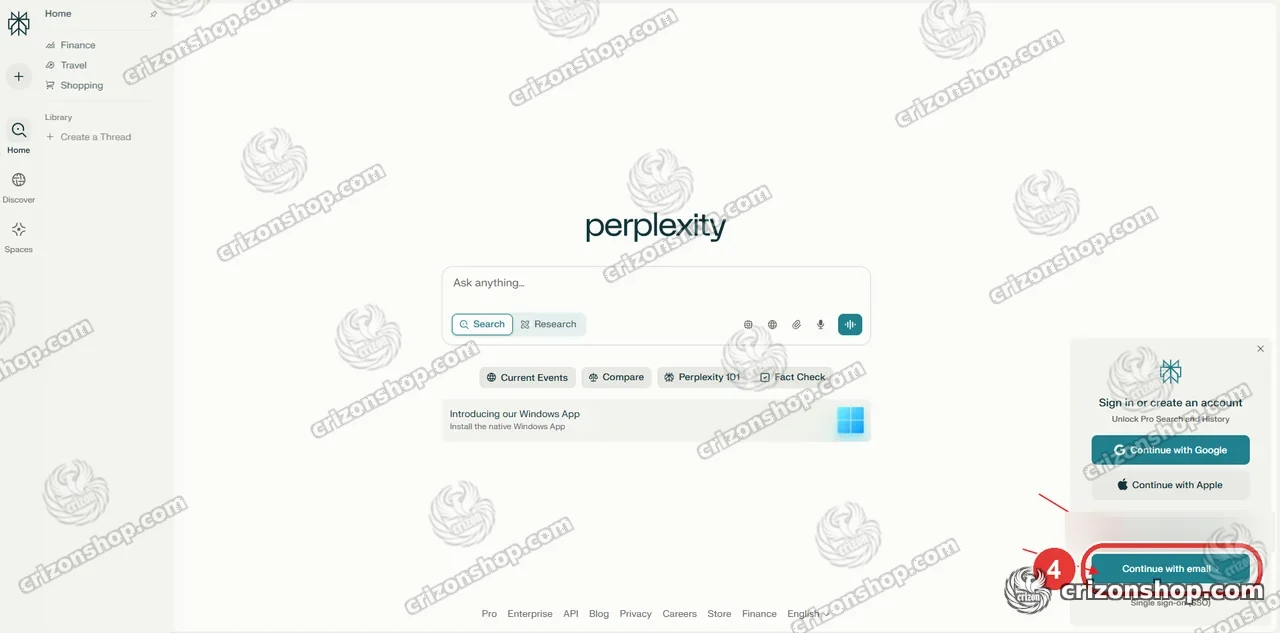
Click “Continue with email” to continue. Open your inbox and find the email from
[email protected].Click the sign-in link in the email, or copy the code from the email and enter it on the Perplexity screen you have open.
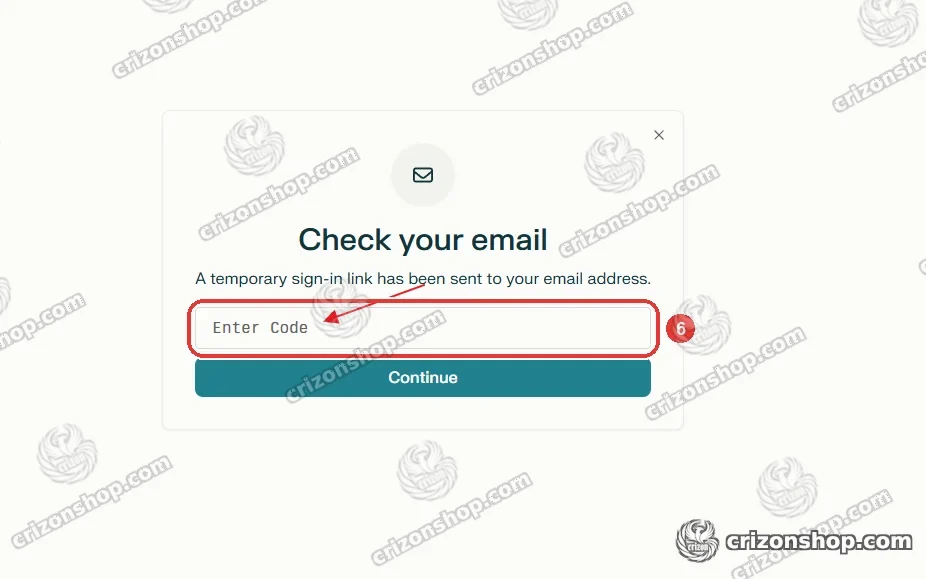
Enter the code from the email in the “Enter Code” field.
Download the Perplexity app from the App Store or Google Play, then open it.
Tap Continue with email and enter your email address.
Open the email Perplexity just sent you on your phone.
Tap the link in the email to open the app and sign in automatically, or enter the code from the email in the app.
Sign in with Google or Apple
On the sign-in screen, click Continue with Google or Continue with Apple.
Choose the Google account or Apple ID you want to use.
If asked, allow Perplexity to use your basic info.
Wait for the page to take you back to Perplexity, now signed in.
Didn't get the code or sign-in link?
If you've tried everything and still can't sign in, contact Perplexity using Contact support in the top bar of the Perplexity Help Center. List the steps you've already tried so they can help you faster.
FAQ
No. When you sign in with email, you get a new link and code in your inbox each time, so there's no password to set or remember. If you use Google or Apple, you just sign in with your Google account or Apple ID.
No, as long as you enter the exact Gmail address you used, with the same capitalization. Just sign out, choose Continue with email, and enter that address to get back into your existing account.
Make sure you're clicking the link in the latest email and opening it on the same device where you use Perplexity. If that still doesn't work, enter the code from the email instead of using the link. On your phone, turn off your VPN and try again.
No. Perplexity doesn't let you change the email on an existing account. If you bought a Pro or Max plan directly from Perplexity, they may be able to transfer it to a new account under certain conditions. For details, see Perplexity's guide.
Related guides
How to Sign In to Perplexity and Check Your Pro PlanHow to Accept an Invitation to Join Perplexity Enterprise How to Log In to Your Private ChatGPT Plus Account
Still need help?
Send your order code and we can sort it out faster.
