 Perplexity · Sign in
How to Sign In to Perplexity and Check Your Pro Plan
Perplexity doesn't use passwords. Enter your email, click Continue with email, then click the link in the email Perplexity sends you. Or choose Google or Apple if that's how you signed up.
Perplexity lets you sign in with email, Google, or Apple. You don't need a password. This guide shows you how to get into the right account on desktop and mobile and check that your Pro plan shows up. It also covers what to do if the sign-in email doesn't arrive.
Before you sign in
Perplexity identifies your account by its email address. You can sign in with email, Google, or Apple. As long as the email address is the same, you'll always get into the same account on every device.
Sign in with email
Open perplexity.ai in your browser.
Click Log in.
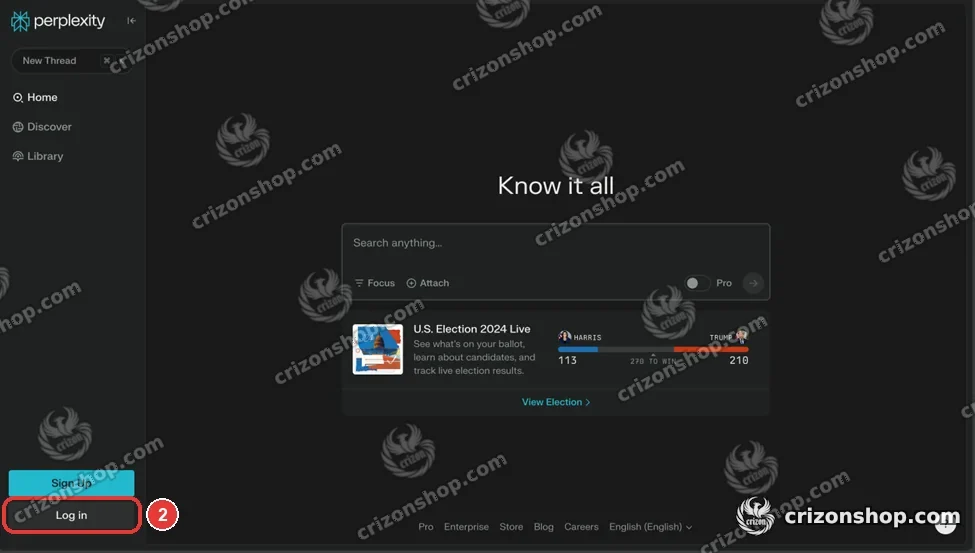
Click Log in to sign in. Enter your email in the email field and click Continue with email.
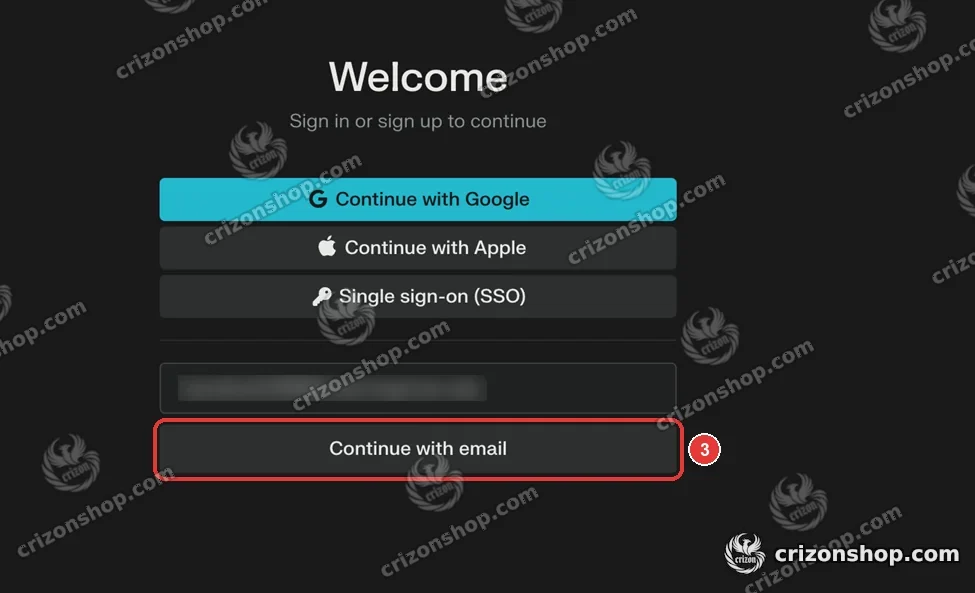
Click Continue with email to continue. Open the inbox for the email you just entered and find the new email from Perplexity.
Click the sign-in button in the email. Your browser opens Perplexity again, and you're signed in.
Download the Perplexity app from the App Store or Google Play, then open it.
Go to the app's sign-in screen.
Enter your email and tap Continue with email.
Open your email app on this same phone and find the email from Perplexity.
Tap the sign-in button in the email. Your phone switches back to the Perplexity app, and you're signed in.
Sign in with Google or Apple
If you signed up with Google or Apple, the quickest way in is to choose that same option again.
On the sign-in screen, click Continue with Google or Continue with Apple.
Choose the Google account or Apple ID that uses the same email as your Perplexity account.
Confirm the sign-in when asked.
Check your Pro plan
According to Perplexity, Pro features unlock as soon as you sign in to an account that has the plan. To make sure, follow these steps.
Open your Perplexity account settings.
Find the subscription section. It shows your current plan and options to manage it.
If you still see the free plan, sign out and sign back in with the exact email that was upgraded.
Didn't get the sign-in email?
If the email still hasn't arrived after a while, or the link doesn't sign you in, go through these checks one by one.
FAQ
Email sign-in on Perplexity doesn't use a password, so there's no password reset option. Each time you sign in, just enter your email and click the link in the email Perplexity sends you. If you use Google or Apple, the only password you need is the one for that Google or Apple account.
This usually means you signed in with a different email than the one you signed up with, so Perplexity created a new account. Sign out and sign back in with your original email. If you signed up through Apple with Hide My Email, your account email is Apple's relay address, not your real email.
Perplexity doesn't let you change your account email directly. To use a different email, you need to create a new account. What you can change is how you sign in. You can switch between email, Google, and Apple, as long as the email address stays the same.
Yes. Sign in with the same email on your computer, your phone, or the Comet browser, and you'll get the same account, with your history and current plan.
Related guides
How to Sign In to Perplexity with Email, Google, or AppleHow to Accept an Invitation to Join Perplexity Enterprise How to Log In to Your Private ChatGPT Plus Account
Still need help?
Send your order code and we can sort it out faster.
