 Xbox · Activate
How to Redeem an Xbox Game Pass Ultimate Code on Your Microsoft Account
Sign in to redeem.microsoft.com with your Microsoft account, paste your Game Pass Ultimate code, and confirm the plan. If you added a card, turn off recurring billing in Services & subscriptions.

This guide shows you how to redeem an Xbox Game Pass Ultimate code on your own Microsoft account. It also covers how to check your account region before you redeem, and how to turn off recurring billing if Microsoft asks you to add a card.
See what your order includes
Sign in to crizonshop.com, go to Account › My orders, and open your Xbox Game Pass Ultimate order. Depending on the order, you'll see either a code to redeem or an account with a password. Instructions for your specific order appear right below the product name.
- If your order includes a code (key), follow the sections below to add the subscription to your Microsoft account.
- If your order includes an account and password, you don't need to redeem a code. Just sign in to that account in the Xbox app on PC, or open xbox.com/play to play via the cloud.
Before you redeem your code
Check and change your account region
Open the Your info page and sign in to your Microsoft account.
Click Edit profile info.
Check your current region in the Country or region field.
If you need to change it, pick a new region from the list and save your changes.
Redeem your Game Pass Ultimate code
Copy the code from your order details on CrizonShop.
Open redeem.microsoft.com and sign in to the Microsoft account you'll use Game Pass on.
Paste the code into the box and click Next.
Check the plan name and number of months shown on screen.
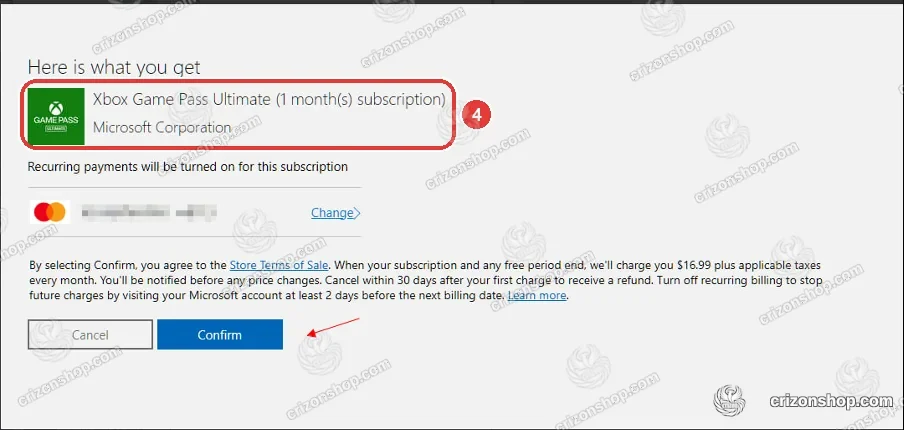
Check that it shows Xbox Game Pass Ultimate for 1 month. Click Confirm to finish.
If Microsoft asks for a payment method
After you redeem the code, Microsoft may ask you to add a Visa or Mastercard so the subscription renews automatically when it ends. If you see this step, use a card in your own name and enter the card's correct billing address. Once the subscription is active, turn off recurring billing as shown below so your card isn't charged for the next period.
Turn off recurring billing
If you added a card while redeeming the code, recurring billing is most likely on. Turning it off doesn't cut your remaining time. You can keep playing as usual until the expiration date.
Go to Services & subscriptions and sign in to the account you redeemed the code on.
Find Xbox Game Pass Ultimate and click Manage.
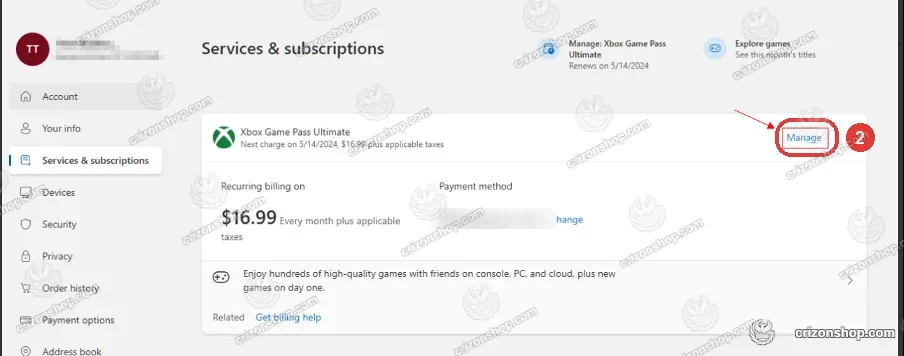
Click “Manage” to manage your Xbox Game Pass Ultimate subscription. Click Turn off recurring billing.
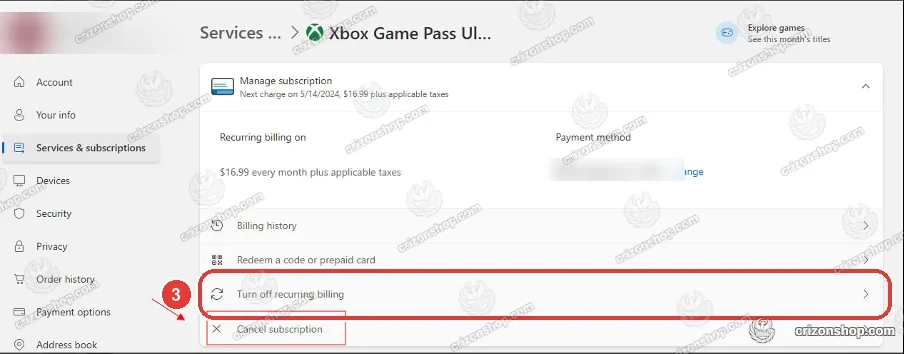
Click “Turn off recurring billing”. Follow the on-screen confirmation steps until the page says recurring billing is off.
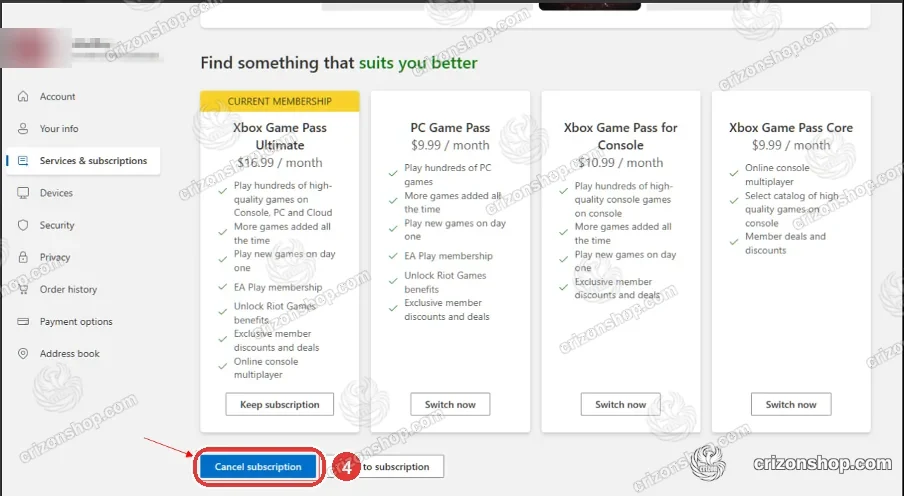
Click “Cancel subscription” to continue turning off recurring billing.
Start playing once it's active
Once the subscription is on your account, sign in to that account on your Xbox console or in the Xbox app on PC. To play via the cloud, open xbox.com/play on a supported device and browser. Cloud gaming needs at least 10 Mbps, and some devices need around 20 Mbps for a more stable picture.
Frequently asked questions
Your Microsoft account region doesn't match the code's region. Check the Country or region field as described above. If you've changed your region in the last three months, you can't change it again yet. In that case, click Report a problem on your order in Account › My orders so CrizonShop can look into it.
You may have redeemed the code on a different Microsoft account. Sign in to each account you have and check the Services & subscriptions page. If none of them has the subscription, click Report a problem on your order and attach a screenshot of the error message.
No. According to Microsoft, once you turn off recurring billing you won't be charged for the next period, and you can keep using the subscription as usual until it expires.
You don't need the redeem page. Sign in with the account and password from your order details in the Xbox app on PC or at xbox.com/play. Then follow the instructions right below the product in your order.
Related guides
How to Redeem an Xbox Code or Microsoft Gift Card How to Recover Your Steam Account When You've Lost Access to Your EmailHow to Change Your EA Account (Formerly Origin) Email and Password
Still need help?
Send your order code and we can sort it out faster.
