 Xbox · Activate
How to Redeem an Xbox Code or Microsoft Gift Card
Redeem a 25-character Xbox code on your Xbox console through Store and Redeem, on PC through the Xbox app or Microsoft Store, or on your phone by going to redeem.microsoft.com in a browser.

This guide shows you how to redeem a 25-character Xbox code or Microsoft gift card to your Microsoft account on an Xbox console, a PC, or your phone's browser. Game Pass codes, game download codes, and prepaid gift cards all work the same way.
Each code has 25 letters and numbers, usually split into 5 groups like the example below.
XXXXX-XXXXX-XXXXX-XXXXX-XXXXXBefore you start
How to redeem your code
Pick the tab for the device you're using. Button names below follow the English interface. If your device is set to another language, the buttons will show in that language in the same place.
Turn on your console and sign in to the Microsoft account that should get the code.
Press the Xbox button on your controller to open the guide, then select Store.
Press the View button (the one with two overlapping squares) to open the side menu.
Select Redeem.
Enter all 25 characters of the code, then select Next.
Follow the on-screen instructions to finish.
Open the Xbox app on Windows and check which account is signed in.
Click your profile picture (gamerpic), then select Settings.
Go to the Redeem section.
Paste or type the 25-character code, then select Next.
Follow the next steps on screen.
Open the Microsoft Store app on Windows.
Click the account icon in the top-right corner.
Select Redeem code or gift cards.
Enter the 25-character code, then select Redeem.
Follow the on-screen instructions to finish.
Open redeem.microsoft.com in your browser.
Sign in to the Microsoft account that should get the code. If the page is signed in to the wrong account, sign out and sign in again.
Type or paste the 25-character code, then select Next.
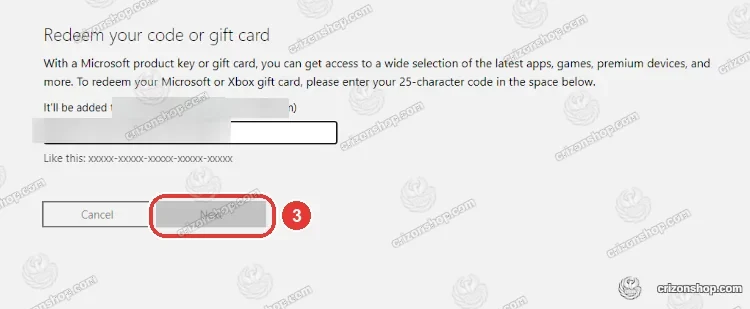
Enter the 25-character code, then select “Next”. Review the code details shown on screen, then confirm.
If your code shows an error
- Check each character again. It's best to delete the code and paste it again from where you got it.
- Make sure you're signed in to the account you want the code added to.
- If you see an error code (for example
XBOS3004), look it up on Xbox's digital code or gift card not working page.
If a key you bought from CrizonShop still won't redeem, click Report a problem on the product in your order details, or message Chat with Support in the corner of the screen. Including a screenshot of the error message helps us sort it out faster.
FAQ
No. According to Xbox, redeemed codes can't be transferred to another account. That's why you should check the sign-in email before you confirm.
You shouldn't. Microsoft 365 or Office keys are redeemed at office.com/setup with your Microsoft account. Windows keys are entered on your PC under Settings › Activation › Change product key.
Xbox codes and gift cards are usually issued for a specific region, so a code from one country may not work on an account set to a different country. Before redeeming, check the region shown on the code and the region of your Microsoft account.
The amount is added to your Microsoft account balance. You can use it to buy games or pay for Game Pass, and check your balance on your Microsoft account page.
Related guides
How to Redeem an Xbox Game Pass Ultimate Code on Your Microsoft Account How to Recover Your Steam Account When You've Lost Access to Your EmailHow to Change Your EA Account (Formerly Origin) Email and Password
Still need help?
Send your order code and we can sort it out faster.
