Unity Asset Store · Activate
How to Redeem UFPS: Ultimate FPS on the Unity Asset Store
Sign in to the Unity Asset Store with your Unity ID. Click your profile picture, choose Redeem Voucher, enter your code and click Redeem Voucher Code. UFPS will then show up in My Assets.
This guide shows you how to redeem a UFPS: Ultimate FPS voucher code on your own Unity ID. UFPS is a first-person shooter framework published by Opsive. After that, you'll download the package into your project with Package Manager.
Before you redeem the code
- A Unity ID (Unity account) that you'll keep using for game development. Once you redeem the code, the package belongs to this account.
- A valid UFPS voucher code that hasn't been used yet.
- Unity Hub and Unity Editor installed on your computer, so you can download the package into your project.
- Complete billing information (billing address) on your account. Unity may reject the code if this is missing.
Check which type of code you have
Unity has two types of vouchers, and you redeem each type in a different place. Look at your code, then follow the matching method below.
| Code type | Example | Where to enter it |
|---|---|---|
| With hyphens | ASV-XXXX-XXXX-XXXX-XXXX-XXXX | Redeem Voucher in the account menu (Method 1) |
| No hyphens | ASVXXXXXXXXXXXXXXXX20221202 | Coupon code field on the checkout page (Method 2) |
Method 1: Redeem a code with hyphens through Redeem Voucher
Open the Unity Asset Store and sign in with your Unity ID.
Click the account icon (your profile picture) in the top-right corner.
Select Redeem Voucher from the menu that opens.
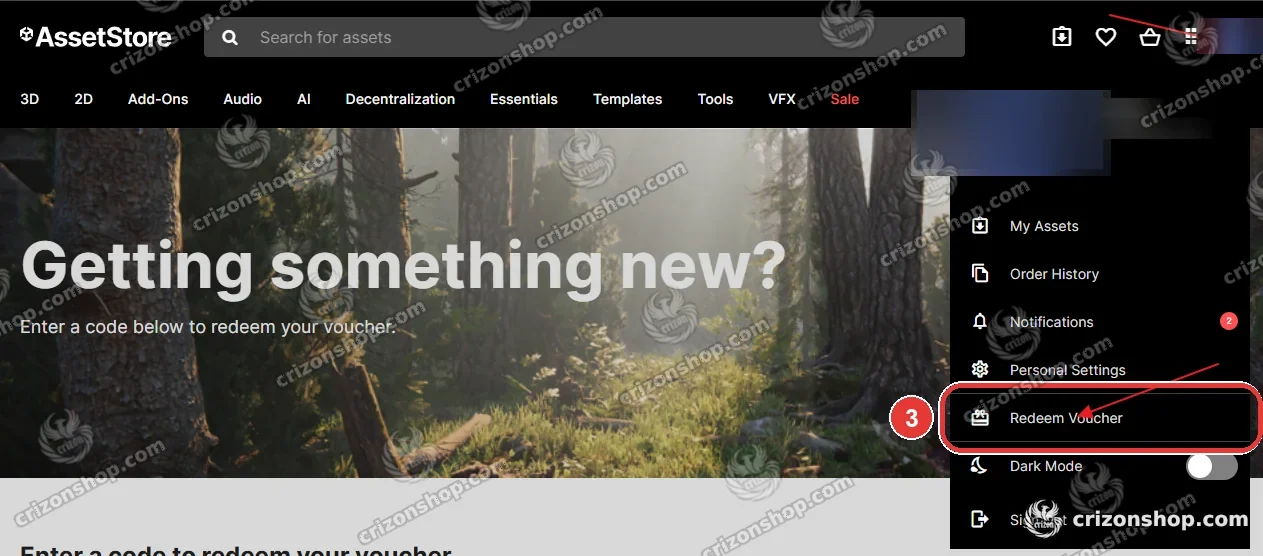
Click “Redeem Voucher”. Paste the code into the field and click Redeem Voucher Code.
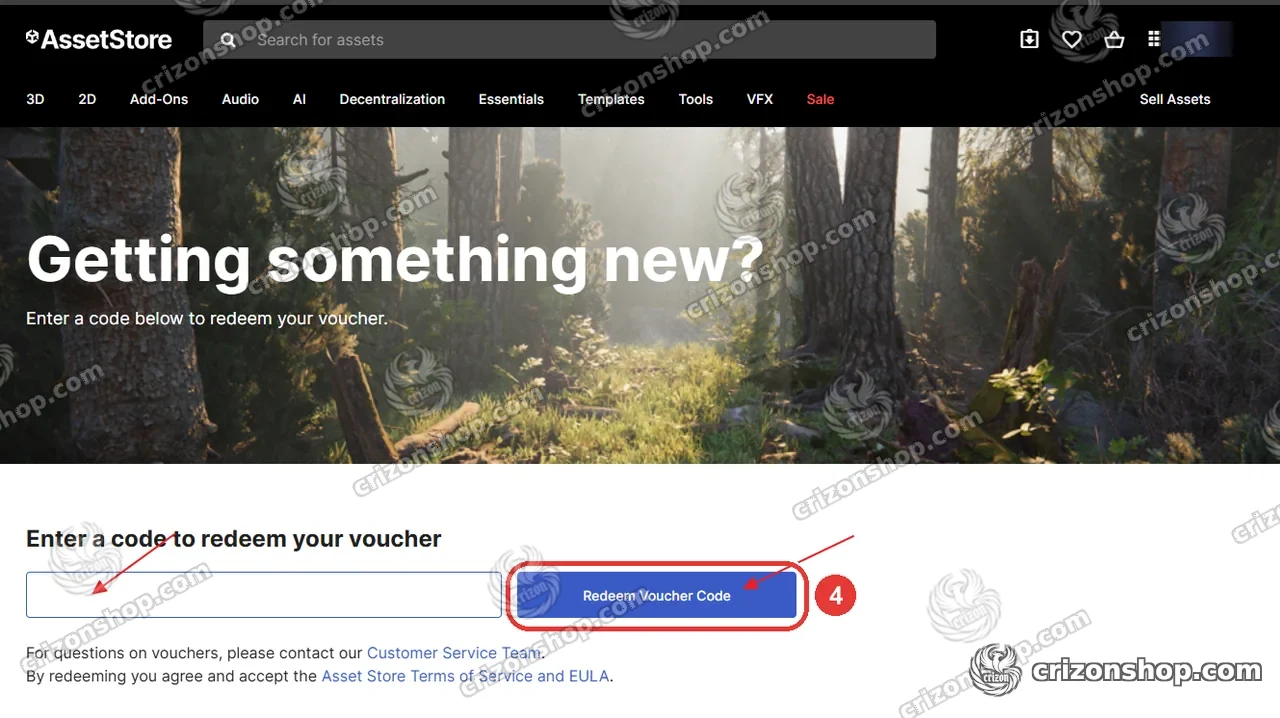
Paste the code into the field, then click “Redeem Voucher Code”. Open My Assets in your account and check that UFPS is in the list.
Method 2: Enter a code without hyphens at checkout
Sign in to the Unity Asset Store and open the UFPS: Ultimate FPS page.
Add the package to your cart or click Buy Now.
On the checkout page, paste the code into the coupon code field and click Apply.
Check that the total is now $0.
Fill in any missing billing details, then click Pay now to complete the order.
Open My Assets to make sure UFPS is now on your account.
Download UFPS into your Unity project
Once the package is in My Assets, you can download and import it right from the Unity Editor.
Open your Unity project and make sure the Editor is signed in with the Unity ID you redeemed the code on.
Open the Package Manager window from the Window menu. In newer Unity 6 versions, it's under Window › Package Management.
Select My Assets in the navigation panel on the left.
If the list is long, type UFPS in the search box. Then select the package.
Click Download in the details panel and wait for the download to finish.
Click Import #.# to project (#.# is the package version number).
In the Import window, uncheck any items you don't need, then click Import.
If the code is invalid
If the Asset Store shows The voucher code is not valid. Please try again., go through these checks one by one.
If you've checked everything and it still doesn't work, contact Unity's Customer Experience team. Follow Unity's voucher troubleshooting guide to send a request, and include the voucher code you're trying to redeem.
Frequently asked questions
Package Manager only lists packages owned by the Unity ID that's signed in to the Editor. Make sure the Editor is signed in to the account you redeemed the code on, then open My Assets again. If UFPS also isn't in My Assets on the Asset Store website, the code wasn't accepted. Redeem it again using the method that matches your code type.
Use the Unity ID you work with every day to make games. The package is tied to the account that redeemed the code, and Package Manager only shows packages for the account that's signed in. If you redeem it on a secondary account by mistake, you won't see UFPS while you work.
If the code is valid, the total drops to $0 right after you click Apply. A voucher can't pay for only part of an order. If the total isn't $0, stop and check the code before you pay.
Related guides
How to Activate Ultimate Game Music Collection on the Unity Asset StoreHow to Redeem a Databox Code on the Unity Asset Store How to Activate a GRFX Studio Key for Corel PaintShop Pro
Still need help?
Send your order code and we can sort it out faster.
