Unity Asset Store · Activate
How to Activate Ultimate Game Music Collection on the Unity Asset Store
Sign in to the Unity Asset Store, click your profile picture in the top-right corner, choose Redeem Voucher, enter your code, and click Redeem Voucher Code. The music pack then appears in My Assets, ready to download into your project.
This guide shows you how to redeem your Ultimate Game Music Collection voucher code on your Unity account. You'll then download the pack and add it to a project in the Unity Editor.
Before you start
- A Unity account (Unity ID) that can sign in to the Unity Asset Store.
- Your voucher code for Ultimate Game Music Collection.
- Unity Editor installed on your computer if you want to add the music to a project right away.
Check which type of code you have
Unity has several types of vouchers, and each type is redeemed in a different place. Look closely at your code first, then follow the matching method in the table below.
| Your code | Example | Where to enter it |
|---|---|---|
| Contains hyphens | ASV-XXXX-XXXX-XXXX-XXXX-XXXX | The Redeem Voucher page |
| One continuous string | ASVXXXXXXXXXXXXXXXX20221202 | The coupon code field at checkout |
Redeem a code with hyphens
Go to assetstore.unity.com and sign in with your Unity account.
Click your profile picture in the top-right corner of the screen.
Select Redeem Voucher from the menu that opens.
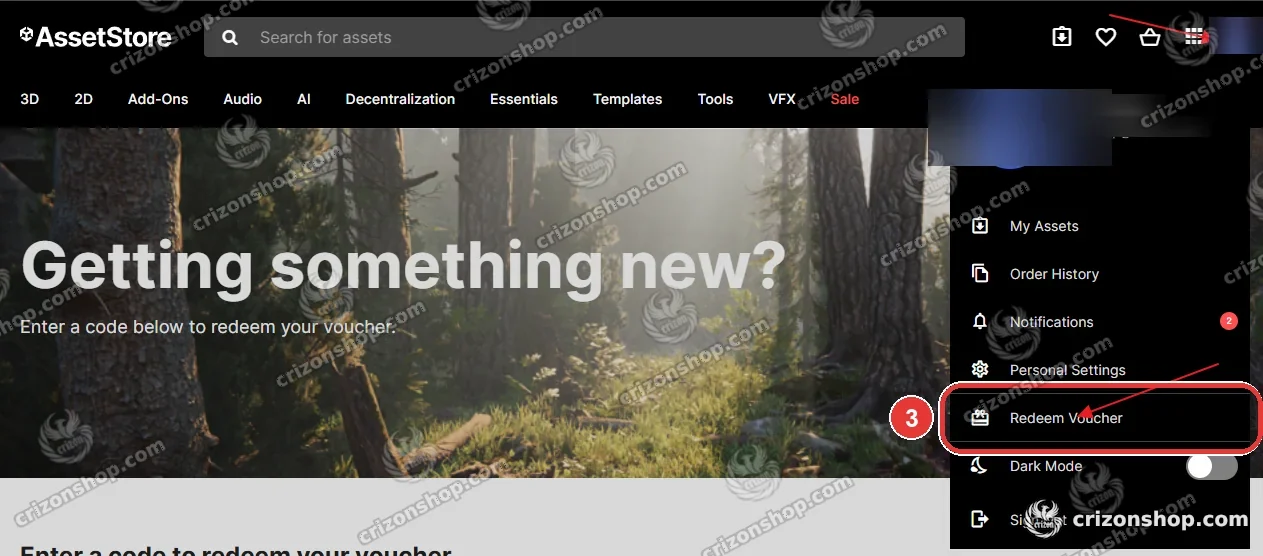
Select Redeem Voucher to redeem your voucher. Paste your voucher code into the field, keeping all the hyphens.
Click Redeem Voucher Code.
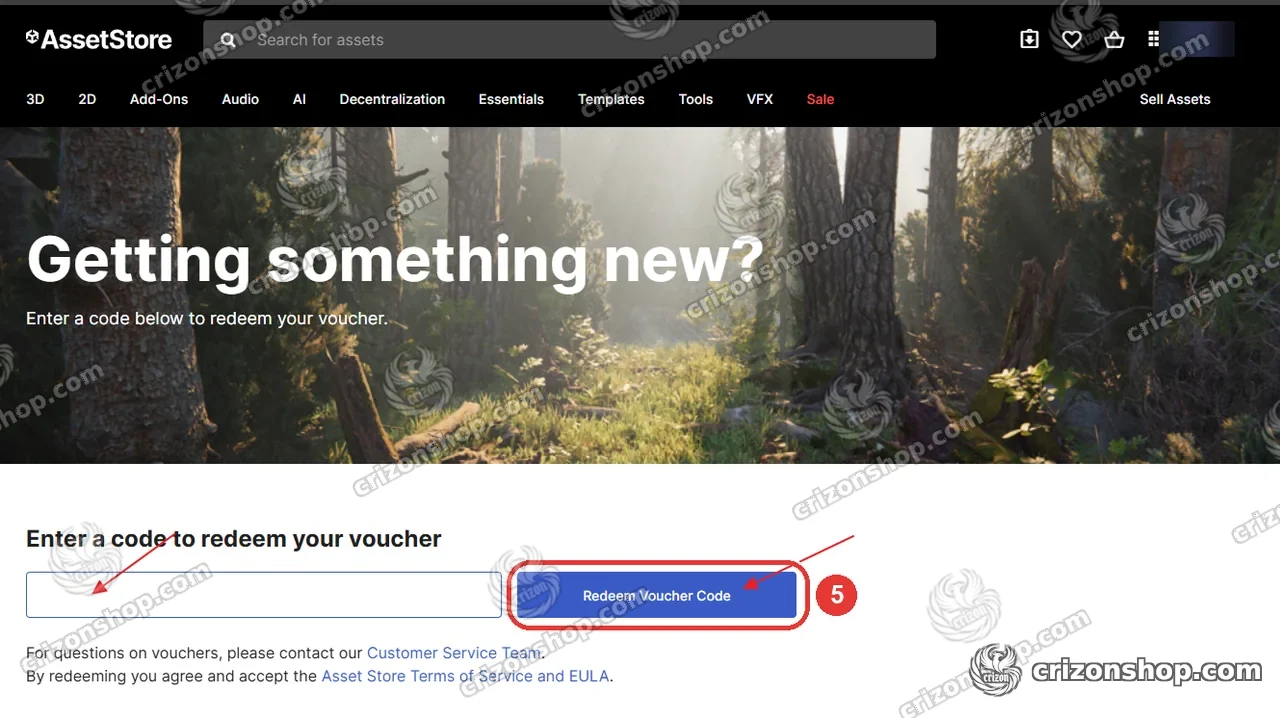
Click Redeem Voucher Code.
Once the code is redeemed, Ultimate Game Music Collection is added to My Assets on your account. If you're already signed in, you can also go straight to the Redeem Voucher page without using the menu.
Redeem a code without hyphens at checkout
Sign in to the Unity Asset Store and find the Ultimate Game Music Collection product page.
Click Add to Cart or Buy Now.
On the checkout page, paste your code into the coupon code field.
Click Apply and check that the total has dropped to $0.
Fill in the billing details the page asks for.
Click Pay now to finish.
Download the music pack into your Unity project
Once the pack is in My Assets, you can download it and add it to your project directly from the Unity Editor.
Open your project in the Unity Editor and sign in with the same Unity account you used to redeem the code.
Open the Package Manager window from the Window menu.
Select My Assets in the left navigation pane.
Find and select Ultimate Game Music Collection in the list.
Click Download and wait for it to finish.
Click the Import button (it includes the version number, for example Import 1.0 to project).
In the window that appears, uncheck any files you don't need, then click Import.
Frequently asked questions
First, check that the code type matches where you're entering it. Codes with hyphens go on the Redeem Voucher page, and codes without hyphens go in the coupon code field at checkout. Also check for extra spaces at the start or end of the code after pasting. If it still doesn't work, contact Unity's support team through Unity Support and include the code you're entering.
The Unity Editor must be signed in with the same Unity account you used to redeem the code on the Asset Store. Check which account is signed in using the account icon on the Editor toolbar. Then reopen My Assets in Package Manager and search for the pack by name.
No. The music pack is tied to your Unity account. Just sign in with the same account on the new computer and download it again from My Assets.
No. According to Unity, vouchers and Asset Store Credits are separate and can't be exchanged for each other. A voucher can only be used to claim its matching pack or get a discount on that pack.
Related guides
How to Redeem a Databox Code on the Unity Asset StoreHow to Redeem UFPS: Ultimate FPS on the Unity Asset Store How to Activate a GRFX Studio Key for Corel PaintShop Pro
Still need help?
Send your order code and we can sort it out faster.
