 Roblox · Activate
How to Redeem Roblox Codes for Robux and Roblox Credit
You can only redeem Roblox codes in a web browser at roblox.com/redeem. Log in to the right account, type the code in the code box, and click Redeem. Your Robux or Roblox Credit is added right away.
This guide shows you how to redeem a Roblox code (a Robux code or a Roblox gift card) on your Roblox account. The steps are the same whether you play on a computer, phone, or console. All you need is a web browser.
What you need before redeeming
- An unused Roblox code. Each code works only once.
- The username and password of the Roblox account that should get the Robux.
- A web browser such as Chrome, Safari, Edge, or Firefox. You can't enter codes in the standard Roblox mobile app or in Roblox on PlayStation or Xbox.
There are two main types of Roblox codes. Robux codes add Robux directly to your account. Roblox Credit gift cards add money to your Roblox Credit balance. You can then use that balance to buy Robux or a Roblox Premium subscription.
How to redeem a Roblox code
Open your browser and go to roblox.com/redeem.
If prompted, log in to the Roblox account that should get the Robux.
Type the code in the code box exactly as it appears on the card.
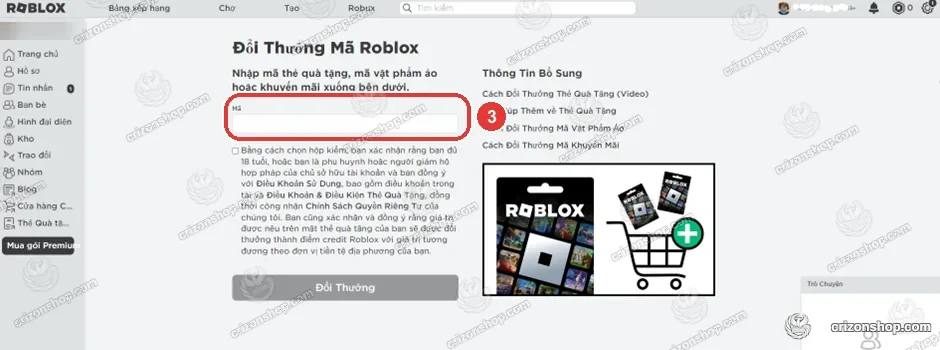
Type the code in the code box exactly as it appears on the card. Click Redeem.
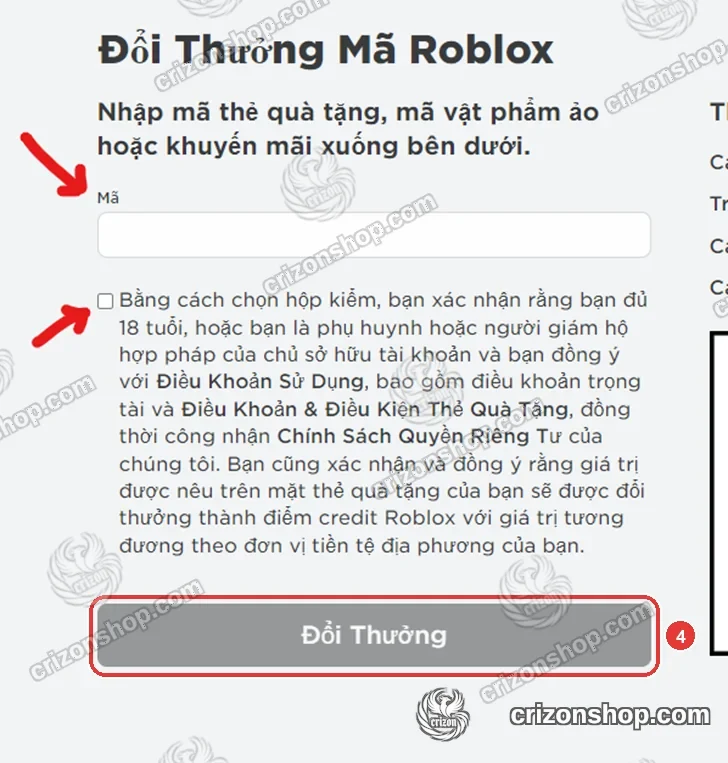
Click Redeem. Wait for the success message to appear on the screen.
Open Chrome, Safari, or another browser on your phone. Don't use the Roblox app.
Go to roblox.com/redeem.
Log in to the same account you use in the Roblox app.
Type the code in the code box, then tap Redeem.
When you see the success message, reopen the Roblox app to use your Robux.
On Samsung Galaxy devices, Roblox lets you redeem codes right in the app. See how on Roblox's support page.
On a computer or phone, open a browser and go to roblox.com/redeem.
Log in to the same Roblox account you use on PlayStation or Xbox.
Type the code in the code box, then click Redeem.
Go back to your console and reopen the game. Robux are tied to your Roblox account, so they'll show up there.
Check your balance after redeeming
- For a Robux code, the Robux are added right away. Check the Robux icon in the top-right corner of the Roblox site.
- For a Roblox Credit card, the amount is added to your Credit balance. Use this balance when you buy Robux or Roblox Premium.
- If the card comes with a bonus virtual item, it's added to your account's Inventory.
- If you have several codes, enter them one at a time and click Redeem for each one.
What to do if a code shows an error
According to Roblox, an invalid code error is often caused by mixing up numbers and letters that look alike. Try swapping the characters below, then enter the code again.
| Character in the code | Try replacing it with |
|---|---|
| 0 (zero) | O |
| 1 (one) | I |
| 2 | Z |
| 5 | S |
| 6 | G or Q |
| 8 | B |
If you've tried everything and it still doesn't work, contact Roblox Support or the seller you bought the code from. Include a screenshot of the error message so they can check it faster.
FAQ
The standard Roblox app doesn't have a place to enter codes. Open a browser on the same phone, go to roblox.com/redeem, and log in to the same account. Once redeemed, the Robux will show up in the app. Samsung Galaxy devices are the exception, since Roblox lets you redeem codes right in the app there.
Redeem it in a browser on your computer or phone at roblox.com/redeem. Make sure you log in to the same Roblox account you use on your console. Robux are tied to your account, so they'll show up on your console after you reopen the game.
If it's a Roblox Credit card, Roblox only lets you redeem it when your account's country matches the currency on the card. Robux codes don't have this limit. Also double-check characters that are easy to mix up, like 0 and O or 1 and I.
No, you can't combine codes into one entry. Enter each code separately at roblox.com/redeem and click Redeem once per code. Roblox doesn't limit how many codes you can redeem on one account.
Related guides
 How to Recover Your Steam Account When You've Lost Access to Your EmailHow to Change Your EA Account (Formerly Origin) Email and Password
 How to Redeem a Battle.net Code on the Web, Desktop, and Mobile
Still need help?
Send your order code and we can sort it out faster.
