 Tinder · Activate
How to Redeem a Tinder Gold or Tinder Plus Code
You redeem Tinder Gold and Tinder Plus codes on the Tinder.com website. Log in and click your profile icon. Then scroll down to Promo Code, paste your code and click Submit to activate it.
This guide shows you how to redeem a Tinder Gold or Tinder Plus code on your own Tinder account to unlock the paid subscription. You redeem both plans the same way. You do it in a web browser, and it only takes a few minutes.
Check before you redeem
Tinder will reject the code if any of these conditions isn't met, so go through them before you start.
Redeem a code on an existing Tinder account
Open your browser, go to tinder.com and log in to your account.
Click your profile icon.
Scroll down and select Promo Code.
Paste the code into the field and click Submit.
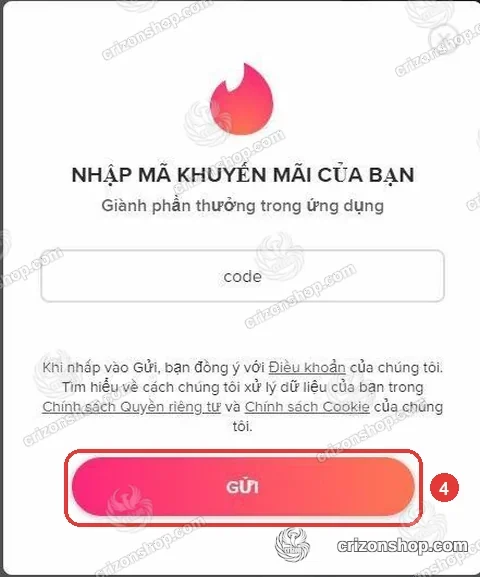
Paste the code into the field, then click Submit. If Tinder asks for your card details, check the amount shown carefully, then follow the on-screen instructions to finish.
If you don't have a Tinder account yet
You can redeem the code first and create your account afterward. Once you finish signing up, the subscription is added to your new account.
Go to tinder.com without logging in and scroll to the bottom of the page.
Select Promo Code in the footer.
Paste the code and click Submit.
Choose how you want to sign up and follow the steps to create your Tinder account.
If you're asked for card details, follow the on-screen instructions.
Check that your subscription is active
Once your code is accepted, open the Tinder app on your phone and go to your profile to check whether your subscription features are unlocked. If the app hasn't updated yet, close it completely and reopen it. You can also log out and log back in with the same sign-in method you used on Tinder.com.
Code errors or subscription not showing up
| Situation | Common cause | What to do |
|---|---|---|
| Tinder says the code is incorrect | A typo, or extra spaces picked up when pasting | Copy the code again, remove any spaces at the start and end, then resubmit |
| Tinder says the code can't be used where you are | The code was issued for a different country | Codes only work in the country they were issued for, so you'll need a code for your region |
| Tinder says the code has already been used | The code was entered before, possibly on another account | Check your other Tinder accounts to see whether the subscription is active there |
| Code accepted, but your account has no subscription | Your account still has an active paid subscription | Cancel auto-renewal on the old subscription and wait for it to expire. Tinder will then apply the subscription from the code automatically |
Tinder explains these cases in its guide to using promo codes and its article on third-party purchase issues.
Frequently asked questions
Tinder only explains how to redeem codes on the Tinder.com website. You can still do this on your phone. Open Tinder.com in a browser such as Chrome or Safari, log in to the right account, then enter the code. Once it's activated, the subscription will show up in the app.
If your account still has an active paid subscription, the code may be rejected. It may also be accepted without the subscription showing up. Cancel auto-renewal on your current Plus subscription and wait for it to expire. Tinder will then add the Gold subscription from the code to your account automatically.
Tinder says it may ask for card details when you redeem a code, usually for discount promo codes. Check the amount and billing period on screen carefully before you confirm. If your code is for a prepaid subscription but Tinder still says you need to pay, stop. Check which type of code you have before you enter your card details.
Related guides
Tinder Plus vs Gold vs Platinum: Which Plan Should You Choose? How to Set a Spotify Password When You Log In with Google, Facebook, or Phone
 How to Sign In to Your Private YouTube Premium Account
Still need help?
Send your order code and we can sort it out faster.
